


AGHSync keeps your AdGuard Home instances in sync automatically. Designate one instance as the master, and AGHSync propagates its configuration to every slave instance on a schedule, on demand, via webhook, or whenever the AdGuard Home config file changes on disk.
It ships as a single self-contained binary (Go backend with an embedded React web UI and SQLite database), so there is nothing else to install. Everything you can do in the web UI is also available through a REST API.
- Screenshots
- Features
- How It Works
- Requirements
- Installation
- Configuration
- Usage
- Filesystem Watchdog
- Notification Channels
- API
- Security Notes
- Troubleshooting
- Supported Platforms
- Development
- Contributing
- License
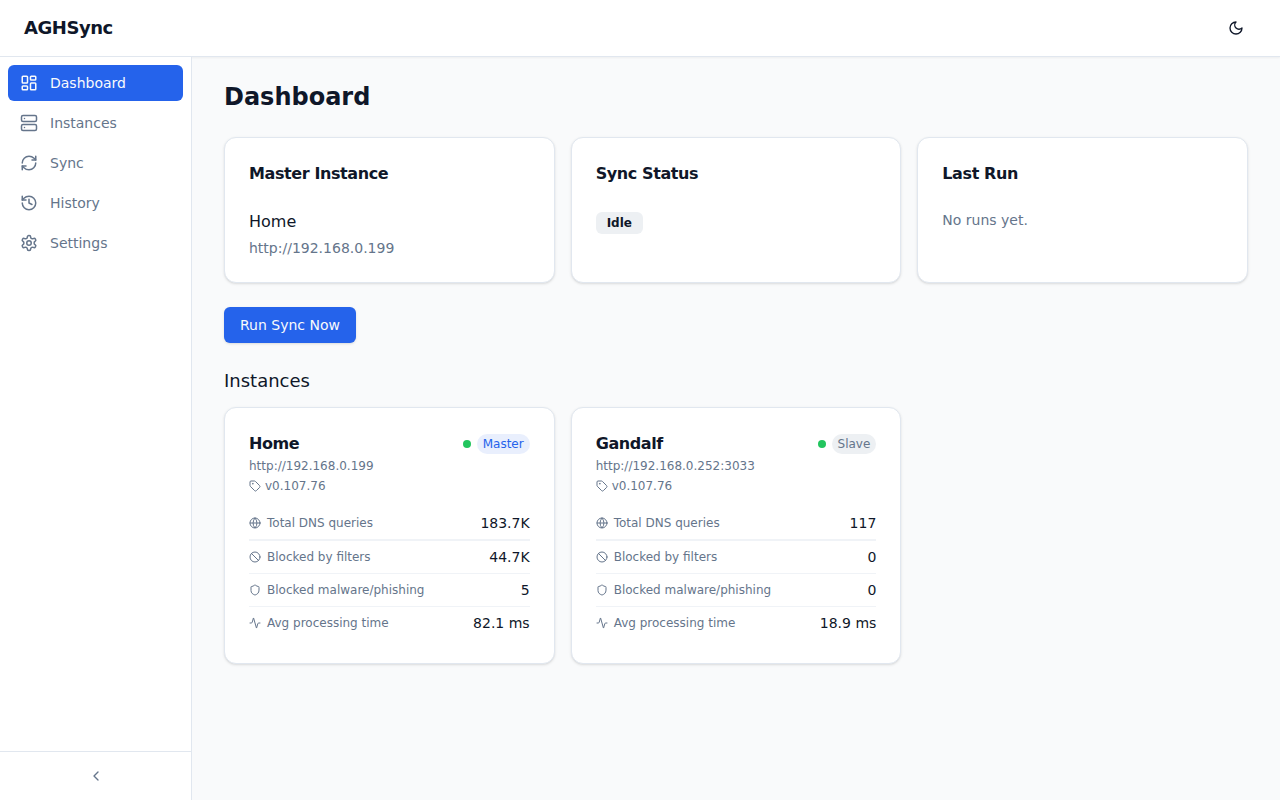
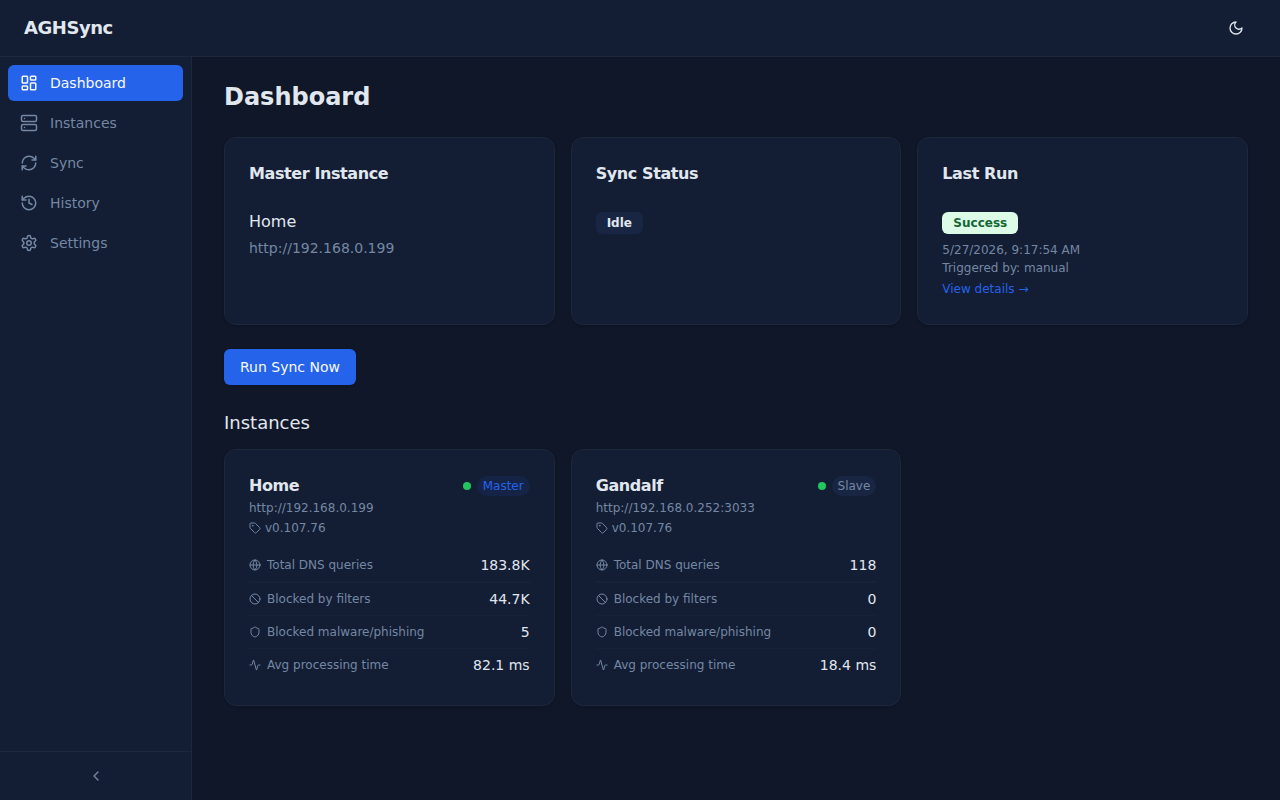
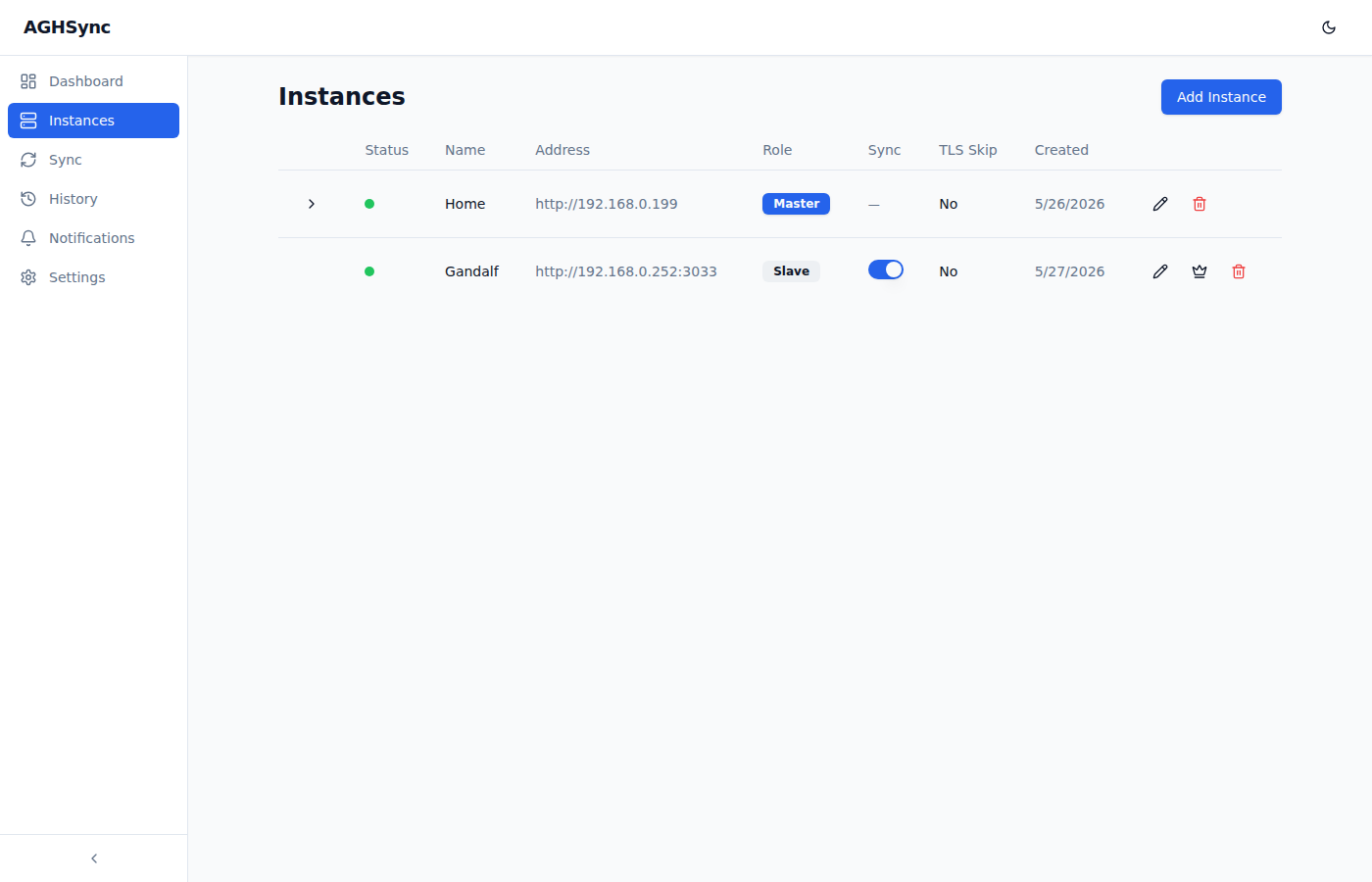
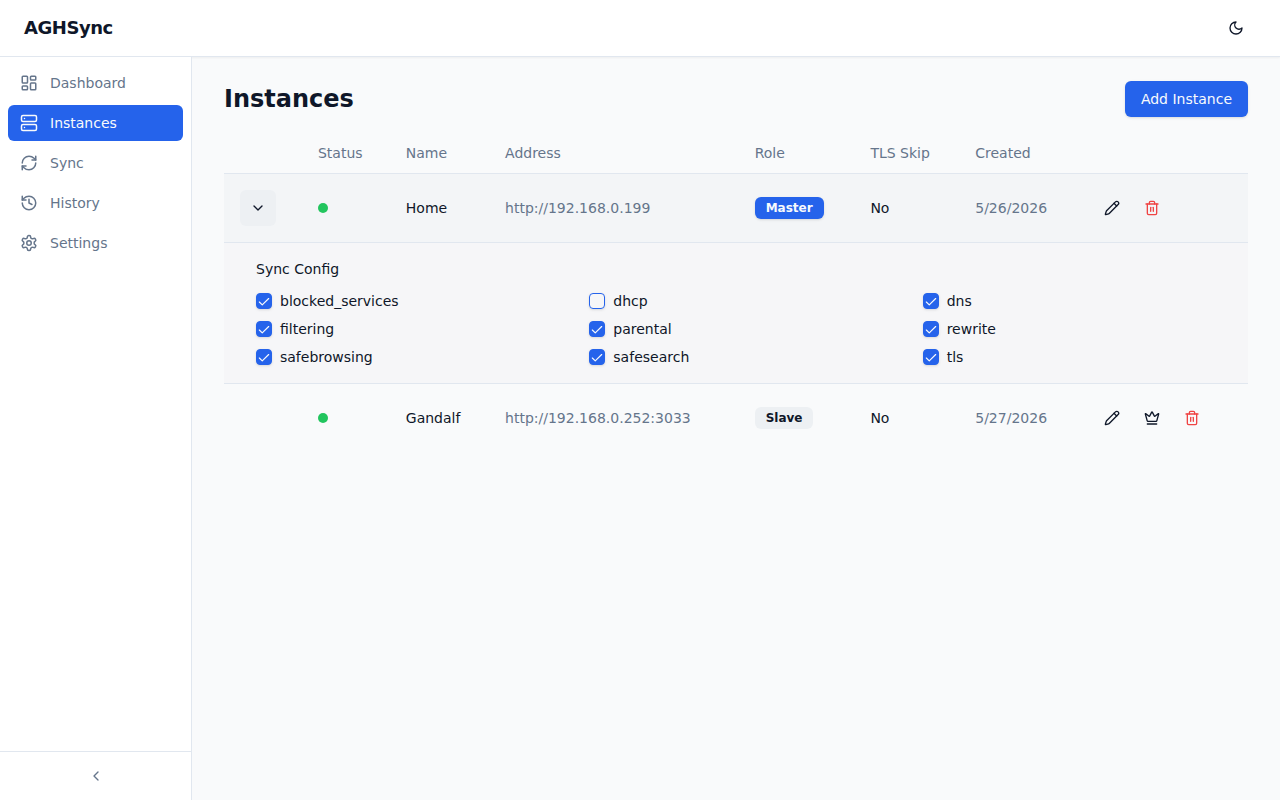
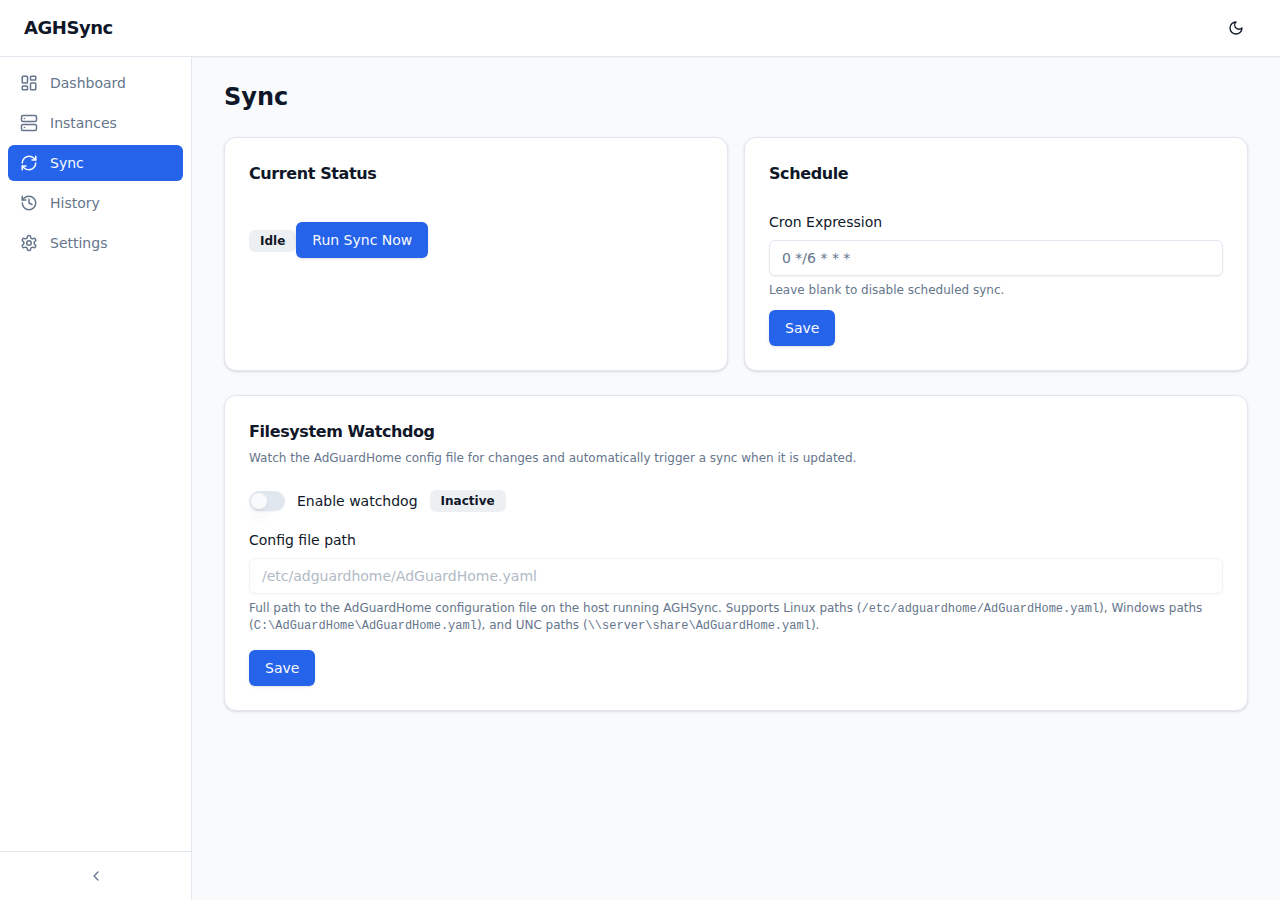
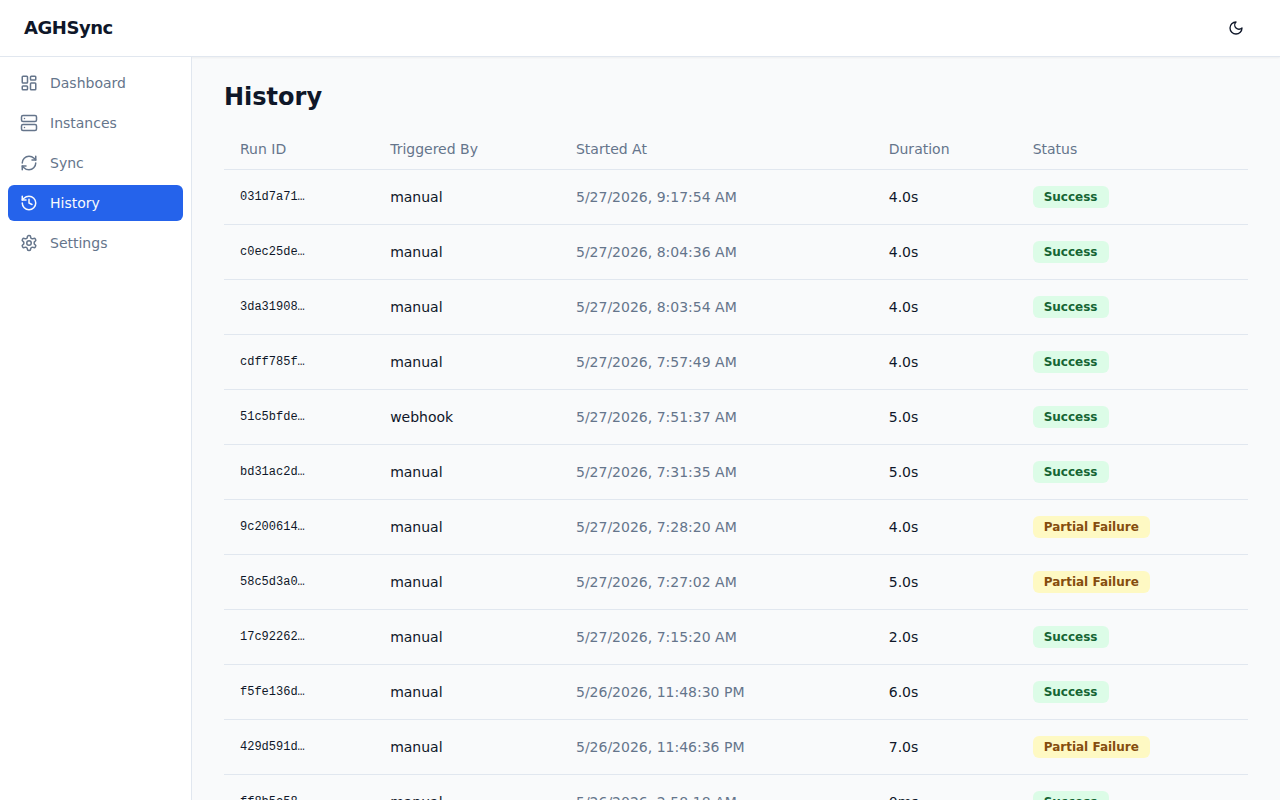
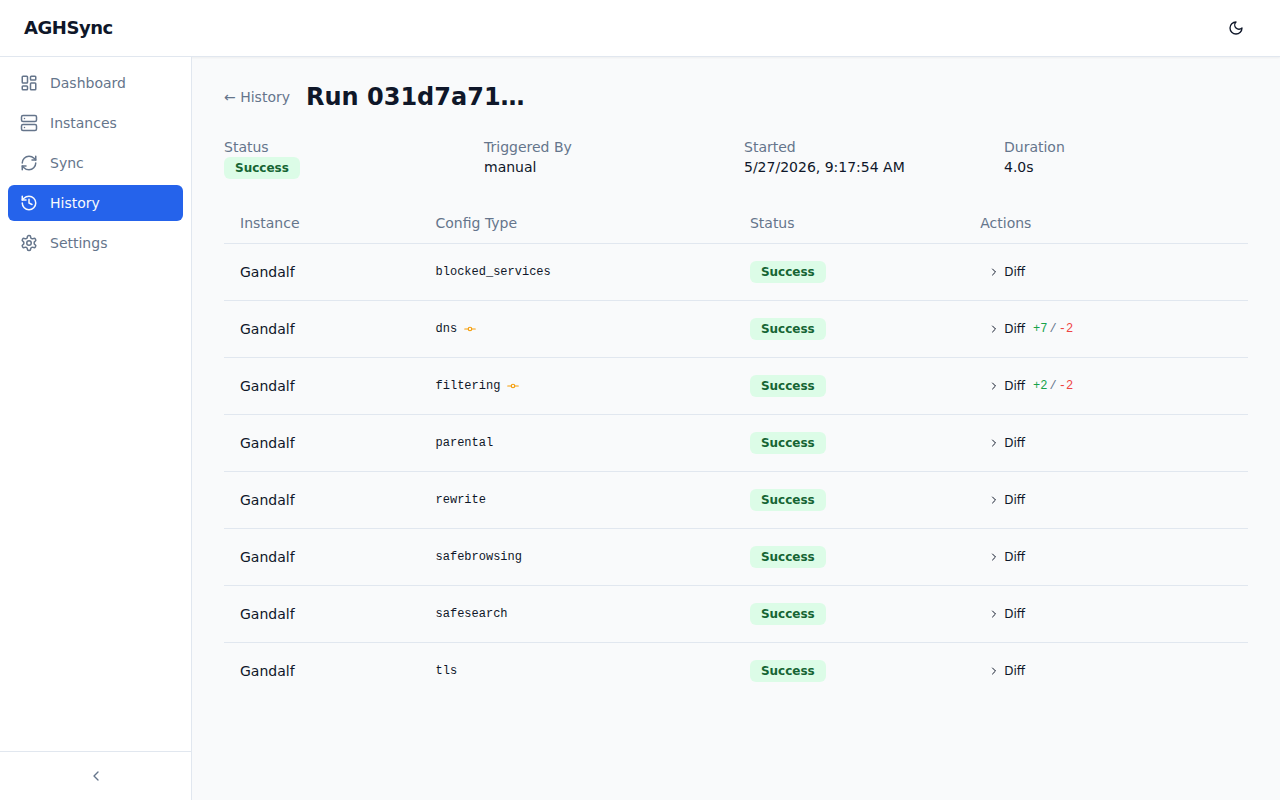
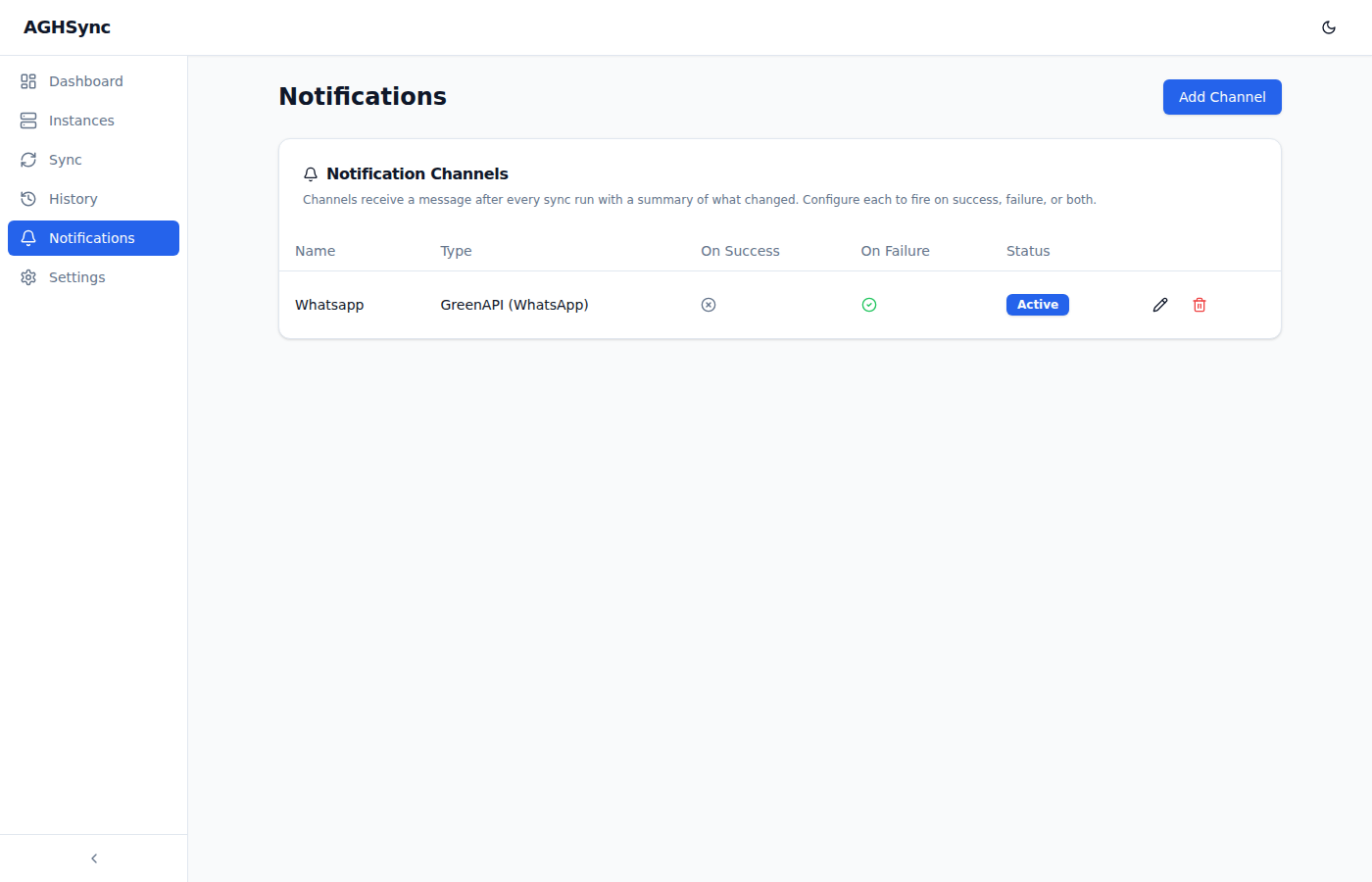
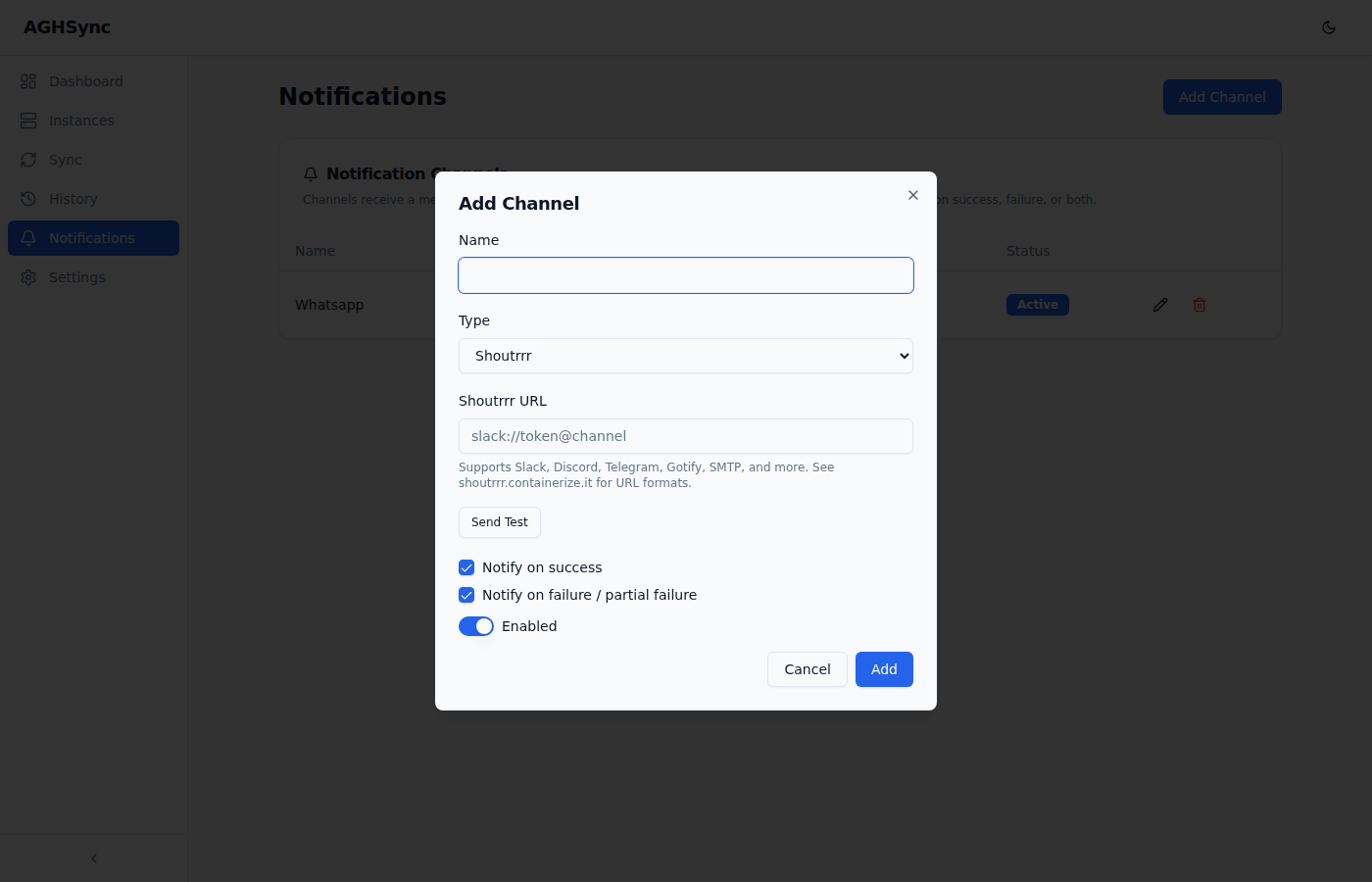
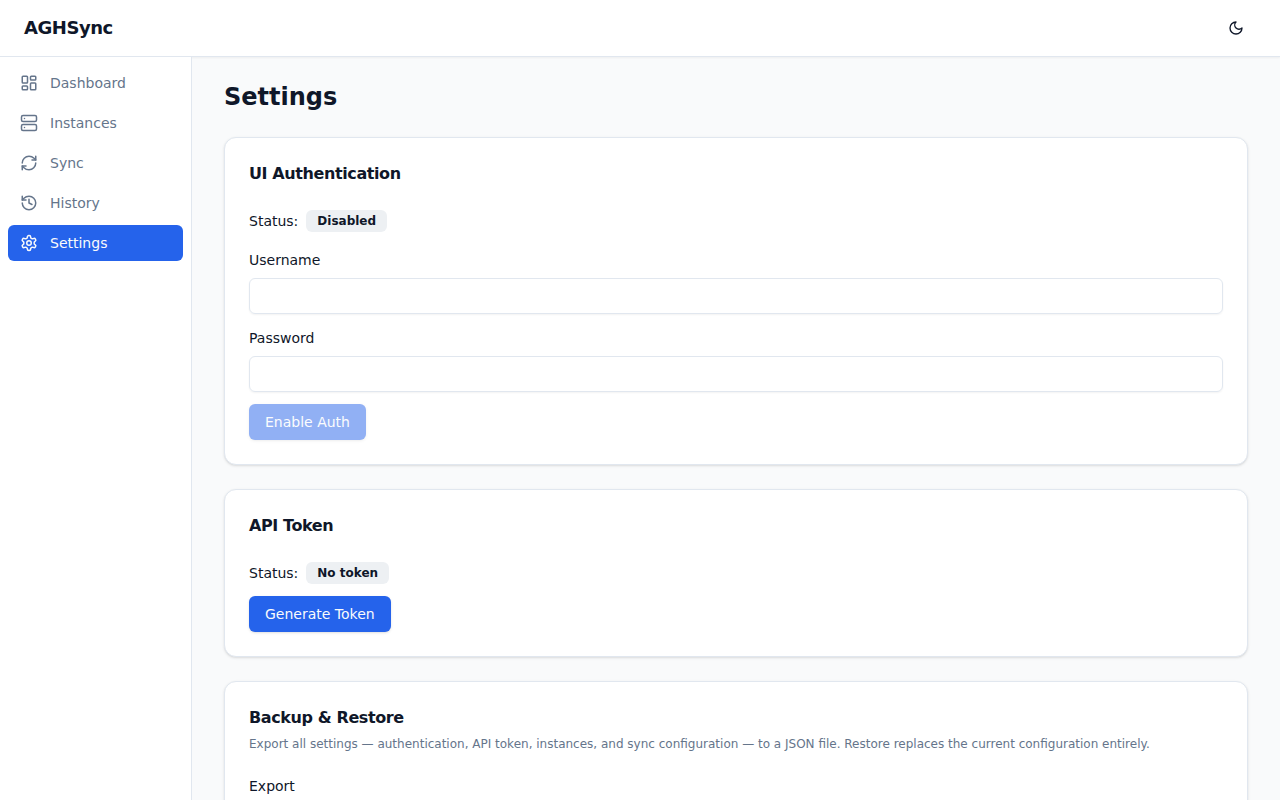
- Add, edit, and delete AdGuard Home instances (
http://orhttps://address, username, password) - Designate one instance as Master; promoting a slave automatically demotes the current master and transfers its sync configuration
- Connection test with live credential validation before saving
- TLS skip-verify option per instance for self-signed certificates
- Duplicate prevention: each address can only be added once; a clear error is shown if you try to add the same instance twice
- Online/Offline status: a colored dot per instance, refreshed every 60 seconds
- AdGuard Home version badge: the running AdGuard Home version is shown per instance alongside the status dot
- Per-instance last sync time: the Instances table shows when each slave was last synced and whether it succeeded or failed, with a green/red indicator
- Per-slave sync toggle: each slave can be individually enabled or disabled; disabled slaves are skipped during sync
-
Granular sync config: the master controls which AdGuard Home configuration types are pushed to slaves via per-type checkboxes:
Type What is synced blocked_servicesBlocked services list dhcpDHCP server configuration (off by default, since DHCP settings are usually host-specific) dnsDNS settings (upstreams, bootstrap DNS, cache, etc.) filteringFiltering enabled flag, filter update interval, and custom user rules parentalParental control on/off rewriteDNS rewrites (entries are added/removed on the slave to match the master) and rewrite settings safebrowsingSafe Browsing on/off safesearchSafe Search settings tlsEncryption (TLS) settings -
Scheduled sync: user-configurable standard 5-field cron expression, evaluated in UTC (e.g.
0 * * * *for hourly) -
Manual run: trigger a sync instantly from the UI or via API
-
Sync on startup: optional toggle to trigger a full sync automatically when AGHSync starts
-
Webhook trigger:
POST /api/v1/webhook/syncfor external integrations (e.g. scripts or automation tools) -
Filesystem watchdog: watches the AdGuard Home config file for changes and automatically triggers a sync when it is updated; supports Linux paths, and Windows and UNC paths when AGHSync runs on Windows; changes are debounced (2 seconds) to handle atomic multi-step writes (works correctly inside Docker volumes)
-
Sync runs concurrently across slave instances (up to 5 at a time); only one sync run is active at a time, with one additional run allowed to queue
- Notification channels: receive a message after every sync run with a summary of what changed per instance
- Three providers supported:
- Shoutrrr: Slack, Discord, Telegram, Gotify, SMTP, and many more
- GreenAPI: WhatsApp cloud messaging via GreenAPI
- WhatsApp Web: self-hosted WhatsApp via go-whatsapp-web-multidevice
- Per-channel toggles for notify on success and notify on failure / partial failure
- Channels can be enabled or disabled without deleting them
- Send Test button fires a real message from the add/edit dialog before saving
- Channel credentials are stored AES-256-GCM encrypted in the database
- Master instance summary, live sync status, and last run result
- Per-instance stats cards showing:
- AdGuard Home version
- Total DNS queries
- Blocked by filters
- Blocked malware / phishing
- Average DNS processing time
- Stats refresh automatically every 60 seconds
- Full sync run history with status (
Success,Partial Failure,Error), trigger source (manual,scheduler,webhook,watchdog,startup), start time, and duration - Per-run detail view with a result row per config type and per slave
- Change indicator: an amber icon flags config types where a change was actually applied
- LCS-based diff viewer: click any row to expand a green/red unified diff showing exactly what changed, with a
+N / -Nsummary badge
- UI Authentication: enable/disable Basic Auth for the web interface; username and password set via the UI
- API Token: generate a secure token for protecting the REST API; shown once and stored only as a bcrypt hash
- Backup & Restore: export all settings to a JSON file and import it to fully restore a previous state. The backup includes:
- All instances and their credentials (encrypted)
- Per-instance sync configuration
- Watchdog settings
- Scheduler configuration
- Notification channels (encrypted)
- UI auth, API token hash, and UI theme
- The per-install encryption secret, so encrypted credentials stay usable on another machine
- Every UI action has an equivalent REST endpoint
- Swagger UI served at
/api/docs(fully offline, no CDN) - Token-authenticated (
X-API-Tokenheader) or Basic Auth - See API below for the endpoint reference
- System-preference-aware dark/light toggle in the navbar; the chosen theme is saved on the server
flowchart LR
    subgraph Triggers
        UI[Web UI / REST API]
        CRON[Cron schedule]
        WH[Webhook]
        FS[Filesystem watchdog]
        ST[Startup]
    end
    Triggers --> D[Dispatcher<br/>one run at a time]
    D --> E[Sync engine]
    E -- "1. read enabled config types" --> M[(Master<br/>AdGuard Home)]
    E -- "2. apply to each enabled slave" --> S1[(Slave 1)]
    E --> S2[(Slave 2)]
    E --> SN[(Slave N)]
    E --> H[(SQLite<br/>history + diffs)]
    E --> N[Notification channels]
- A trigger (manual, cron, webhook, watchdog, or startup) submits a run to the dispatcher. If a run is already queued, the request is rejected with "sync already in progress".
- The engine reads a snapshot of every enabled config type from the master through the AdGuard Home
/controlAPI. - For each enabled slave, it captures the slave's current state (for the diff) and applies the master's snapshot.
- Results per slave and per config type are stored in the history, and notifications are sent to matching channels.
All state (instances, settings, history, notification channels) lives in a single SQLite file, aghsync.db.
- One or more AdGuard Home instances reachable over HTTP(S) from the AGHSync host, with admin username and password
- Docker, or a supported OS/architecture for the prebuilt binary (see Supported Platforms)
- For the filesystem watchdog: read access to the master's
AdGuardHome.yamlfrom the AGHSync host/container - To build from source: Go 1.25+ and Node.js 20+
docker run -d \
  --name aghsync \
  -p 8080:8080 \
  -v aghsync-data:/app/data \
  -e AGHSYNC_DATA=/app/data \
  techblog/aghsync:latest
Open http://localhost:8080.
Set
AGHSYNC_DATAto the mounted volume path. Without it the database is created in the container's working directory (/app) and is lost when the container is recreated.
A manual workflow can also publish the image to the GitHub Container Registry (ghcr.io/t0mer/aghsync).
services:
  aghsync:
    image: techblog/aghsync:latest
    ports:
      - "8080:8080"
    volumes:
      - aghsync-data:/app/data
    environment:
      AGHSYNC_DATA: /app/data
      LOG_LEVEL: info

volumes:
  aghsync-data:
docker compose up -dDownload the binary for your platform from the Releases page. Binaries are named aghsync-<os>-<arch> (for example aghsync-linux-amd64, aghsync-linux-armv7, aghsync-darwin-arm64, aghsync-windows-amd64.exe).
# Linux / macOS
chmod +x aghsync-linux-amd64
./aghsync-linux-amd64

# Windows
aghsync-windows-amd64.exe
The web UI is embedded in the binary. By default, aghsync.db is created in the current working directory; set AGHSYNC_DATA to store it elsewhere.
AGHSync can register itself with systemd or launchd under the name aghsync:
sudo ./aghsync-linux-amd64 --service install
sudo ./aghsync-linux-amd64 --service start
# other actions: stop, restart, uninstall
Service mode has these limitations:
- The service is registered without any flags or environment variables, so it starts with the defaults (port
8080, log levelwarning). - No working directory is set, so under systemd the database is created as
/aghsync.db. - The binary runs as a plain process under systemd/launchd. It does not integrate with the Windows Service Control Manager, so starting it as a Windows service is expected to time out (error 1053). On Windows, run it another way (for example a scheduled task or a service wrapper).
- Every invocation, including
--serviceactions, opens (and creates if missing)aghsync.dbin the current directory orAGHSYNC_DATA.
git clone https://github.com/t0mer/AGHSync.git
cd AGHSync
./scripts/build.sh          # builds the frontend (if not already built), then all release targets into dist/
Or build a Docker image locally:
docker build -t aghsync .AGHSync has only a few startup options. Everything else (instances, schedule, watchdog, authentication, notifications) is configured in the web UI or API and stored in the database.
| Flag | Default | Description |
|---|---|---|
--port <n> |
8080 |
Listening port. Overridden by AGHSYNC_PORT. |
--log-level <level> |
warning |
debug / info / warning / error. Overridden by LOG_LEVEL. |
--reset-password |
– | Interactively reset the UI login password (also enables UI auth), then exit. |
--service <action> |
– | Manage the OS service: install / uninstall / start / stop / restart. |
| Variable | Default | Description |
|---|---|---|
AGHSYNC_PORT |
– | Server port; takes precedence over --port. |
LOG_LEVEL |
– | Log level; takes precedence over --log-level. |
AGHSYNC_DATA |
current working directory | Directory where aghsync.db is stored. |
Precedence (highest → lowest):
- Port:
AGHSYNC_PORT→--port→ built-in default (8080) - Log level:
LOG_LEVEL→--log-level→ built-in default (warning)
Application logs (HTTP requests, scheduler, watchdog, notifications) are written to stdout as JSON at the configured level. Values of attributes whose names contain password, token, secret, authorization, or credential are redacted.
Messages from the sync engine itself (for example master snapshot failed, apply failed) use Go's default logger instead: they are written to stderr as plain text, are not redacted, and are not controlled by LOG_LEVEL (warnings and errors are always shown).
- Add your instances: go to Instances → Add Instance, enter the address (e.g.
http://192.168.0.10:3000), username, and password, and use the connection test to validate them. - Pick a master: the crown icon promotes an instance to master. Expand the master row to choose which config types are synced.
- Choose how to sync on the Sync page:
- Run Sync Now for an immediate run
- Schedule: enter a cron expression (UTC), or leave it blank to disable scheduled sync
- Sync on Startup: run a sync every time AGHSync starts
- Filesystem Watchdog: see below
- Review results under History. Open a run to see per-slave, per-type results and expand rows to see the diff.
- Get notified: add channels under Notifications.
- Secure it: under Settings, enable UI authentication and generate an API token (see Security Notes), and export a backup.
To reset a forgotten UI password, stop AGHSync and run it once with --reset-password (using the same AGHSYNC_DATA).
The watchdog monitors the master's AdGuard Home configuration file for changes and triggers an immediate sync whenever it is updated. It is designed to work correctly with AdGuard Home's atomic-write pattern (write to a temp file → rename), which is the default on all platforms and inside Docker containers: AGHSync watches the file's parent directory and debounces events for 2 seconds.
Setup: go to Sync → Filesystem Watchdog, enable it, and enter the full path to the AdGuard Home AdGuardHome.yaml file as seen by AGHSync.
Docker example: if AdGuard Home writes its config to /opt/adguardhome/conf/AdGuardHome.yaml on the host, mount that same path into AGHSync:
services:
  aghsync:
    image: techblog/aghsync:latest
    volumes:
      - aghsync-data:/app/data
      - /opt/adguardhome/conf:/opt/adguardhome/conf:ro
    environment:
      AGHSYNC_DATA: /app/data
Then set the watchdog path to /opt/adguardhome/conf/AdGuardHome.yaml.
Supported path formats (Windows and UNC paths only work when AGHSync itself runs on Windows):
| Format | Example |
|---|---|
| Linux absolute | /etc/adguardhome/AdGuardHome.yaml |
| Windows absolute | C:\AdGuardHome\AdGuardHome.yaml |
| UNC (network share) | \\server\share\AdGuardHome.yaml |
After every sync run AGHSync can send a message to one or more notification channels. The message includes the run result (success / partial failure / error), the trigger, start time, duration, and a per-instance summary of which config types succeeded or failed. Sending is best-effort: a failing channel is logged and never affects the sync.
Shoutrrr supports Slack, Discord, Telegram, Gotify, SMTP e-mail, ntfy, and many more via a single URL scheme.
slack://token@channel
discord://token@id
telegram://token@telegram?chats=@channel
gotify://hostname/token
smtp://user:password@host:port/?from=from@example.com&to=to@example.com
Send WhatsApp messages via GreenAPI. Requires a GreenAPI account and an active instance.
| Field | Description |
|---|---|
| Instance ID | Found in the GreenAPI console |
| Token | API token for the instance |
| Recipient Phone | International format, digits only, no + or spaces (e.g. 14085551234); @c.us is appended automatically |
| API URL (optional) | Cluster-specific URL from the GreenAPI console (e.g. https://7103.api.greenapi.com); leave blank to use https://api.green-api.com |
Send WhatsApp messages via a self-hosted go-whatsapp-web-multidevice instance.
| Field | Description |
|---|---|
| Base URL | URL of your go-whatsapp-web-multidevice instance (e.g. http://localhost:3000) |
| Recipient Phone | International format, no + or spaces |
| Username (optional) | Basic Auth username if your instance is protected |
| Password (optional) | Basic Auth password |
Interactive Swagger UI is served at /api/docs, and the raw OpenAPI spec at /api/docs/openapi.yaml. Both are available without authentication.
All endpoints below are relative to the server root.
| Method | Path | Description |
|---|---|---|
GET |
/api/v1/health |
Liveness check ({"status":"ok"}); never requires auth |
GET |
/api/v1/instances |
List all instances |
POST |
/api/v1/instances |
Add an instance |
POST |
/api/v1/instances/test-connection |
Test an address/credentials without saving |
GET |
/api/v1/instances/statuses |
Online/offline status and AdGuard Home version for all instances |
GET |
/api/v1/instances/last-sync |
Last sync time and status per instance |
GET |
/api/v1/instances/{id} |
Get one instance |
PUT |
/api/v1/instances/{id} |
Update an instance |
DELETE |
/api/v1/instances/{id} |
Remove an instance |
PUT |
/api/v1/instances/{id}/promote |
Promote slave to master |
GET |
/api/v1/instances/{id}/stats |
DNS stats for one instance |
GET |
/api/v1/instances/{id}/sync-config |
Get master sync config |
PUT |
/api/v1/instances/{id}/sync-config |
Update master sync config |
PUT |
/api/v1/instances/{id}/sync-enabled |
Enable or disable sync for a slave |
POST |
/api/v1/sync/run |
Trigger a manual sync |
GET |
/api/v1/sync/status |
Current and last run status |
PUT |
/api/v1/sync/schedule |
Update the cron schedule ({"cron": "0 * * * *"}; empty string disables) |
POST |
/api/v1/webhook/sync |
Webhook trigger |
GET |
/api/v1/history |
List sync runs (?limit=20&offset=0) |
GET |
/api/v1/history/{runId} |
Run detail with per-config diffs |
GET |
/api/v1/notifications |
List notification channels |
POST |
/api/v1/notifications |
Add a notification channel |
POST |
/api/v1/notifications/test |
Send a test message |
GET |
/api/v1/notifications/{id} |
Get one notification channel |
PUT |
/api/v1/notifications/{id} |
Update a notification channel |
DELETE |
/api/v1/notifications/{id} |
Remove a notification channel |
GET |
/api/v1/settings |
Get application settings |
PUT |
/api/v1/settings/ui-auth |
Enable/disable UI auth |
POST |
/api/v1/settings/api-token |
Generate API token |
DELETE |
/api/v1/settings/api-token |
Remove API token |
PUT |
/api/v1/settings/theme |
Save UI theme (dark / light) |
PUT |
/api/v1/settings/watchdog |
Configure filesystem watchdog |
PUT |
/api/v1/settings/sync-on-startup |
Enable/disable sync on startup |
GET |
/api/v1/backup/export |
Download settings backup |
POST |
/api/v1/backup/restore |
Restore from backup |
- No token configured → all
/api/v1requests pass through (bootstrap mode, intended for first-run setup). - Token configured → requests must include
X-API-Token: <token>or valid Basic Auth credentials (when UI auth is enabled). - UI auth enabled → mutating requests (
POST,PUT,PATCH,DELETE) must also include anX-Requested-Withheader (any value) as CSRF protection.
POST /api/v1/sync/run and POST /api/v1/webhook/sync both queue a run and differ only in the trigger recorded in the history.
curl -X POST http://aghsync:8080/api/v1/webhook/sync \
  -H "X-API-Token: <token>" \
-H "X-Requested-With: XMLHttpRequest"| Status | Meaning |
|---|---|
202 Accepted |
Run queued; body is {"run_id": "<uuid>"} |
409 Conflict |
A sync is already in progress |
422 Unprocessable Entity |
No enabled slave instances to sync to |
- Bootstrap mode is open. Until an API token is generated, the whole
/api/v1API (including instance credentials management and backup export) is accessible without authentication. Generate a token as soon as setup is done, and don't expose AGHSync to untrusted networks. - Enable UI auth together with an API token. The web UI only asks for a login once the API rejects anonymous requests, which happens only after an API token has been generated.
- Credentials at rest: AdGuard Home passwords and notification channel settings are encrypted with AES-256-GCM using a key derived (HKDF-SHA256) from a random per-install secret stored in the database. The UI password and API token are stored only as bcrypt hashes.
- Protect
aghsync.dband backup files. Both contain the per-install secret alongside the encrypted credentials, so anyone with the file can recover the AdGuard Home and notification credentials. - TLS skip-verify disables certificate validation for that instance; use it only for trusted self-signed setups.
- AGHSync serves plain HTTP. Put it behind a reverse proxy with TLS if it is reachable beyond your LAN.
| Symptom | Cause / fix |
|---|---|
sync already in progress (HTTP 409) |
A run is running and another is already queued. Wait for it to finish. |
no enabled slave instances to sync to (HTTP 422) |
Add at least one slave and make sure its sync toggle is on. |
403 forbidden on API calls from scripts |
UI auth is enabled; add an X-Requested-With header to mutating requests. |
| Web UI does not ask for a login after enabling UI auth | Generate an API token as well (see Security Notes). |
| A config type is missing from a run's results | Reading that type from the master failed; look for master snapshot failed in AGHSync's stderr output (shown regardless of LOG_LEVEL). |
dns sync fails with "private upstream servers" |
AGHSync already disables use_private_ptr_resolvers on the slave when the master has no private PTR upstreams; if it still fails, check the slave's AdGuard Home logs. |
| Watchdog never triggers | The path must be reachable from AGHSync (mount it into the container) and point to the file itself, not its directory. |
| Data lost after recreating the container | Set AGHSYNC_DATA to a path on a mounted volume. |
| Credentials fail after restoring a backup from another machine | Restart AGHSync after the restore so the restored encryption secret, schedule, and watchdog settings are loaded. |
| OS | Architecture |
|---|---|
| Linux | amd64, arm64, armv7, armv6, 386 |
| macOS | amd64 (Intel), arm64 (Apple Silicon) |
| Windows | amd64, arm64 |
Docker images: linux/amd64, linux/arm64, linux/arm/v7
# Prerequisites: Go 1.25+, Node 20+

# Install frontend dependencies and build the UI once
# (the Go binary embeds internal/webui/dist, so Go builds and tests fail to compile without it)
cd web && npm ci && npm run build && cd ..

# Run the backend (terminal 1)
go run ./cmd/aghsync --port 8080 --log-level debug

# Run the frontend with hot reload (terminal 2)
# (Vite dev server proxies /api to the backend on :8080)
cd web && npm run dev

# Run tests
go test ./...
cd web && npm test

# Lint the frontend
cd web && npm run lint

# Build all release targets → dist/
./scripts/build.sh

# Build Docker image
docker build -t aghsync .
Other helper scripts:
scripts/dev.sh: starts the Vite dev server and the backend with air hot reload. The repository has no.air.toml, so the backend half needs an air config pointing at./cmd/aghsyncfirstscripts/gen-adguard-client.sh: regenerates the AdGuard Home API client (internal/adguard/gen) fromswagger.ymlusingoapi-codegenscripts/vendor-swagger-ui.sh: vendors the offline Swagger UI assets intointernal/api/docs/swagger-uiscripts/next-version.sh: computes the nextYYYY.M.PATCHrelease version
cmd/aghsync/          # main package (flags, startup, shutdown)
internal/
  adguard/            # AdGuard Home API client (snapshot/apply per config type)
  api/                # chi router, handlers, middleware, OpenAPI docs + Swagger UI
  auth/               # bcrypt hashing, token generation, AES-256-GCM helpers
  backup/             # backup export/restore
  config/             # typed access to settings stored in SQLite
  history/            # sync run history and results
  instance/           # instance repository and sync config
  notification/       # Shoutrrr, GreenAPI, WhatsApp Web senders
  service/            # OS service integration
  store/              # SQLite store and migrations
  sync/               # engine, dispatcher, scheduler, watchdog
  webui/              # embedded frontend build
web/                  # React + TypeScript + Vite frontend
scripts/              # build, dev, and code generation helpers
Issues and pull requests are welcome. Please run go test ./... and the frontend tests (cd web && npm test) before opening a pull request, and keep changes focused.
This project is licensed under the Apache License 2.0.