A real-time hand gesture recognition system that combines WiFi RSSI sensing and MPU6050 inertial measurements to detect user gestures and visualize them through an interactive 3D web interface.
The project demonstrates how wireless signal variations and motion sensor data can be fused to perform gesture recognition without requiring cameras or expensive wearable gloves.
⚠️ Educational Purpose OnlyThis project was developed for educational and research purposes to demonstrate alternative human-computer interaction techniques using WiFi sensing and inertial measurement units (IMUs). It is intended as a proof-of-concept and experimental platform.
- Real-time hand gesture recognition
- ESP32 WiFi RSSI sensing
- MPU6050 motion tracking
- FastAPI backend
- WebSocket-based communication
- React-based web dashboard
- Interactive 3D hand visualization
- Low-cost hardware implementation
- Wireless operation
- Real-time gesture updates
The system consists of three major components:
- ESP32 Sensor Node
- FastAPI Backend Server
- React 3D Visualization Interface
The ESP32 continuously collects:
- WiFi RSSI values
- Accelerometer data
- Gyroscope data
The sensor data is transmitted to the backend where gesture detection algorithms classify the current hand motion.
Detected gestures are streamed through WebSockets to the web interface and visualized using a 3D animated hand model.
RSSI (Received Signal Strength Indicator) is a measurement of the power level received by a wireless receiver.
In WiFi communication:
Higher RSSI  → Stronger signal
Lower RSSI   → Weaker signal
RSSI values are usually represented in dBm:
-30 dBm  → Excellent signal
-50 dBm  → Strong signal
-70 dBm  → Moderate signal
-90 dBm  → Weak signal
Human body movements affect wireless signal propagation.
When a hand moves near the ESP32:
- Reflection changes
- Multipath propagation changes
- Signal attenuation changes
- Signal scattering changes
These effects cause measurable RSSI variations.
Different hand gestures produce unique RSSI patterns.
Examples:
Stable RSSI values.
Localized hand movement causing moderate RSSI changes.
Significant hand contraction resulting in distinct RSSI patterns.
Changes in hand orientation affecting signal propagation.
By calibrating RSSI values for different gestures, the system can classify gestures without using cameras.
This project combines:
Used for:
- Relax
- Pinch
- Fist
- Wrist Flex
The system performs calibration for each gesture and compares incoming RSSI measurements against learned averages.
Used for:
- Wave
- Rotation
- Motion analysis
The MPU6050 provides:
- Accelerometer measurements
- Gyroscope measurements
These values are processed to determine hand movement and orientation.
The MPU6050 is a 6-axis Inertial Measurement Unit (IMU).
It contains:
Measures:
- X-axis acceleration
- Y-axis acceleration
- Z-axis acceleration
Used for:
- Tilt estimation
- Orientation tracking
Measures:
- Angular velocity around X-axis
- Angular velocity around Y-axis
- Angular velocity around Z-axis
Used for:
- Rotation detection
- Motion tracking
Workflow:
ESP32 + MPU6050
        ↓
RSSI + IMU Data
        ↓
UDP Communication
        ↓
FastAPI Backend
        ↓
Gesture Classification
        ↓
WebSocket Server
        ↓
React Dashboard
        ↓
3D Hand Visualization
- ESP32
- MPU6050
- WiFi Network
- Computer / Laptop
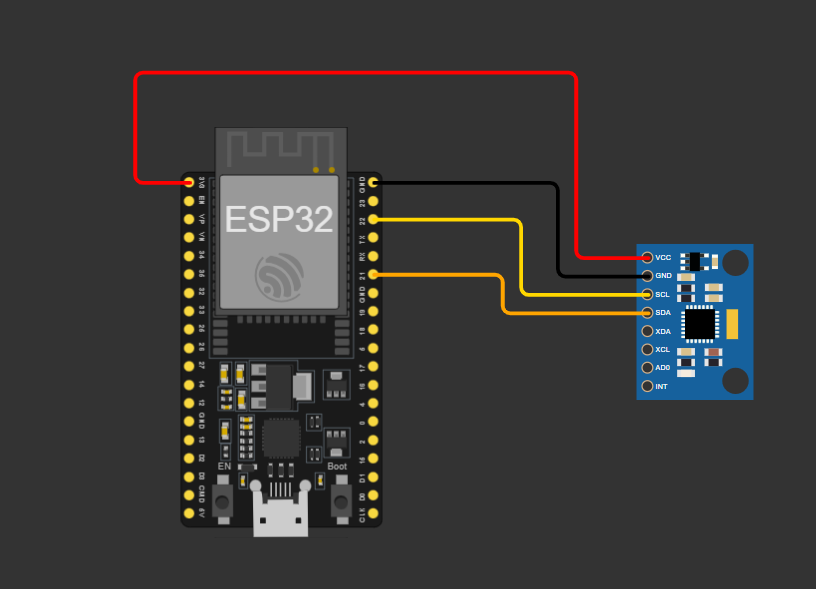
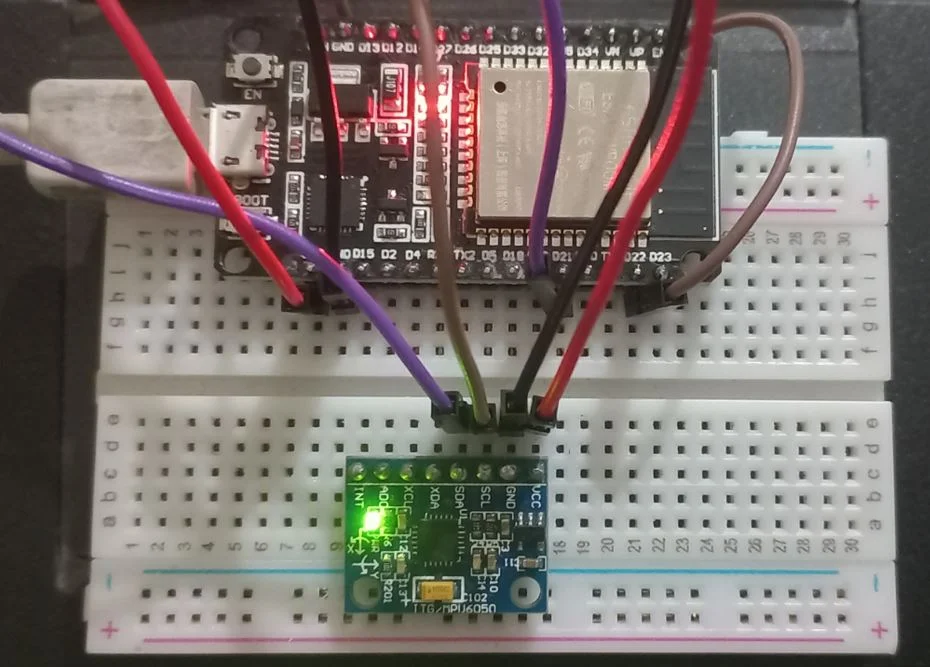
 The frontend displays:
- Connection status
- Live gesture recognition
- Interactive 3D hand model
- Real-time updates
The interface updates instantly whenever a new gesture is detected.
Video demonstration:
- Relax
- Wave
- Rotation
- Pinch
- Fist
- Wrist Flex
The backend performs sensor fusion by combining RSSI and MPU6050 information to determine the final gesture state.
WifiHandGesture/
│
├── esp32/
│   └── rssi-mpu.ino
│
├── backend/
│   ├── app.py
│   └── requirements.txt
│
├── frontend/
│   ├── src/
│   ├── public/
│   ├── package.json
│   └── ...
│
├── assets/
│   ├── thumbnail.png
│   ├── circuit.png
│   ├── hardware.webp
│   ├── webui.png
│   └── wifigesturedemo.mp4
│
└── README.md
The project structure may evolve over time. Refer to the repository tree for the latest structure.
git clone https://github.com/tecrade/WifiHandGesture.git
cd WifiHandGestureNavigate to backend:
cd backendInstall dependencies:
pip install -r requirements.txtStart FastAPI server:
python app.pyBackend starts WebSocket services for gesture streaming.
Open:
esp32/rssi-mpu.ino
Using:
- Arduino IDE
- PlatformIO
Install libraries:
- WiFi
- Wire
- MPU6050
Upload code to ESP32.
The ESP32 communicates with the backend wirelessly using the UDP protocol over a WiFi network.
Unlike serial communication, UDP allows the ESP32 to transmit sensor data to the backend computer without requiring a USB connection for data transfer.
The ESP32 continuously sends:
- RSSI measurements
- Accelerometer data
- Gyroscope data
to the FastAPI backend through UDP packets.
ESP32
  │
  │  UDP Packets
  ▼
Computer Running FastAPI Backend
  │
  ▼
WebSocket Server
  │
  ▼
React Web Dashboard
The UDP IP address and UDP port must match in both:
esp32/rssi-mpu.ino
and
backend/app.py
Example:
const char* udpAddress = "192.168.1.100";
const int udpPort = 5005;
UDP_IP = "0.0.0.0"
UDP_PORT = 5005
The UDP port number must be identical on both sides.
The ESP32 must send data to the IP address of the computer running the backend.
On Windows:
ipconfig
Look for:
IPv4 Address . . . . . . . . : 192.168.1.100
Use this IPv4 address inside the ESP32 firmware.
Example:
const char* udpAddress = "192.168.1.100";
Before running the system:
- ESP32 and computer must be connected to the same WiFi network.
- The IPv4 address configured in the ESP32 firmware must match the computer's current IPv4 address.
- The UDP port number must match in both the ESP32 firmware and FastAPI backend.
- The FastAPI backend must be running before gesture data can be received.
- Firewall settings should allow UDP communication on the selected port.
Check:
- ESP32 is powered on.
- ESP32 is connected to WiFi.
- Backend is running.
- Correct IPv4 address is configured.
- UDP ports match.
- Firewall is not blocking UDP packets.
If the computer reconnects to WiFi, the IPv4 address may change.
Run:
ipconfig
again and update the ESP32 firmware with the new IPv4 address if necessary.
When everything is configured correctly, the backend should display:
UDP socket listening on 0.0.0.0:5005
and the frontend should show:
Live
indicating successful communication between the ESP32, backend server, and web interface.
Navigate to frontend:
cd frontendInstall packages:
npm installRun development server:
npm run devOpen browser:
http://localhost:5173
The web dashboard will connect to:
ws://127.0.0.1:8000/ws/gesture
for real-time gesture updates.
- Human Computer Interaction
- AR/VR Interfaces
- Smart Home Control
- Robotics Control
- Accessibility Systems
- Sign Language Research
- Gesture-Based Gaming
- Industrial Automation
- Remote Device Control
- Machine Learning Based Classification
- Multiple User Support
- Dynamic Gesture Training
- Wearable EMG Integration
- Edge AI Deployment
- Higher Accuracy Sensor Fusion
- Mobile Application Support
- Cloud Analytics Dashboard
- Custom Gesture Recording
This project demonstrates:
- ESP32 Programming
- WiFi RSSI Sensing
- MPU6050 Integration
- UDP Communication
- FastAPI Development
- WebSocket Communication
- React Development
- Three.js Visualization
- Real-Time Systems
- Gesture Recognition Fundamentals
RSSI-based gesture recognition is highly sensitive to environmental conditions.
Factors affecting performance include:
- WiFi interference
- Human movement nearby
- Room geometry
- Signal multipath effects
- Sensor placement
Therefore, recognition accuracy may vary across environments and should be considered experimental.