

A custom Lovelace card for Home Assistant that visualizes real-time energy flow between solar, battery, grid, and home — with animated flows, neon-style connectors, and a history mode.
| ⚡ Realtime mode | 📊 History mode |
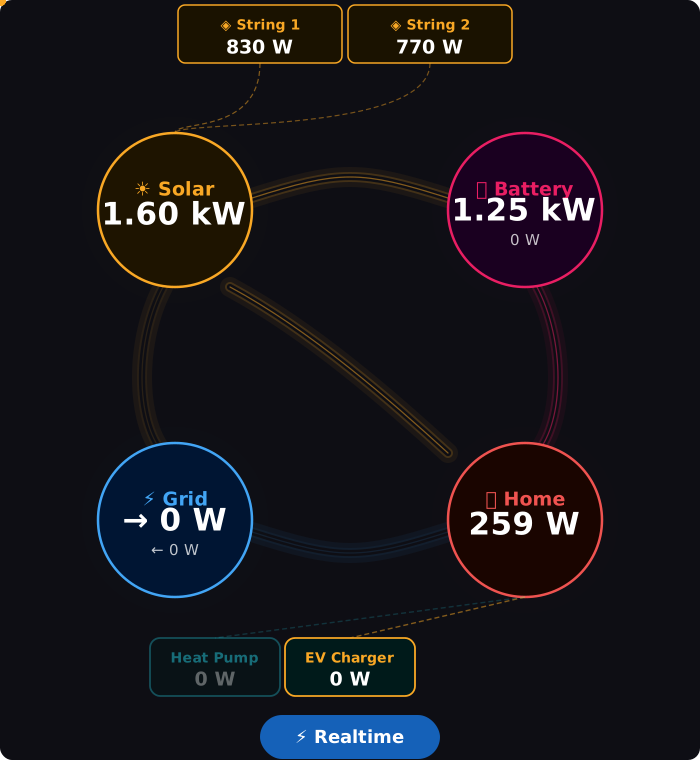 |
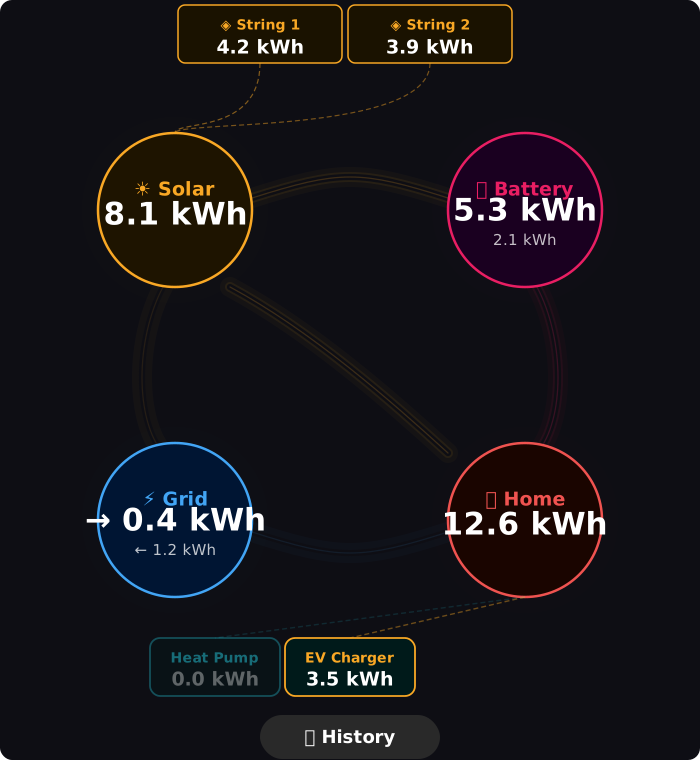 |
- 4-node layout — Solar, Battery, Grid, Home at the four corners
- Animated flow dots — speed scales automatically with power (W)
- Neon tube connectors — multi-layer glow effect on all paths
- Solar strings — up to 4 individual string boxes above the solar node
- Home loads — up to 5 individual load boxes below the home node
- Realtime / History toggle — switch between live power (W/kW) and daily energy (kWh)
- Fully customizable — colors, fonts, glow, line width, dot speed, thresholds
- Visual editor — configure everything without touching YAML
- In Home Assistant, go to HACS → Frontend
- Click the three dots menu → Custom repositories
- Add
https://github.com/themask1987/energy-flow-cardwith category Dashboard - Search for Energy Flow Card and install
- Reload the browser
- Download
energy-flow-card.jsfrom the latest release - Copy it to
/config/www/energy-flow-card/energy-flow-card.js - In Home Assistant go to Settings → Dashboards → Resources
- Add resource
/local/energy-flow-card/energy-flow-card.jsof type JavaScript module - Reload the browser
type: custom:energy-flow-card
solar:
  entity_power: sensor.solar_power
grid:
  entity_import: sensor.grid_import_power
  entity_export: sensor.grid_export_power
home:
entity_power: sensor.home_powertype: custom:energy-flow-card
view_mode: realtime # realtime | history
refresh_interval: 5 # seconds
# ── ENTITIES ────────────────────────────────────────────────
solar:
entity_power: sensor.solar_power
unit: kW # kW | W (default: reads from entity)
entity_energy: sensor.solar_energy_today # for history mode
strings: # up to 4 strings
- name: "String 1"
entity_power: sensor.solar_string_1_power
unit: kW
entity_energy: sensor.solar_string_1_energy_today
- name: "String 2"
entity_power: sensor.solar_string_2_power
unit: kW
grid:
entity_import: sensor.grid_import_power # power drawn from grid (W)
entity_export: sensor.grid_export_power # power sent to grid (W)
entity_import_energy: sensor.grid_import_energy_today
entity_export_energy: sensor.grid_export_energy_today
battery:
entity_power: sensor.battery_charge_power # W, positive = charging
entity_discharge: sensor.battery_discharge_power # W, optional separate sensor
entity_soc: sensor.battery_soc # % state of charge
entity_energy_in: sensor.battery_energy_in_today
entity_energy_out: sensor.battery_energy_out_today
home:
entity_power: sensor.home_power
entity_energy: sensor.home_energy_today
loads: # up to 5 loads
- name: "EV Charger"
entity_power: sensor.ev_charger_power
color: "#F9A825"
- name: "Heat Pump"
entity_power: sensor.heat_pump_power
color: "#42A5F5"
# ── APPEARANCE ──────────────────────────────────────────────
appearance:
node_radius: 77 # px, all main nodes
dot_size: 6 # px, flow dots
dot_speed: auto # auto | fixed seconds (e.g. 1.5)
glow_intensity: 0.08 # 0.0–1.0
glow_speed: 2.8 # seconds per pulse cycle
line_width: 2.5 # connector line thickness
line_opacity_inactive: 0.15 # opacity of inactive lines/nodes
flow_threshold: 10 # W minimum to activate a flow
font_node_label: 19 # node title font size
font_node_value: 31 # node main value font size
font_node_secondary: 15 # node secondary value font size
font_secondary_label: 14 # string/load label font size
font_secondary_value: 19 # string/load value font size
# ── COLORS ──────────────────────────────────────────────────
colors:
solar:
stroke: "#F9A825"
fill: "#1e1400"
battery:
stroke: "#E91E63"
fill: "#1a0020"
grid:
stroke: "#42A5F5"
fill: "#001533"
home:
stroke: "#EF5350"
fill: "#1a0500"
# ── VISIBILITY ──────────────────────────────────────────────
display:
show_grid: true
show_battery: true
show_strings: true
show_loads: true
show_history_button: true| Flow | Activates when |
|---|---|
| Solar → Home | Solar power > threshold |
| Solar → Battery | Solar active AND battery charging |
| Solar → Grid | Solar active AND grid export > threshold × 2 |
| Grid → Home | Grid import > threshold |
| Battery → Home | Battery discharging |
Click the button at the bottom of the card to toggle between modes.
- Realtime — shows live power in W / kW, refreshed every
refresh_intervalseconds - History — shows daily energy in kWh (reads
entity_energyfields)
- Initial public release
- 4-node SVG layout with neon tube connectors
- Animated flow dots with auto speed scaling
- Solar strings (up to 4) and home loads (up to 5)
- Realtime / History toggle
- Full visual editor with entity search, sliders, color pickers
- Configurable colors, fonts, glow, line width, flow threshold