

Local live brushing data for Oral-B iO toothbrushes and iO Sense chargers in Home Assistant.
Oral-B Live combines passive Bluetooth updates, a direct toothbrush connection, an iO Sense charger bridge, and the brush's retained session summary. It provides live timer, pressure, pacer and mode entities, persists the latest-session summary and daily session count, and exposes supported battery, brush-head, display and charger diagnostics without using the Oral-B cloud.
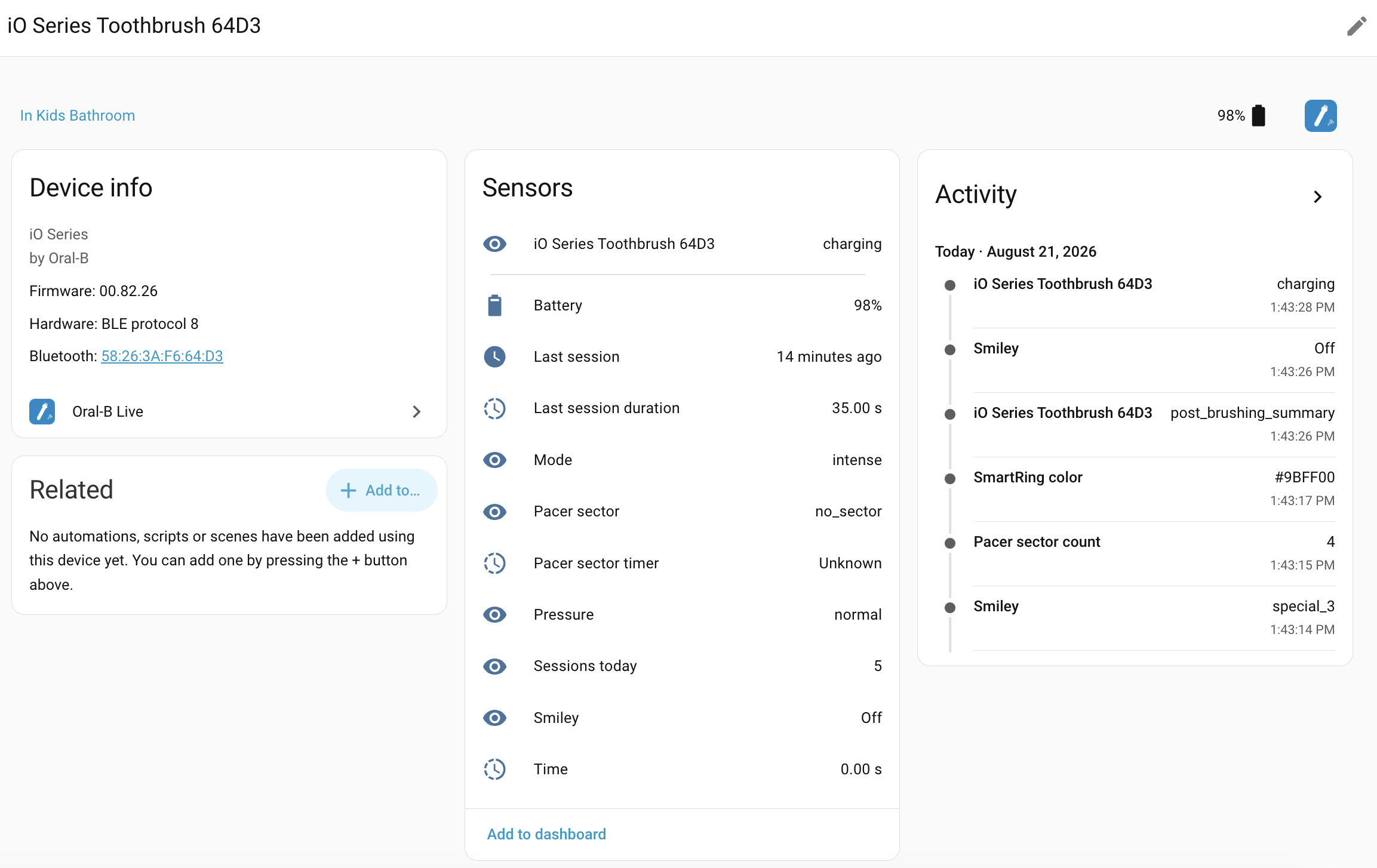
Toothbrush entities and session activity
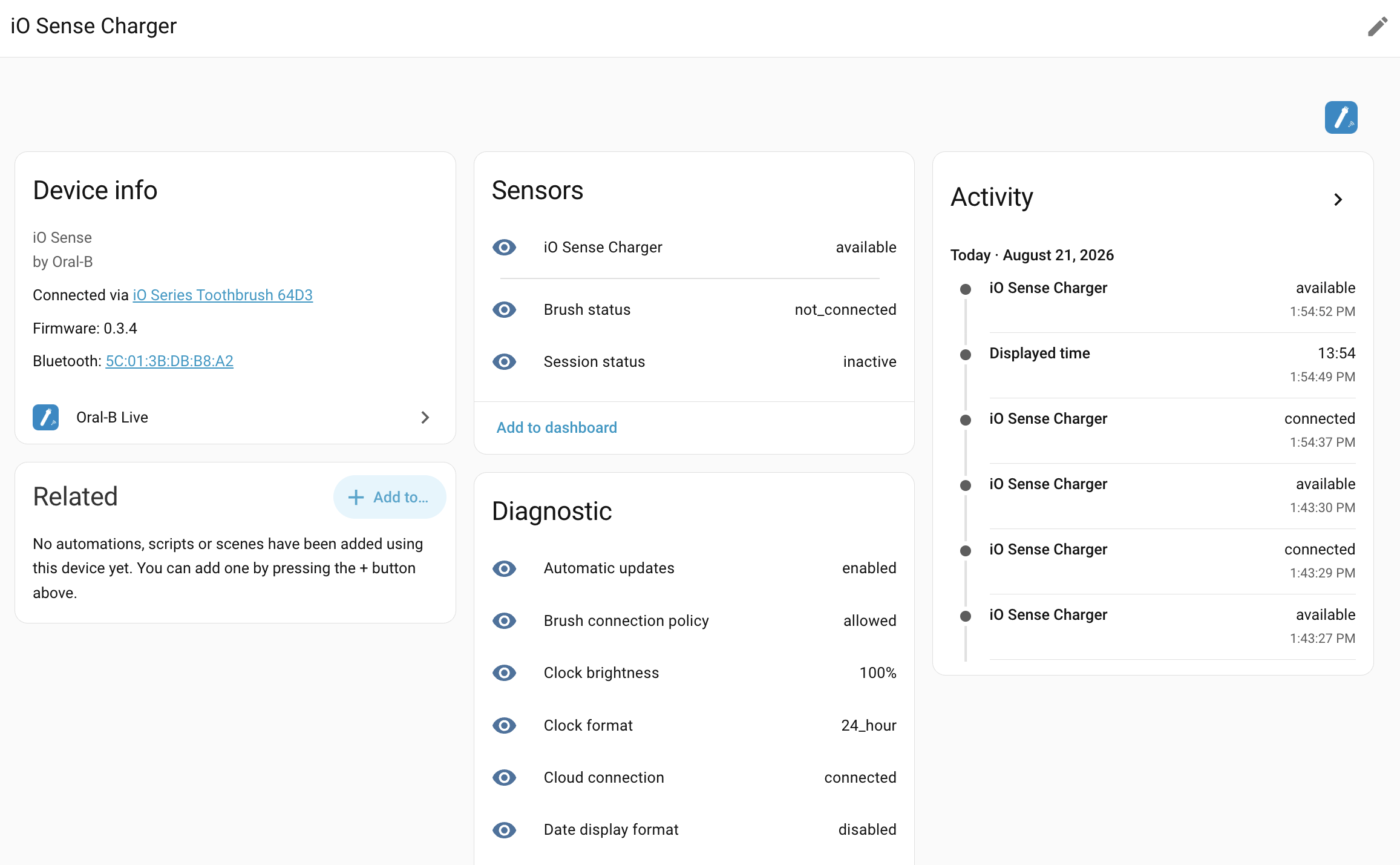
iO Sense charger entities and diagnostics
- How it works
- Connection options
- Comparison with Home Assistant's built-in Oral-B integration
- Data sources and fallbacks
- Entities
- Installation
- Configuration
- Cards and automations
- Requirements
- Protocol reference
- Known limitations
- Troubleshooting
Oral-B Live can collect brushing data in two ways. You choose the behaviour under the integration's Configure menu:
- Charger/app compatible is recommended for an iO Sense setup. The charger keeps its normal connection to the toothbrush, while Home Assistant reads live brush data locally through the charger. Home Assistant does not take the brush connection slot away from the charger or phone app.
- Home Assistant direct connects Home Assistant straight to the toothbrush for its fastest notification stream. While this connection is active, the charger display and phone app cannot connect to the brush.
This choice is necessary because the toothbrush accepts only one BLE client at a time and stops advertising while that connection is occupied.
Charger/app compatible

Home Assistant <--local BLE--> iO Sense <--private BLE--> Toothbrush
                                 keeps brush slot

Home Assistant direct

Home Assistant <--direct BLE notifications--> Toothbrush
     owns brush slot
In charger/app-compatible mode, the integration discovers the paired iO Sense, matches its stored toothbrush identity to the existing config entry and ignores unrelated chargers. Home Assistant reads through that charger without taking over the toothbrush connection, so the charger display continues to handle the session. The same local path also retrieves the brush's retained session result when it becomes available.
Choose the behaviour under Settings → Devices & services → Oral-B Live → Configure.
Home Assistant leaves the toothbrush connection available to the iO Sense and phone app. When a paired iO Sense is present, it is used automatically as a local live-data bridge.
During a session, pressure normally refreshes every second. The displayed timer, pacer sector and sector timer also advance at one-second intervals and are regularly corrected by fresh values from the brush. Battery and other slower-changing diagnostics refresh when the charger can provide them without interrupting the live session.
If no matching charger is available, the same option falls back automatically to passive brush advertisements and guarded post-session reads. There is no additional user setting to manage.
Home Assistant connects directly to the brush. Timer, pressure, pacer, mode and state arrive at the brush's fastest available update rate.
This is the highest-rate source, but Home Assistant owns the brush's single connection slot. The iO Sense display and phone app cannot use the brush at the same time.
A connection acquired while the brush is docked remains active when brushing starts, so Home Assistant receives the entire session directly. Oral-B Live reconnects automatically if the brush releases an idle connection. The complete direct BLE characteristic and advertisement findings are preserved in the protocol reference.
Home Assistant already includes an official Oral-B integration. Both integrations work locally without the Oral-B cloud, but they are intended for different needs:
- Choose Home Assistant Oral-B if you want the integration included with Home Assistant and only need basic live toothbrush information.
- Choose Oral-B Live if you use an iO Sense charger, want completed-session history, need the additional brush diagnostics, or want to choose whether Home Assistant or the charger/app owns the brush connection.
| What matters to you | Home Assistant Oral-B | Oral-B Live |
|---|---|---|
| Installation | Included with Home Assistant | Installed through HACS |
| Live brushing | Time, pressure, timed pacer sector, mode and state when broadcast by the brush | The same card-compatible values through the charger or a direct brush connection |
| Toothbrush Card mouth graphic | Displays the brush's sequential timed sector | Displays the same sequential timed sector; physical-position protocol research is documented separately and is not exposed as an entity |
| Completed-session summary | Not provided | Last session, duration and sessions today, retained across Home Assistant restarts |
| Detailed session result | Not available | Actual duration, mode, target, pressure summary, ending battery and session ID where supported |
| Battery | Percentage | Percentage plus estimated brushing runtime remaining on the current charge, voltage, signed current and temperature where supported |
| Additional brush information | Basic toothbrush information | Smiley, brush-head remainder, pacer setup, target duration and additional iO modes |
| iO Sense charger | Not exposed | Separate charger device with connection, display, light, clock, Wi-Fi and transport diagnostics |
| Works while using the Oral-B app or charger display | Normally, because it mainly listens for broadcasts | Yes with Charger/app compatible; not at the same time with Home Assistant direct |
| Connection choice | Automatic | Charger/app compatible or Home Assistant direct |
| Oral-B cloud required | No | No |
| Changes brush or charger settings | No | No; access is read-only |
In Charger/app compatible, the iO Sense keeps its private brush connection and Oral-B Live obtains live and retained data through the charger. In Home Assistant direct, Home Assistant takes the brush's single connection for the highest-rate notifications, so the app and charger display cannot use the brush simultaneously.
Only one integration should manage a given toothbrush in Home Assistant. Disable the other config entry for that brush to avoid duplicate devices, entities and Bluetooth work.
The state entity exposes the active data_source so the path is always visible:
| Data source | Meaning |
|---|---|
charger_bridge |
Live reads forwarded locally through a matched iO Sense |
direct_brush |
Live updates from a direct toothbrush connection |
advertisement |
Passive manufacturer data from the toothbrush |
Sources are selected automatically inside the chosen connection option. Entity IDs stay the same when the source changes.
The toothbrush is a sleepy Bluetooth device and can stop advertising while it is docked or otherwise inactive. Oral-B Live keeps the last valid toothbrush values available in that situation and marks them as assumed until a fresh advertisement, direct connection or charger update arrives.
Completed sessions are saved immediately from the live or passive stream. The
brush retains one authoritative summary containing exact duration, mode,
pressure totals, event counts and ending battery. Through the charger it
becomes readable on the next charger-managed brush connection and refines the
already-recorded session without counting it twice.
The Last session entity records source: retained_session after this
reconciliation.
| Entity | Description |
|---|---|
| Toothbrush state | idle, running, charging, selection_menu, summaries and diagnostic states |
| Time | Current brushing duration; locally advanced between charger timer anchors |
| Pressure | low, normal or high while actively brushing and unknown otherwise; direct and charger-forwarded reads also expose raw force as an attribute when available |
| Drive diagnostics | Brush-head oscillation angle in degrees and a raw unitless drive-target word from direct or charger-forwarded pressure samples; useful for observing mode waveforms and pressure reduction and disabled by default |
| Mode | Daily clean, sensitive, gum care, whiten, intense, super sensitive, tongue clean, Smart Adapt, gentle white and supported unknown values |
| Pacer sector | Current sequential pacer interval (sector_1 … sector_8), advanced locally from the configured schedule and corrected by the brush |
| Pacer sector timer | Elapsed seconds in the current pacer interval while brushing; unknown outside an active session |
| Pacer sector count | Configured pacer interval count |
| Target duration | Sum of configured per-sector times |
| Smiley | Current brush display face, decoded passively from advertisements or read from FF0A over GATT |
| SmartRing color | Configured handle SmartRing LED drive levels as raw #RRGGBB; restored across Home Assistant restarts and refreshed through direct or charger-mediated brush reads where supported |
| Battery | Brush battery percentage |
| Battery diagnostics | Estimated brushing runtime remaining on the current charge, voltage, signed current and temperature where supported |
| Brush-head diagnostics | Estimated calendar days and active brushing hours remaining where supported |
| Last session | Timestamp plus complete session attributes |
| Last session duration | Duration of the latest session |
| Sessions today | Daily session counter, retained across restarts |
The Pacer sector entity is the brush's configured timed prompt, not a measurement of the brush's physical position. It changes when the pacer advances, so a short session can remain on a single sector.
The Pacer sector timer counts elapsed seconds within that pacer sector. In charger/app-compatible mode both pacer entities advance locally at 1 Hz from the brush's configured schedule, while regular brush reads correct them to the toothbrush's authoritative state.
The Pressure entity is transient contact feedback rather than a retained
handle property. It is unknown while the brush is idle, charging or showing
a summary. Direct and charger-forwarded FF0B samples distinguish low, normal
and high pressure during brushing. Passive advertisements distinguish normal
from high pressure but do not carry a separate active low-pressure state.
The Smiley entity follows the face currently shown by the brush. Passive
advertisements carry faces off through special_7; direct FF0A notifications
and reads, plus iO Sense charger-forwarded FF0A reads, can additionally expose
newer face values supported by the firmware.
The entities used by Toothbrush Card deliberately retain the same meanings as
Home Assistant's built-in Oral-B integration. In particular, the sector
translation key always carries the brush's sequential timed pacer. Physical
mouth-position inference is research-only, is not exposed as a Home Assistant
entity and never replaces the card-facing pacer value. The protocol findings
and limitations are documented in the
protocol reference.
Advanced battery, brush-head and pacer diagnostics are populated only after a
successful brush read. They remain unknown until the charger or direct brush
connection has returned the corresponding characteristic; Oral-B Live does not
invent placeholder values for unsupported or not-yet-read fields.
Battery voltage, current and temperature, oscillation angle and raw drive target, plus both brush-head remainder entities, are disabled by default. The first drive word is converted from hundredths of a degree to degrees; the second word's physical meaning remains unresolved. The captured mappings are documented in the pressure payload reference. Enable them from the toothbrush device's entity list if those diagnostics are needed.
The SmartRing color entity belongs to the toothbrush and is distinct from
the iO Sense charger's own Ring color entity. Oral-B Live reads the handle's
configured/default FF2B accent and never writes it. During brushing, the
physical SmartRing can temporarily show pressure feedback, such as red for
high pressure. Those transient indications are represented by the Pressure
entity and do not change the configured FF2B value.
The first three FF2B bytes are the raw drive levels for the ring's red,
green and blue LEDs, not a screen-calibrated RGB colour. The sensor deliberately
keeps those device bytes as its state so the contract remains exact and stable
across models. Display consumers may apply a model-appropriate correction once;
Toothbrush Card 0.33.0 and newer do this for Oral-B entities. The measured
calibration and current model-scope limitation are documented in the
protocol reference.
The Battery entity keeps its last valid percentage across Home Assistant
restarts and exposes last_read and source attributes. A fresh brush reading
is preferred; the ending percentage from a newly retained session result is
used as a local fallback when a current reading is unavailable.
The Last session attributes can include:
- duration and brushing mode;
- the result display face captured from an ending advertisement or FF0A;
- source and session identifier;
- configured target and sectors covered;
- high/low-pressure event counts and durations;
- average and maximum pressure in millinewtons;
- battery percentage at the end of the session.
Live sessions immediately save the observed mode and a locally sampled
pressure summary. When the brush later exposes its retained FF29 result,
Oral-B Live replaces those estimates with the brush's exact pressure totals,
event counts and ending battery without creating a second session. The
captured display face remains attached to that session because FF29 does not
contain it. Direct connections also make a few short FF0A reads immediately
after the session because optional notifications can be missed; the connection
is retained throughout. Raw standard is the lowest result face and is stored
like every special_* verdict; only off means that no result was exposed. If
the handle supplies only off or no usable face, display_face remains null
rather than inheriting an older session's face.
A successfully matched charger appears as a separate device connected through the toothbrush device. Its read-only entities include:
| Entity | Description |
|---|---|
| State | Charger availability and connection state, with firmware, hardware, MAC, pairing, charging and bridge details as attributes |
| Session status | Whether the charger reports an active brushing session |
| Brush status | Paired-brush connection and charging status reported by the charger |
| Wi-Fi status | Current charger Wi-Fi state |
| Wi-Fi signal | Received signal strength in dBm |
| Cloud connection | Charger connection to the Oral-B service; the integration itself does not use the cloud |
| Internet type | Network transport reported by the charger |
| Displayed time | Clock text currently shown on the charger |
| Timezone | Charger timezone setting |
| Clock format | 12- or 24-hour display mode |
| Date display format | Configured date layout |
| Clock brightness | Configured clock brightness percentage |
| Night-light mode | Current night-light configuration |
| Ring color | Configured charger ring color |
| Uptime | Time since the charger last restarted |
| Automatic updates | Whether automatic charger firmware updates are enabled |
| Touchpad status | Current rear-touchpad state |
| Brush connection policy | Charger policy for maintaining its paired-brush connection |
Uptime, automatic updates, touchpad status and brush connection policy are disabled by default. The integration does not write display, light, network or update settings.

Oral-B Live is included in the default HACS catalog. Use the button above or:
- In HACS, open Integrations.
- Search for Oral-B Live.
- Select Download.
- Restart Home Assistant.
Alternatively, install it as a custom repository:
- In HACS, open Custom repositories.
- Add
https://github.com/thomasgregg/oralb-haas an Integration. - Install Oral-B Live.
- Restart Home Assistant.
HACS tracks GitHub releases. After a new release is published, open HACS and select Redownload or install the offered update, then restart Home Assistant.
Copy custom_components/oralb_live into
config/custom_components/oralb_live and restart Home Assistant.
- Disable the official Oral-B config entry for the same brush to avoid duplicate entities and competing Bluetooth activity.
- Wake the toothbrush by pressing its button.
- Add or confirm Oral-B Live under Settings → Devices & services.
- Open Configure and choose one of the two connection options.
The default charger/app-compatible option discovers and matches an iO Sense automatically. The charger must be within range of a connectable Home Assistant Bluetooth adapter or proxy.
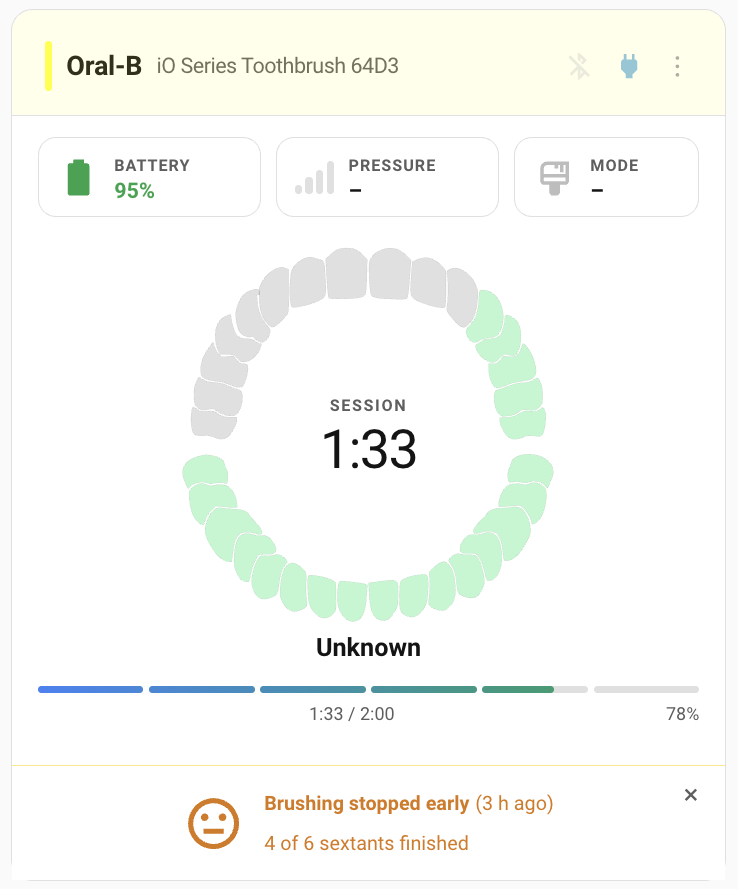
Live brushing progress and session recap in Toothbrush Card
The main entities follow the structure expected by Toothbrush Card:
| Card reading | Oral-B Live contract |
|---|---|
| State | toothbrush_state translation key |
| Elapsed brushing time | brushing_time translation key and duration device class |
| Mouth graphic | sector timed-pacer value |
| Sector count | number_of_sectors translation key |
| Pressure | pressure translation key |
| Mode | mode translation key |
| Battery | Battery device class |
| Routine target | routine_length translation key, reported in seconds |
| Session recap | last_session translation key, with duration in its attributes or through the last_session_duration translation key |
| Completion verdict | smiley translation key and the retained session's display_face attribute |
| Handle-color accent | ring_color translation key containing the brush's raw #RRGGBB LED drive levels |
Toothbrush Card 0.28.0 and newer support Oral-B Live directly, including device selection in the visual editor. The equivalent YAML configuration is:
type: custom:toothbrush-card
device_id: <your Oral-B Live device id>
show_subtitle: true
show_header: false
The card recognizes the oralb_live domain through the toothbrush_state
translation key. Oral-B Live intentionally presents the same sequential pacer
semantics as the built-in Oral-B integration; its sector entity is not a
physical mouth-position reading.
A simple session log:
type: grid
cards:
  - type: tile
    entity: sensor.<your_brush>_last_session
    name: Last session
  - type: tile
    entity: sensor.<your_brush>_last_session_duration
    name: Duration
  - type: tile
    entity: sensor.<your_brush>_sessions_today
    name: Sessions today
  - type: history-graph
    title: Brushing history
    hours_to_show: 336
    entities:
- sensor.<your_brush>_last_session_durationThe ADHD Toothbrush Tracker blueprint provides persistent morning and evening brushing reminders and can use Oral-B Live to detect when brushing starts.
- Home Assistant 2024.4 or newer.
- A connectable Bluetooth adapter or ESPHome Bluetooth proxy with reliable
coverage near the iO Sense charger in Charger/app compatible mode, or
near the brush in Home Assistant direct mode. A scanner being marked
connectabledescribes its capability; it does not guarantee that it can receive a particular device from its current location. - An iO Sense charger for charger-bridge data; the integration still operates without one through its other local sources.
Merge the following components into an existing ESP32 device configuration:
esp32_ble_tracker:

bluetooth_proxy:
  active: true
Use the ESP-IDF framework and keep the board value matched to the physical
device. For example, an M5Stack ATOM Lite uses board: m5stack-atom; in the
ESPHome Device Builder board picker, choose M5Stack ATOM Lite Bluetooth
Proxy, not a generic ESP32 profile.
The default ESPHome scan parameters are recommended. Oral-B Live needs an
active-capable proxy for direct GATT and charger-bridge connections, but does
not require custom interval, window or continuous values. Remove older
full-duty scan overrides such as interval: 1100ms plus window: 1100ms and
leave esp32_ble_tracker: empty. Current ESPHome releases automatically manage
the scan window while a GATT connection is active; an explicit window can
bypass that behaviour and make Wi-Fi/Bluetooth coexistence less reliable. Keep
the ESPHome integration's Bluetooth scanning mode in Home Assistant set to
Auto. If a configuration explicitly sets the BLE tracker's active: false,
remove that override or set it to true so scan-response data remains
available.
On an original ESP32 using ESP-IDF, ESPHome may report that its bootloader can use SRAM1 as IRAM. If the boot log explicitly says the bootloader supports it, enable the suggested option to reclaim 40 KB of instruction RAM:
esp32:
  # Keep the existing board value that matches the hardware.
  framework:
    type: esp-idf
    advanced:
      sram1_as_iram: true
This setting is not portable to every ESP32 variant, so do not put it in a
shared package used by ESP32-C3, ESP32-S3 or other board families. A successful
charger transaction normally connects, discovers services and disconnects
again after a few seconds. DISCONNECT_EVT reason=0x16 means the local host
ended the connection and is expected. A single ESP-IDF message saying that a
connection-parameter update is still pending is also harmless when service
discovery and the disconnect complete successfully. Repeated status=133,
disconnect reason 0x08, crashes or boot loops indicate a real problem.
Hardware choices:
- M5Stack ATOM Lite is the compact, project-tested Wi-Fi option for a proxy
placed close to the brush or iO Sense charger. Use the
m5stack-atomESPHome board ID and the matching Bluetooth Proxy profile in Device Builder. - Olimex ESP32-PoE-ISO-EA is the preferred higher-reliability option when
Ethernet is available. Ethernet avoids Wi-Fi/Bluetooth radio contention and
the
-EAmodel supports an external antenna for better reception. - A generic original ESP32 development board is sufficient when it has stable power and can be placed near the Oral-B device, but select the exact board profile whenever one exists.
Do not use an advertisement-only scanner for charger-bridge or direct mode. For example, a Shelly scanner can forward advertisements but cannot establish the required GATT connection. ESPHome also recommends leaving scan timing at its defaults and, for the best reception, placing the proxy away from routers, switches and other sources of interference. See the ESPHome Bluetooth Proxy and ESP32 platform documentation.
See the full protocol reference for all UUIDs, packet layouts, charger commands, firmware formatting, captured benchmarks, queue and Wi-Fi experiments, motion research, safety boundaries and the distinction between captured, reconstructed and inferred behaviour. Protocol details are kept there rather than duplicated in this user guide.
- The toothbrush still has one BLE client slot. Home Assistant direct mode intentionally occupies it.
- The charger bridge is request/response rather than a notification stream, so pressure is prioritised and slower-changing readings share the remaining request time.
- The charger can forward brush data only while it is connected to the brush. Static diagnostics and retained results are collected opportunistically.
- The current session's exact retained summary becomes available through the charger on its next brush connection. The immediate session record is built locally from the live stream and reconciled later.
- The brush retains only its latest summary. The charger's richer durable upload queue is not exposed by any discovered local command.
- Connecting to the charger uses its BLE peripheral connection. If the phone app is changing charger settings at the same moment, one client may need to retry; the integration disconnects from an idle charger to minimise this.
- Protocol support is verified on one iO Series 10/iO Sense pair. Unsupported characteristics remain unknown rather than being guessed.
charger_address: null does not by itself mean that the charger is
unsupported or that Home Assistant received no advertisement. Oral-B Live sets
the address only after it receives a matching advertisement, finds a
connectable route, establishes GATT, reads the paired-brush identity and
verifies that the charger belongs to the configured brush.
First confirm that the entry uses Charger/app compatible, the iO Sense is
powered, the Oral-B phone app is closed and at least one ESPHome proxy has
bluetooth_proxy.active: true. Wake the brush once so the charger advertises
its paired and charging state.
- In Home Assistant, open Settings → Bluetooth → Adapters. Choose a
movable ESPHome scanner that supports active connections (
connectable: true). Do not choose a Shelly scanner for this test because Shelly can forward advertisements but cannot establish the required GATT connection. - Move that proxy within one or two metres of the iO Sense, power it again and wait until Home Assistant shows it online with a working network connection. Do not change its scan timing for this test.
- Open the
Bluetooth Advertisement Monitor,
tap the iO Sense control, wake the brush and wait 30–60 seconds. Search for
iO Sense, the charger address, or service UUIDa0f03e00-5047-4d53-8208-4f72616c2d42. Note the receiving scanner and RSSI. - If the charger appears, open Settings → Devices & services → Integrations, find Oral-B Live, select Reload from its three-dot menu, wake the brush again and wait approximately one minute.
- Open Developer tools → States, select the main toothbrush state entity
and inspect its
charger_addressattribute.
If the address populates only with the proxy nearby, improve permanent proxy
placement or antenna coverage. If a nearby connectable proxy clearly receives
the charger but the address remains null, collect the Advertisement Monitor
scanner/RSSI details and an iO Sense diagnostic report for an integration
issue.
If those checks do not find a powered iO Sense, tools/iosense_probe.py can
find a likely charger with a computer's local Bluetooth adapter, capture its
complete advertisement, enumerate its GATT layout and request a small identity
snapshot using GET operations only. It is intended for unsupported-device and
discovery reports, including possible newer charger hardware revisions.
The tool runs independently of Home Assistant and does not use ESPHome or
Shelly Bluetooth proxies. It never sends POST/SET commands. A scan-only mode is
available when no connection or GATT write should occur. The standalone script
is attached to each GitHub release as iosense_probe.py. Its separate
--brush-pacer mode captures raw FF02 plus initial/final FF25/FF26/FF09 reads,
and one complete stream of FF04/FF07/FF08/FF09 toothbrush notifications for
sector-count diagnostics.
See the complete diagnostic-probe guide for prerequisites, virtual-environment setup, safety details, commands, report contents, troubleshooting and how to attach a capture to an issue. For a sector-count investigation, follow the dedicated toothbrush pacer capture instructions.
data_source: advertisement means no matched charger bridge or direct brush
connection is currently available. The integration remains functional through
its passive fallback and will switch sources automatically when possible.
The entry is using Home Assistant direct. Select Charger/app compatible to leave the brush connection with the charger/app.
The immediate session is reconstructed locally. Exact pressure totals and ending battery come from the retained result on the next managed connection and update the same session instead of creating a duplicate.
Disable another integration that is managing the same brush, verify active
Bluetooth connectivity, reload the config entry, and wake the brush. Debug
logging for custom_components.oralb_live shows charger matching, source
selection and read failures without exposing cloud credentials.
- bkbilly/oralb_ble
- Bluetooth-Devices/oralb-ble
- Home Assistant Oral-B integration
- MatrixEditor/oralb-io
- mtheli/toothbrush-card
Not affiliated with, endorsed by, or connected to Oral-B or Procter & Gamble. Protocol behaviour may differ across models and firmware.