Marketplace aims to simplify the process of buying/selling/trading items. This user-friendly tool is built using JDA (Java Discord API), and all data is stored in MongoDB Atlas.
Unlike other online marketplaces or discussion forums, our bot targets Discord users who are interested in integrating a C2C marketplace functionality into their server. This bot helps narrow the search for users looking to buy/sell within their interest-based communities. The bot assists in sharing and filtering listings, making the selling experience easier and the search for items faster.
This repository is a continuation of a group project completed in Northeastern University's CS5500 course. To view the original project's repository and work, use the following links:
Marketplace Bot has the following features:
- Create a Listing: Users can post their listing by filling out a form that inquires details of the item being sold.
- View Your Own Listings: Users can review the listings they have already posted and delete the ones that are no longer active.
- Search and Sort for Listings: Users can search for specific listings that contain a keyword in the title and sort the results by date/price.
- Update Your Location: Users can add or update their approximate location that is displayed along with their listing, which informs other potential buyers where the item may be picked up/shipped from.
- Create a New Channel: A text channel with special permissions, where the bot can post users' listings, will be created in the server.
This project was built using VS Code. Please see the build.gradle file for dependencies.
Skip these steps if using our production bot
- Clone this repository to your local machine.
- Create an Application at the Discord Developer Portal.
- Generate an invite link for the application using the OAuth2 URL Generator with scopes as bot and bot permission set as Administrator.
- Invite the bot into the server of choice.
- Set the following environment variables or export these tokens:
- BOT_TOKEN: Your Discord bot token.
- MONGODB_URI: Your MongoDB URI.
After exporting the tokens or running the environment variables, run the bot with ./gradlew run.
Use the following invite link to join our Production Discord server: Invite Link To Our Server
Use the following invite link to add the bot to a server: Bot Invite Link
Upon adding the bot to a server, please read what happens when bot joins server
The bot executes the following commands when the user enters them into the chat.
/createlisting: Displays a template for the user to fill out accordingly.

After filling out the template, the user can choose to post, edit, or cancel their listing. When posting the listing, it will be displayed in the designated trading channel.
/mylisting: Sends the user a direct message containing all their listings within the server. User can choose to delete their listing.
/searchlistings: Allows users to search for listings containing a keyword in the title. Users can sort their search results with a select menu and are given the option to sort by price or date.

/updatelocation: Prompts the user to update their state and city through a direct message.


/createtradingchannel: Creates a new text-channel using a unique name defined by the user. This channel has special permissions where only the bot can send messages.

This section provides details of what would occur when specific JDA Events are triggered.
First, the server owner will receive the following DM from the bot:
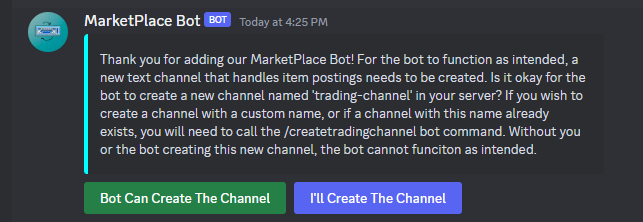
If the owner selects "Bot Can Create The Channel", the bot will attempt to create a new text channel named "trading-channel". If a channel with that name already exists OR if "I'll Create The Channel" is selected, the server owner MUST call the command /createtradingchannel to create the trading channel. The owner MUST input a custom, unique name for the channel when calling the command. If they do not and they enter a name that already is present in the server, they will have to call the command again until a unique name is given.
Second, each member of the server, including the owner, will receive a DM from the bot asking the member to select the State and City they are located in from drop-down menus. An exact location is not necessary. The bot tracks this information to later attach it to listings created by members.
Listings within the server will be deleted from the database. If the server owner decides to invite the bot back, previous information will no longer be available. User data will also be removed if the user is not a part of another server containing the bot.
The bot will send a greeting to the user's direct messages and ask the user to update their location.
Only listings in the server belonging to the user will be removed from the database. User data will only be fully erased in the database if they do not belong to any other server containing the bot.
Foundations of Software Engineering @ NEU, Instructor: Alexander Lash
Title: US.java
Author: AustinC, harlanhaskins
Date: 2017
Code version: 1.1
Availability: https://github.com/AustinC/UnitedStates/blob/master/src/main/java/unitedstates/US.java
License: https://github.com/AustinC/UnitedStates/blob/master/LICENSE.md
The codebase above is based on the following repository: https://gist.github.com/webdevwilson/5271984