
Run one command → open the dashboard → your bot is live. Windows, macOS, Linux, VPS - Docker-powered, auto-installed for you.




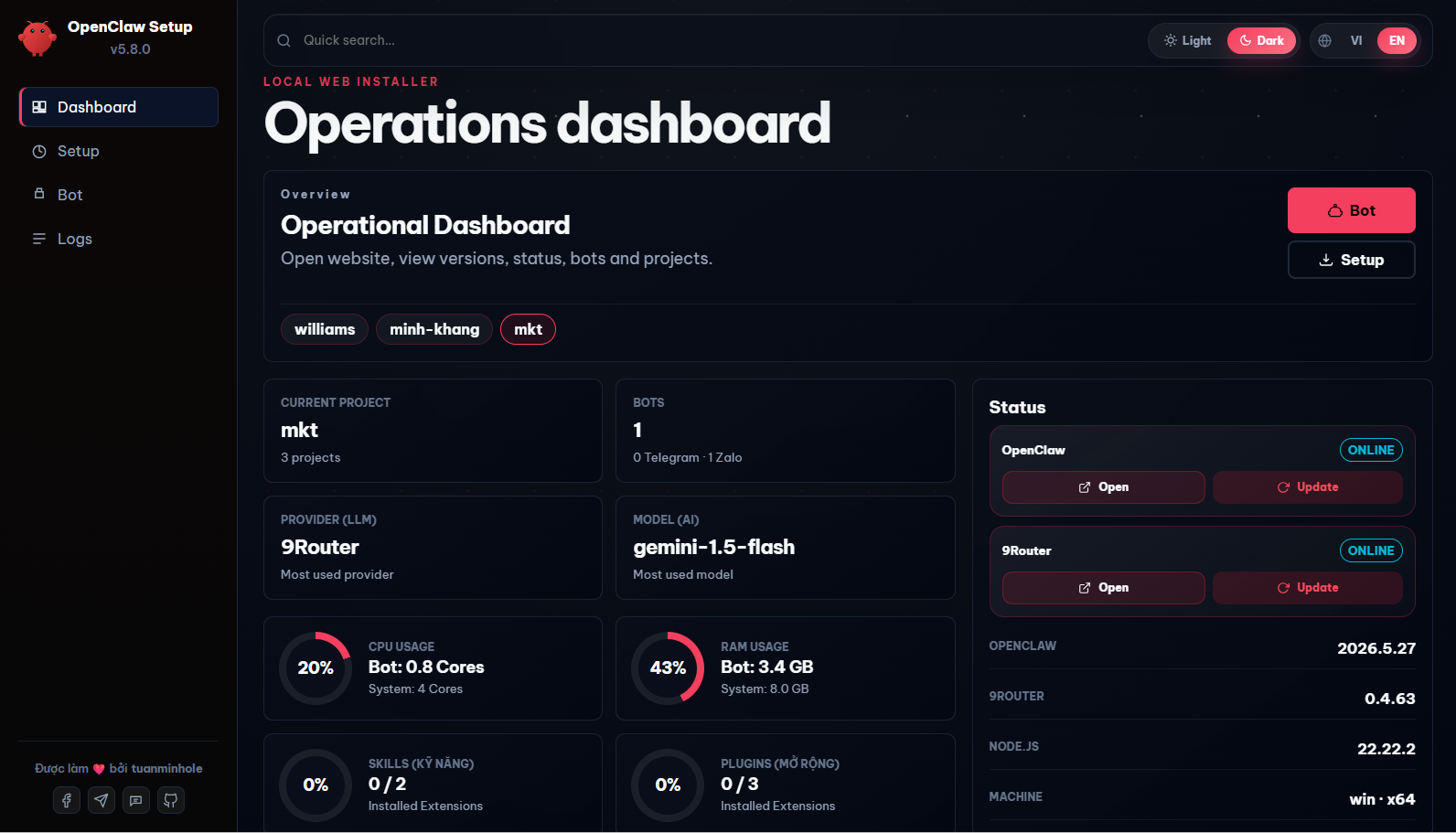
💡 Open-source & free. A management dashboard that automates 100% of project scaffolding, deployment, and control for AI bots on Telegram · Zalo · Facebook Messenger (Discord & Lark soon) - set up in minutes, no coding needed.
▶ Watch the OpenClaw + Zalo setup video on YouTube
- 🔧 Plugin updates apply without a needless restart, and bots keep their cron tool - when OpenClaw has already loaded a new plugin, Setup no longer restarts the bot on top of it; "doctor --fix" is skipped while the gateway is running; and the bot owner is added to OpenClaw's owner list, which ignores
"*"since 2026.9 and had left bots without their cron tool. Includes every fix from 5.18.1.
Previous: What's new in v5.18.1
- 🔧 "Update OpenClaw" finishes cleanly on servers installed with older versions - the old gateway is now stopped before the update is applied, so the data migration and plugin checks run against the new version instead of failing one after another. Plugins installed the new way (ClawHub/npm) are recognised, servers set up on older versions keep their data folder, and Setup can control the bot service even when it runs as a system service.
Previous: What's new in v5.18.0
- 💸 Bots stop burning tokens on old conversations - long chats are now summarised automatically (smart-route gets a 250,000-token working budget instead of never compacting), and every chat starts fresh at 4:00 in the morning in your time zone, after saving its last 30 messages to the bot's memory. Measured on a customer group that re-sent about 170,000 tokens of history with every question.
- 📌 OpenClaw pinned to 2026.9.8 - fixes a finished sub-task being retried forever and losing its result. Back up before updating: from 2026.9.5 the database format changed.
- 💬 Telegram: call the bot by name in groups - new "Names in groups" field on the Telegram bot form; editing a Telegram bot no longer wipes its per-group settings.
- 🛠️ Fixes - Zalo QR appears on Windows; bots whose ID contains
_can be deleted; updating 9Router works on Windows and Linux; a broken openclaw.json is reported instead of showing "0 bots"; the dashboard shows the right OpenClaw version after an update made outside it.
Previous: What's new in v5.17.5
- 🤖 The dashboard no longer shows zero bots while the bots are running - a model written in its short string form (
"smart-route"instead of{ primary, fallbacks }) broke every config read at once, emptying the bot list on all channels along with the token fields and plugin versions. Both shapes are accepted now. - 🔑 No more "authentication failed" on a bot whose key is correct - OpenClaw froze the
sk-no-keyplaceholder from project creation into an auth profile and kept sending it; restarting never helped. Writing a new key now clears that profile, and bots installed earlier repair themselves on the next restart. - 💬 Zalo's own Bot API channel actually works now - pick Zalo Bot API when creating a bot, paste the Bot Token from
bot.zaloplatforms.com, done: no QR scan, no personal account, no public webhook (the channel long-polls). The bot can join Zalo groups - invite it with the link from the Zalo Bot Creator mini app and have the group owner confirm; inside a group it answers an @mention or a reply to its own message. Theopenclaw-zalo-modplugin is now installable for this channel too. - 🩹 Native installs on OpenClaw 2026.8 are smooth from the first run - this wave patches the remaining chain of issues measured on fresh customer machines: generated configs pass the new strict checks 100%, install steps run in the right order, and restarts/plugin installs no longer get blocked midway.
- 🔑 9Router login works on Docker: the new 9Router blocks the default password for "remote" access - and inside Docker every request counts as remote, so 123456 could never log in. It works now (still change the password once you're in).
- 🧹 Deleting a project fully removes the old 9Router: it used to keep running in the background holding the port, silently forking the next install onto a different port - now removal is clean and reinstalls land on the standard port.
- 🔌 Native machines auto-install the web-search plugin (DuckDuckGo) with its capability consent - no more boot loops over a missing nod.
Previous: What's new in v5.16.3
- 🚑 The big OpenClaw 2026.8.1 catch-up: fresh installs run smoothly (Docker and native, Windows/macOS/Linux), and existing machines heal themselves on upgrade - stale config cleaned, data relocated, and the old file that could mute the bot retired automatically.
- 🤖 The bot stops claiming "I can't see the file": files sent through chat come with clear directions for the AI.
- 🔁 9Router comes back on its own after a server reboot or UI maintenance.
- 🔄 The in-app "Update" button really updates on standard server installs.
- 🧭 One setup build manages both generations (2026.7 and 2026.8).
Previous: What's new in v5.15.3
- 🖥️ "Control PC" - let the bot use your machine: a toggle on each bot card lets the bot take screenshots, move the mouse, click, type and drag on the computer running it, using OpenClaw's own computer tool. Because it operates the machine the way a person would, it can open any installed application - including one installed yesterday - with no app list to maintain. Off by default, and only on a machine with a screen.
- 🌐 Browsing works out of the box on every OS: the bot drives your real Chrome on a desktop (your logged-in profile, so sites don't flag it) and starts its own headless Chromium on a server - no more "no browser available" just because Chrome wasn't running.
Previous: What's new in v5.14.1
- 🦞 Zalo bots react to acknowledge your message: an icon appears on the message you just sent, so you know the bot received it while it is still writing the reply. Runs at the chat-channel layer, so it costs no tokens. On by default for new Zalo bots; change the icon or turn it off via
messages.ackReactioninopenclaw.json. Needs Zalo Connect 3.0.15+.
Previous: What's new in v5.14.0
- 🛠️ Bots build their own skills: ask your bot for a reusable capability ("make me a skill for X") and it writes the skill and puts it to work in the same reply - no approval step, no config editing. The skill is saved to
skills/<name>/SKILL.mdin the bot's workspace and loads itself. Existing bots pick this up automatically on update.
Previous: What's new in v5.13.9
- 🧠 Always-on memory for every bot (learning-memory): a new context-engine plugin injects your curated
MEMORY.md+USER.mdinto every turn - including group chats, which the default recall skips. Bots stop forgetting context and rules over time: no more chiming in when nobody called them, or re-asking things you already told them. Auto-installed for new bots + a 1-click card in the dashboard. - 🧹 Retired TencentDB Agent Memory in favor of the always-on engine above (no external service needed). Existing bots are auto-migrated on update - the old learning-memory skill and the TencentDB plugin are removed automatically.
Previous: What's new in v5.13.4
- ⚙️ New Settings page: pick your theme (light/dark toggle), language (VI/EN) and timezone right from the dashboard - available in both the sidebar and the mobile nav bar.
- 🕒 Schedules & cron run in the correct local time: newly created bots carry an explicit timezone, so reminders/cron no longer drift a day off around midnight (a UTC-vs-local bug that could schedule into the past). Scheduling guidance was hardened end-to-end (local time + timezone, explicit delivery target, raw group id).
Previous: What's new in v5.13.0
- 🟢 Live Zalo status on every bot card: each personal Zalo bot now shows its own connection and login state, with a compact green badge when it is ready.
- 👥 Accurate multi-account visibility: Setup reads the real Zalo Connect runtime per account, so projects with several Zalo bots no longer collapse into an ambiguous shared status.
- ✨ A cleaner Zalo control area: Refresh and Login Again sit together above the bot list, while shared Zalo Connect and Zalo Mod versions move into the main status column.
Previous: What's new in v5.12.0
- 💬 OpenClaw Zalo Connect, ready in one click: create a personal Zalo bot or press Zalo Login and Setup prepares the channel automatically, then opens the QR flow in the dashboard.
- ⚡ Install once, reconnect faster: an existing Zalo Connect installation is reused instead of being downloaded again on every login or restart.
- ✨ Cleaner native Zalo experience: group mentions, reactions and moderation now run through one maintained Zalo runtime; the retired integration and Sticker add-on are gone from Setup.
Previous: What's new in v5.11.1
- 📄 Workspace defaults, rebuilt on OpenClaw's canonical files: new bots get all 7 upstream default workspace files (
AGENTS/BOOTSTRAP/HEARTBEAT/IDENTITY/SOUL/TOOLS/USER.md) as the base, with this project's extra rules appended as clearly-marked add-ons - VI + EN, every bot variant. - 🗄️ SQLite "disk I/O error" on Docker Desktop - fixed:
.openclaw/statenow lives in a named volume on macOS/Windows (WAL locking doesn't survive virtiofs); Linux/VPS keeps the bind mount.
Previous: What's new in v5.11.0
- 🚀 Facebook Messenger, 1-click: the
fb-messengerplugin is now public on ClawHub and installs straight from the dashboard - create a Messenger bot, open Bot → Plugins, and hit Install on theopenclaw-fb-messengercard. Webhook + Graph API, auto User→Page token, HMAC verify. - 🐳 Docker-only, rock-solid: dropped the native (non-Docker) install path to focus on the Docker flow that runs flawlessly and stably across Windows / macOS / Linux / VPS, with cross-OS Docker auto-install.
- 🖥️ Chrome-debug on headless VPS: the browser-automation Chrome-debug relay now works on a headless VPS (bridge-IP-scoped, auto-opens ufw); the bot file editor also saves non-
.mdtext files.
Previous: What's new in v5.10.1
- 🔧 Docker fixes: plugin updates keep the zalo-mod dashboard port, and granted disk/folder mounts (including whole Windows drives like
D:\) now survive a rebuild instead of being dropped. - 🔄 Native auto-restart (process supervision): native installs now register the gateway + 9router as OS services (macOS launchd, Linux systemd, Windows detached) that restart on crash/reboot - mirroring Docker's
restart: always. Best-effort, falls back to a plain detached process. - 🔐 9router first-install sync - fixed: no longer permanently disables "Require login". The generated
sync.jslogs in with 9router's default password123456, builds thesmart-routecombo from active providers once, then stops. Require login stays ON (change the password later);/v1model calls are unaffected. - 📁 Native workspace path - fixed: agent
workspaceis now relative, so persona/memory/skills resolve correctly on native installs (previously a container-absolute path pointing nowhere on the host). - 🧩 Config
metano longer clobbered: the generator stops seedingmeta, so OpenClaw owns it - prevents config parse failures from a version-rangelastTouchedVersion. - 💅 Dashboard UI polish: Bot/Setup hero shortcuts, plugin version badges, cleaner feature-toggle layout, responsive/mobile fixes, and no more duplicate page title on the dashboard tab.
Previous: What's new in v5.9.0
- 🧠 TencentDB Agent Memory - 1-click install: New memory plugin in the UI. A 4-tier (L0-L3) layered-memory + context-compression engine that keeps long sessions coherent and cuts token usage by up to ~61%. Fully local (SQLite), no API key, Docker-ready.
- ⚡ Token-lean defaults for every new bot: Ships with context pruning (cache-TTL) +
safeguardcompaction - cheaper & sharper long conversations with zero tuning. - 🎯 Per-bot & per-channel Skills/Plugins: Install/enable/disable a skill for one bot only (no more leaking across bots); the panel shows only what fits each channel (Zalo / Telegram / Messenger).
- 📤 Reliable file sending on Zalo & Telegram: Bots now know the correct outbound ritual (
media/outbound+messagetool) and to use modern formats like.xlsx- no more "the file won't send". - 🐳 One-click Docker controls: Restart / Rebuild the bot container and grant it disk access (mount any host folder at
/mnt/<name>, cross-OS) right from the dashboard - restart your bot without touching the command line. - ⚡ Faster Dashboard & Bot pages: Runtime/version detection now probes once and is cached instead of re-running on every page load - bot status dropped from ~4s to ~3ms on repeat loads. Cache auto-invalidates on update/rebuild/restart/install.
Previous: What's new in v5.8.24 (Launcher Auto-Update)
- Fix: Cached Launcher Out-of-Sync: Automatically detects if the running launcher (e.g. downloaded via
npx) has a newer/different version than the cached installation inside~/.openclaw-setup, and automatically triggers an upgrade to match.
Previous: What's new in v5.8.23 (Memory Skill Integration)
- New: Long-Term Memory & Skill Auto-Evolution (learning-memory): Pre-integrates the autonomous memory and learning skill from ClawHub.
- Automatically records newly learned facts, instructions, and user preferences into
MEMORY.mdin real-time. - Enables agents to self-package and compile newly acquired behaviors and workflows into reusable
.jsandSKILL.mdfiles directly within the./skills/folder, allowing the bot to organically evolve its capabilities. - Implements OS-agnostic post-install triggers on all platforms (Docker, Windows, macOS, Linux) without requiring manual setup.
- Automatically records newly learned facts, instructions, and user preferences into
- New: UI Skill Toggle: Added the "Siêu Trí Nhớ Dài Hạn" (learning-memory) toggle option directly to the Setup Wizard interface with full installation logic support.
Previous: What's new in v5.8.22
- Infographic Poster Generator Skill: Integrates automatic infographic and poster generation via 9Router API. Automatically generates the helper script
image-generator.js(synchronizing API credentials fromopenclaw.json) and a comprehensiveSKILL.mdguiding agents on styling rules, Vietnamese font support, layouts, and image generation syntax. - Polish: Simplified TOOLS.md generation: Streamlined the
TOOLS.mdgenerator to output a concise, static guide focusing on general principles and referencing the./skills/directory. - Polish: Standardized Reference Docs list in AGENTS.md: Updated the reference docs list in the generated
AGENTS.md(for both single and relay variants in Vietnamese and English) to match the new structure, removing obsolete files (TEAMS.mdfor single-bot,BROWSER.md) and standardizing descriptions to keep exactly 9 core documents.
- 🤖 Multi-Channel - Telegram (single or multi-bot relay), Zalo Bot API, Zalo Personal, and Facebook Messenger (Discord & Lark coming soon).
- 🧑🤝🧑 Multi-Bot Team - Run multiple Telegram/Zalo bots simultaneously with synchronized workspaces and teamwork.
- 🧠 Unified AI Routing via 9Router - Easily route messages to Google Gemini, Claude, GPT-4o, OpenRouter, and Ollama (local offline models).
- 🧩 Built-in Skills - Web Search, Browser Automation (Chrome CDP), and Cron/Scheduler tasks.
- 🔌 Integrated Marketplace - Install advanced plugins (like
openclaw-zalo-mod, Facebook Crawler...) with a single click. - 🔀 9Router Integration - Open-source OAuth-based AI proxy that gets you up and running for free without individual API keys.
- 🔒 Safe & Private - All configurations and API keys are stored locally on your own machine.
Open your terminal and run this single command (works on macOS, Linux & Windows - needs Node.js 24 LTS):
npx create-openclaw-botIt downloads the wizard, starts the local server, and opens the Setup UI in your browser at http://127.0.0.1:51789.
Use this if you specifically want the newest code directly from GitHub:
npx github:tuanminhhole/openclaw-setupGit is required for this method. Install Git and make sure the
gitcommand works in your terminal first; otherwise npm cannot download the GitHub repository.
For contributors who want the full source. Run each line in order:
git clone https://github.com/tuanminhhole/openclaw-setup.git
cd openclaw-setup
npm install
npm start
Then open http://127.0.0.1:51789 if the browser doesn't open by itself.
⚠️ npm install/npm startonly work inside the clonedopenclaw-setupfolder. If you used either npx method, simply run the same npx command again when you want to reopen Setup.
Run the recommended command again. Setup detects and reopens your existing project:
npx create-openclaw-botClick Update in the top-right corner of the Setup interface. It downloads the newest version and restarts the UI automatically; the current browser tab reconnects on its own.
- Node.js 24 LTS (required) - the Setup wizard itself runs on Node, so it's needed for both Docker and Native modes. Download Node.js.
- Git: Installed and available in your environment PATH.
- Docker Desktop (recommended, for the bot runtime): Docker Compose V2. Download Docker.
First time? Follow these in order - no terminal needed beyond opening the UI.
1. Open the Setup UI - run the install command above; the dashboard opens in your browser.
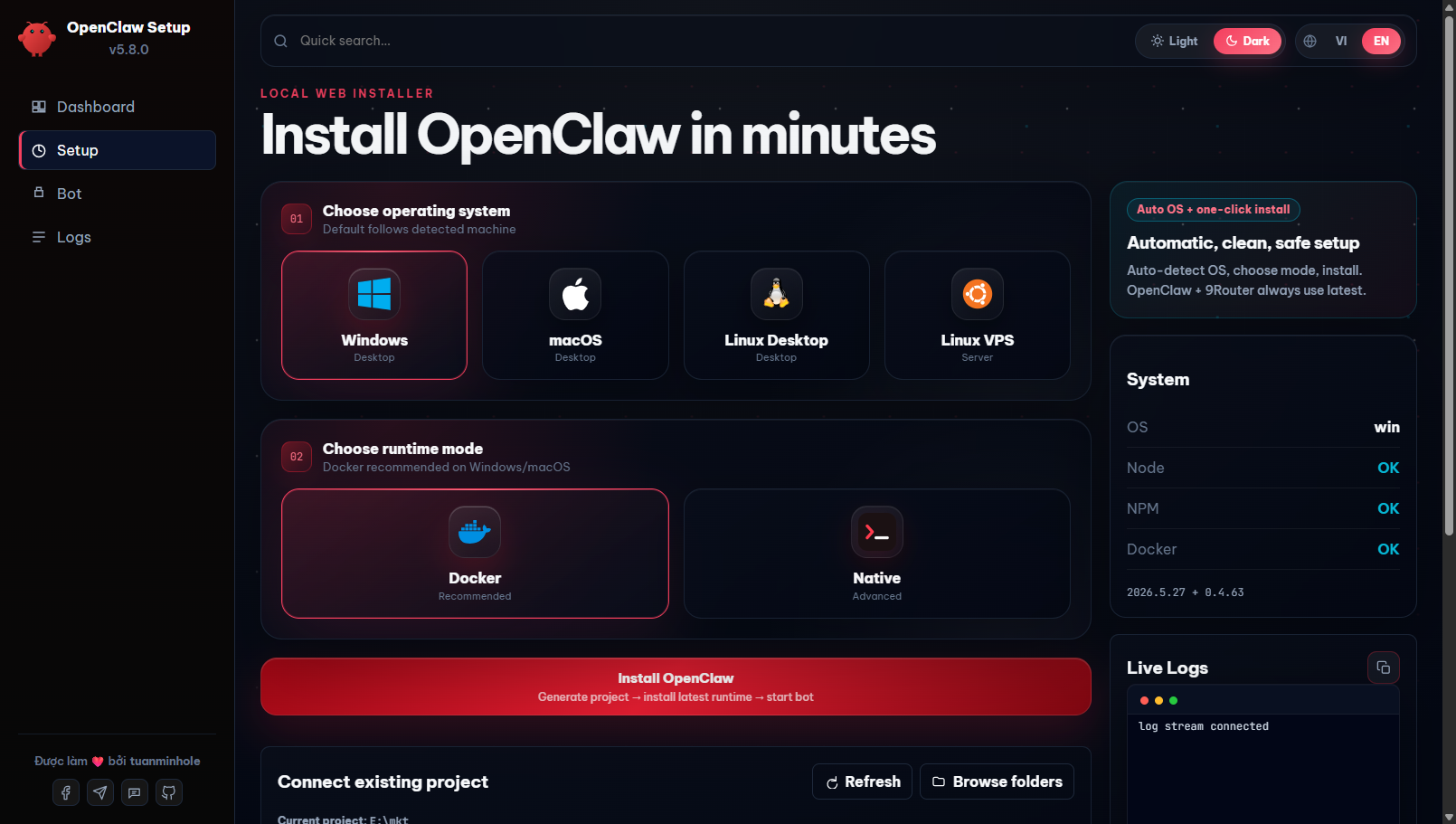
2. Pick OS & run mode - first make sure Node.js 24 LTS is installed (the wizard runs on Node - needed for both modes). Then open the Setup tab, choose your OS and the run mode:
- Docker (recommended) - isolated, and lets you create multiple projects/bots. Also install Docker Desktop.
- Native - lighter, runs the bot directly on the host (no Docker needed).
3. Project path & name - enter a folder path and a project name (example name: bot), then click Install. Example paths:
- Windows:
D:\bot - macOS:
/Users/<you>/bot - Linux:
/home/<you>/bot
4. Log in to 9Router - click Open 9Router website, then log in with the default password 123456.
5. Create an API key (9Router) - in Endpoints, create a new API key. Then open your project folder → openclaw.json → scroll to the models section → paste the key into the empty apiKey field and save.
6. Connect a provider (9Router) - go to Providers, pick the provider you want; it connects automatically.
7. Create the routing combo (9Router) - go to Combos, create a combo named exactly smart-route and add the models it should route to.
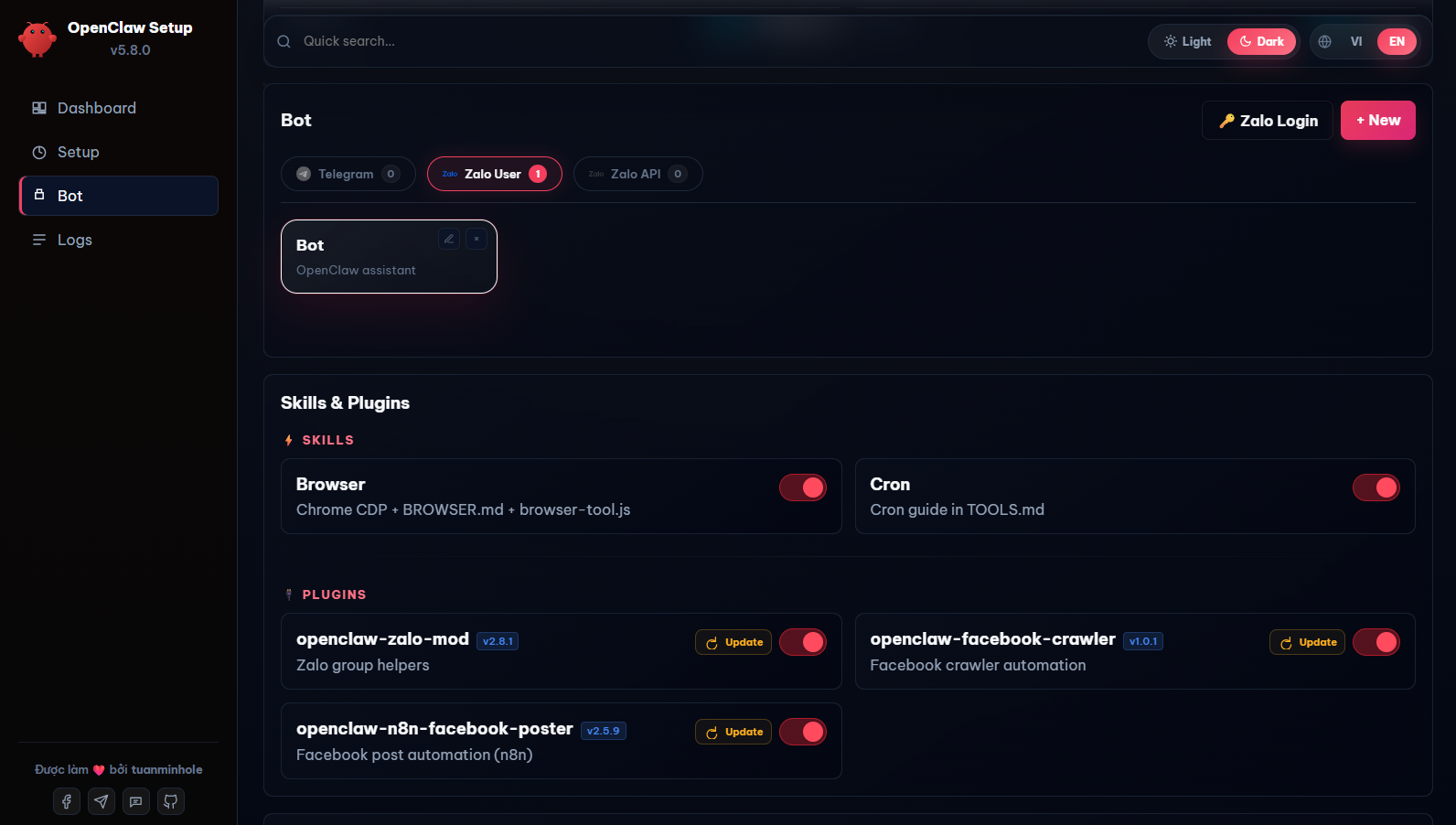
8. Create your bot - back in the Setup UI, choose a channel, fill in the bot info + your personal info, then click Create bot.
9. Restart & test - restart the bot container, then message your bot to test it. 🎉
- Telegram: Acquire your official Bot Token from
@BotFather. - Zalo Bot API: Obtain credentials from developers.zalo.me.
- Zalo Personal: Scan the QR authorization image displayed on the OpenClaw Dashboard.
- Facebook Messenger: Via the
fb-messengerplugin (public on ClawHub, installable from the Setup UI) - just provide a Page token. - Discord: Coming soon.
- Lark: Coming soon.
openclaw-setup/
|-- README.md                ← English documentation (You are here)
|-- README.vi.md             ← Vietnamese documentation
|-- package.json             ← NPM entry and runner scripts
|-- dist/                    ← Compiled Web UI and CLI bundles
`-- src/                     ← Source code (UI, local API backend, build tools)
How do I start or stop the bot?
You no longer need to type terminal commands! Simply access the Setup Web UI, navigate to the Bot tab, and use the interactive Start / Stop / Recreate buttons to manage your bot lifecycle.Where do I edit the bot's persona and instructions?
You can edit them directly in your browser. Go to the Bot tab, scroll down to the Bot file tree section, and select the file you want to edit (e.g., `SOUL.md` or `AGENTS.md`). Click Save to apply changes instantly.Can I change the AI model configuration later?
Yes. You can edit the config JSON directly via the integrated File Editor in the Web UI, or re-run the setup script pointing to your existing project folder.- OpenClaw Docs
- 9Router GitHub
- Google AI Studio
- Telegram BotFather
- Zalo Developer Platform
- Docker Desktop
- ClawHub (Skills)


- OpenClaw - Core AI Gateway framework
- 9Router - Open-source AI proxy (OAuth-based, no API keys)
- ClawHub - Bot skills registry
- TheSVG - High-quality SVG brand icons
Built by tuanminhhole (Kent) as an open gift for the community. Suggestions and PRs are always welcome. If this saved you time, please ⭐ the repo so more people can find it!
Companion repos to build a complete, self-running AI assistant:
🚀 Setup & framework
- openclaw-setup - (this repo) Set up free AI bots with OpenClaw + 9Router (Telegram/Zalo/Messenger, Docker)
- vietbrain - Vietnamese "Second Brain" framework for Obsidian (AI-ready)
🔌 Plugins (runtime)
- openclaw-fb-messenger - Facebook Messenger channel (webhook + Graph API), installable from the Setup UI
- openclaw-telegram-multibot-relay - Multibot Telegram relay, delegation & native cron reminders
- openclaw-zalo-connect - Personal Zalo channel/runtime with QR login, native mentions and group actions
- openclaw-zalo-mod - Zero-token Zalo group management (slash commands, anti-spam, warn, memory)
- openclaw-browser-automation - Smart Search & Browser Automation
- openclaw-facebook-crawler - Facebook data crawler
- openclaw-n8n-facebook-poster - Auto-post to Facebook via n8n
🧩 Skills
- openclaw-learning-memory - Always-on memory context engine (injects curated MEMORY.md + USER.md into every turn, incl. groups)
- openclaw-skill-infographic - Infographic generation