LocVi is a lightweight Flask-based local file browser that lets you poke around your files 📂, watch videos 🎬, listen to audio 🎧, and view images 🖼️ without losing your mind. It remembers recent folders and the last file you opened… because we all forget stuff 😅.
Might add more features someday… maybe, or not 🤷♂️.
Because LocVi is signed with a self-signed certificate, Windows might show a warning like:
“Windows protected your PC – Windows SmartScreen prevented an unrecognized app from starting.”
What to do:
- Click More Info.
- Click Run Anyway.
✅ LocVi is totally safe — it’s just self-signed.
💸 When my pockets are full, I’ll buy a proper certificate and make Windows stop complaining… until then, enjoy the warning pop-up and the app.
⚡ Working on PWA functionality — currently in
testbranch 🚧pwa/locvi
Locally, when you enter something like C:\Users\ullas\Downloads\test, Python/Flask happily accesses your local filesystem because, well… it lives on your machine 💻. os.path.isdir(folder) succeeds because the folder actually exists where your computer can see it ✅.
Now, if you try the same thing on Vercel (or any cloud server), things get… interesting 🤔. Your app is now running on a remote Linux server that has zero idea about your Windows paths. It can’t peek into C:\Users\ullas\Downloads\test because that folder is on your PC, not theirs 🚫.
Result: os.path.isdir(folder) returns False and you get the cheerful message: “Invalid folder. Try again.” 😬
So yeah — for now, if you want to try LocVi, just clone or fork this repo locally and run:
python run.py
# or
py run.py
Enjoy poking around your files 📁, watching videos 🎥, and marking things as “done” ✅ — all without a cloud server judging your folder structure 😎.
(Future plan: maybe one day we’ll make a proper web app 🌐 so everyone can use it online… but that’s a story for another time.)
| Screenshot 1 | Screenshot 2 | Screenshot 3 |
|---|---|---|
 |
 |
 |
| Screenshot 4 | Screenshot 5 |
|---|---|
 |
 |
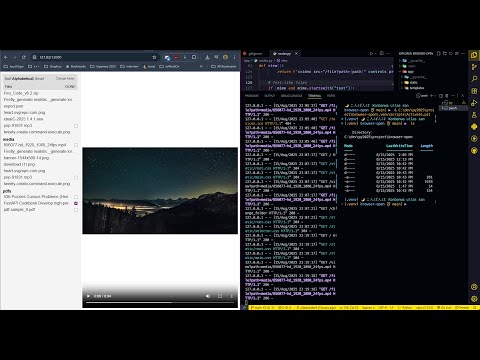
| Video Demo YouTube |
|---|
 |
I have tons of PDFs and other files across multiple subdirectories, and every time I want to read or watch something, I have to open, close, and hunt through folders. It’s annoying. I also often forget what I was reading or watching last, or what I’ve already finished.
So I built a browser-based preview tool—basically my attempt to improve on the frustrating Windows File Explorer experience.
- Paste any folder path and instantly view all files inside.
- Preview PDFs, videos, audio, images (PNG, JPEG, etc.), and text files.
- Sort files the way you want (default folder sorting is just frustrating).
- Remembers recently opened folders and last viewed file, inspired by VS Code.
- Checkbox indicator to mark files as “done reading/watching.” State is saved locally in JSON simple but effective.
- Gives hands-on experience with Python backend development while being genuinely useful.
- For large folders, rendering the file list can take a little time.
- Sometimes PDFs open in a different tab depending on the browser behavior.
- Does not yet support large archives (zip, rar, etc.)—only previews individual files.
I love this project, and I’m thinking of:
- Learn algorithm so I can improve the speed and possible app for it
- Adding search and filtering for quick file lookup.
- Supporting more file types and larger files efficiently.
- Maybe a small recommendation system for files based on your reading/watching history.
- Learning more backend concepts to handle large directories smoothly.