A GitHub-powered web crawler: submit a URL via a GitHub Issue and get a live, interactive results dashboard hosted on GitHub Pages.


Actions and Deployments Chart
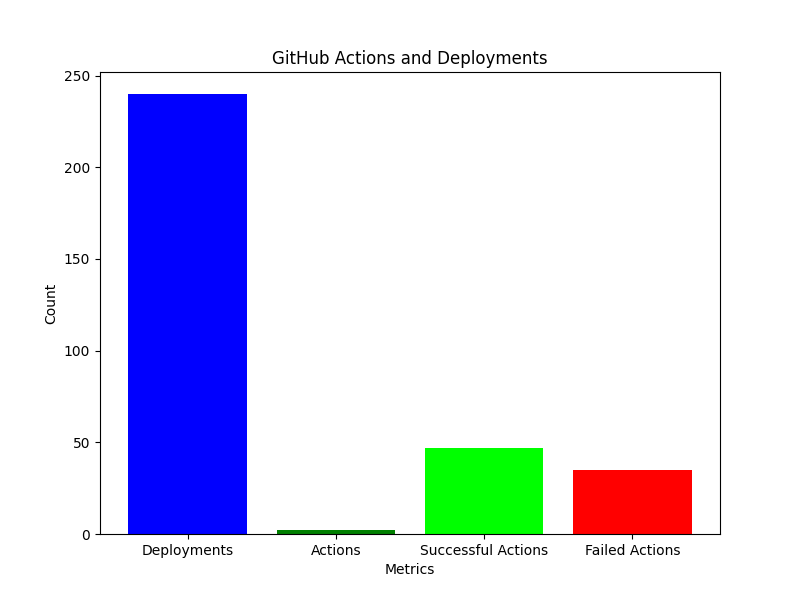
| 📊 Results Dashboard | 📜 Past Crawls & How-To |
| 🚀 Start a New Crawl | 🔍 Check Deployments |
| 📄 Last Run CSV | 📚 Documentation |
PagesXcrawler is a zero-setup web crawling system built on top of GitHub Actions and GitHub Pages.
You submit a URL through a GitHub Issue (or the Actions UI), the crawler visits every reachable page up to the depth you specify, collects metrics for each page, and then publishes the results as an interactive HTML dashboard—automatically, every time.
| Metric | Description |
|---|---|
| Title / Description | Page <title> tag and <meta name="description"> |
| Word count | Number of words in the visible text |
| Image count | Number of <img> tags |
| JS / CSS files | Linked JavaScript and stylesheet files |
| Internal links | Links pointing to the same domain |
| External links | Links pointing to other domains |
| Nofollow links | Links with rel="nofollow" |
| Font / Video / Audio | Other embedded media resources |
| URL length & depth | Structural URL metrics |
| HTTP status code | Response code (200, 404, etc.) |
| Crawl timestamp | When the page was visited |
- Click New Issue.
- Set the title using this exact format:
crawl: URL DEPTH [OPTIONS]
Examples:
crawl: https://example.com 3
crawl: https://example.com 2 --max-pages 50 --timeout 15 --rotate-agent-after 5
- Submit the issue. The bot will post a comment with the crawl configuration, run the crawl, and close the issue when done.
- Visit the Results Dashboard to see the output.
Tip: Always enclose the URL in quotes when running locally (
python crawler.py "https://example.com" 2), especially in PowerShell.
- Go to Actions → Web Crawler.
- Click Run workflow and fill in the form fields.
- The results are published automatically when the run completes.
# Install dependencies
pip install -r requirements.txt

# Basic crawl
python crawler.py "https://example.com" 2

# Advanced crawl
python crawler.py "https://example.com" 3 --max-pages 50 --timeout 15 --rotate-agent-after 5| Parameter | Required | Default | Description |
|---|---|---|---|
url |
✅ | — | Starting URL (must begin with http:// or https://) |
depth |
✅ | — | How many link-levels deep to crawl (1–5 recommended) |
--max-pages |
❌ | 100 | Hard cap on total pages visited |
--timeout |
❌ | 10 | Per-request timeout in seconds |
--requests-per-second |
❌ | 2 | Initial rate limit |
--rotate-agent-after |
❌ | 10 | Requests between user-agent rotations |
PagesXcrawler/
├── crawler.py                   # Core crawler (rate limiting, metadata extraction, …)
├── index.html                   # Auto-generated results dashboard (GitHub Pages)
├── past_crawls.html             # Auto-generated past-crawls history + how-to guide
├── requirements.txt
├── data/
│   ├── results.json             # Full results from the latest crawl
│   ├── results.csv              # CSV version of latest results
│   ├── history/
│   │   └── crawl_history.csv   # Running log of every crawl
│   └── archive/                 # Time-stamped result snapshots
├── scripts/
│   ├── update_html.py           # Generates index.html from results
│   ├── generate_visualizations.py  # Creates charts + PDF report
│   └── generate_history.py      # Generates past_crawls.html
└── visualizations/
    ├── domains_chart.png
    ├── words_chart.png
    ├── links_chart.png
    └── report_<run_id>.pdf
GitHub Issue / Workflow Dispatch
        │
        ▼
GitHub Actions (crawler.yml)
  1. Checkout repo
  2. python crawler.py <url> <depth> [options]
        └─► Visits each page, extracts metrics, saves data/results.json + .csv
  3. python scripts/generate_visualizations.py
        └─► Calls update_html.py → writes index.html
        └─► Generates PNG charts and a PDF report
        └─► Injects visualization charts into index.html
  4. python scripts/generate_history.py
        └─► Reads data/history/crawl_history.csv
        └─► Writes past_crawls.html (history table + how-to guide)
  5. git add + commit + push
        └─► GitHub Pages deploys index.html & past_crawls.html automatically
  6. Post summary comment on the issue (if triggered via issue)
- Live dashboard: https://unaveragetech.github.io/PagesXcrawler/
- Past crawls & how-to: https://unaveragetech.github.io/PagesXcrawler/past_crawls.html
The dashboard supports:
- 🔍 Full-text search across all crawled pages
- 🗂️ Domain and depth filtering
- 📊 Interactive charts (link distribution, content metrics)
- 📷 Static visualizations (domain bar chart, word-count histogram, avg links)
- 🟢 HTTP status badges on each page card (green = 2xx, yellow = 3xx, red = 4xx/5xx)
- 📖 Click-to-expand meta descriptions
-
Fork this repository.
-
Enable GitHub Actions in your fork (
Settings → Actions → General). -
Enable GitHub Pages from the
mainbranch root (Settings → Pages). -
Add a repository secret named
MY_PATwith a personal access token that hasreporead/write scope:Settings → Secrets and variables → Actions → New repository secret

-
Create a test issue:
crawl: https://example.com 2– you should see the bot respond within minutes.

- Depth vs. time: depth 3 on a large site can take several minutes. Use
--max-pagesto keep runs short. - Rate limiting: the crawler waits between requests and backs off automatically on HTTP 429.
- Robots.txt: the crawler does not currently check
robots.txt– please crawl only sites you have permission to access. - Resource limits: GitHub Actions free tier has 2,000 minutes/month. A typical depth-2 crawl uses ~1 minute.
- Correct item counting: fixed duplicate-loading bug that could double-count pages when both JSON and CSV data existed
- Improved dashboard: 6-metric summary cards, HTTP status badges on each result, JS/CSS counts per card, live filter count
- Past Crawls page: new
past_crawls.htmlwith searchable history table and embedded how-to guide - No-duplicate visualizations: repeated runs no longer accumulate multiple chart sections in the HTML
- Navigation: header nav links between the dashboard and the history page
- Updated README: this document
Open a GitHub Issue – the same channel you use to start a crawl!