Doctors describe what they need in plain language — "what's on my schedule today?", "pull the last encounter for patient 123", "book patient 99 in for 3pm" — and Helix plans the action, fetches the data, and writes back the record. An agentic EMR that turns clinical intent into structured operations, so the paperwork stops competing with the patient.
Fast documentation. Smarter scheduling. Complete patient care.





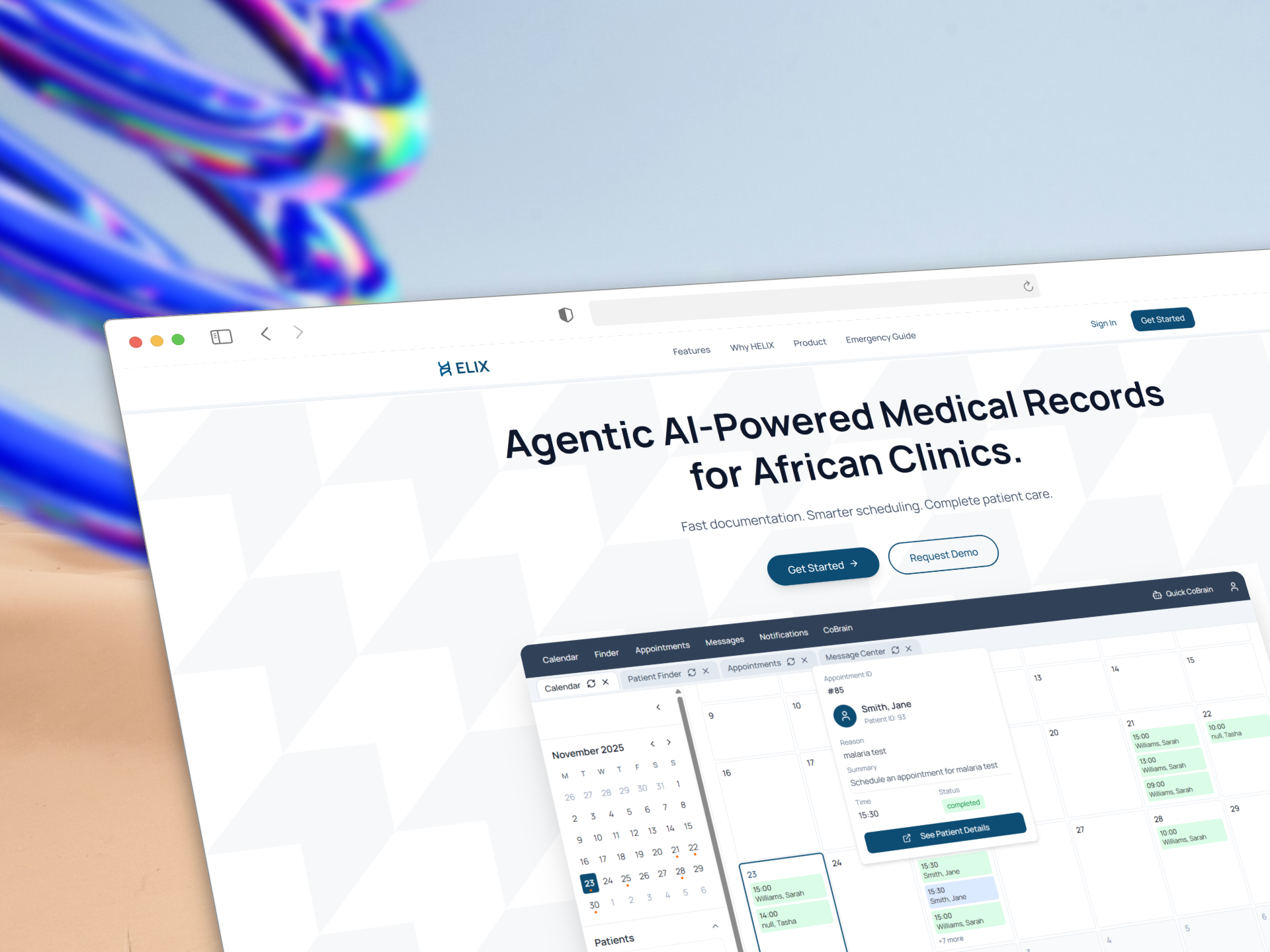
The pitch · "Agentic AI-Powered Medical Records for African Clinics." The hero previews the doctor workspace — a tabbed calendar with an appointment popover for a completed malaria-test visit.
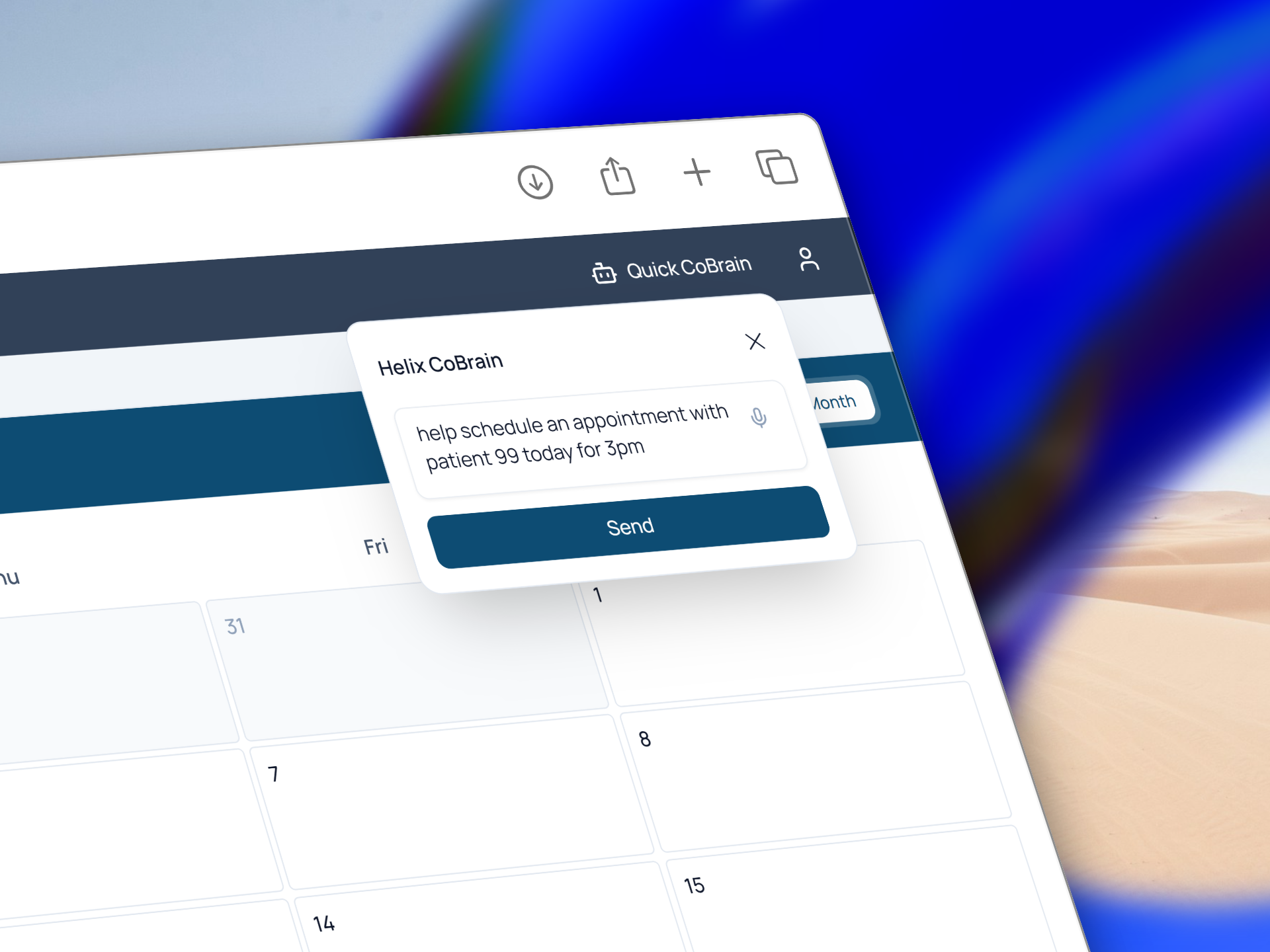 CoBrain, the in-app agent · A quick-access popover takes plain language — "help schedule an appointment with patient 99 today for 3pm" — with voice input alongside the text field. |
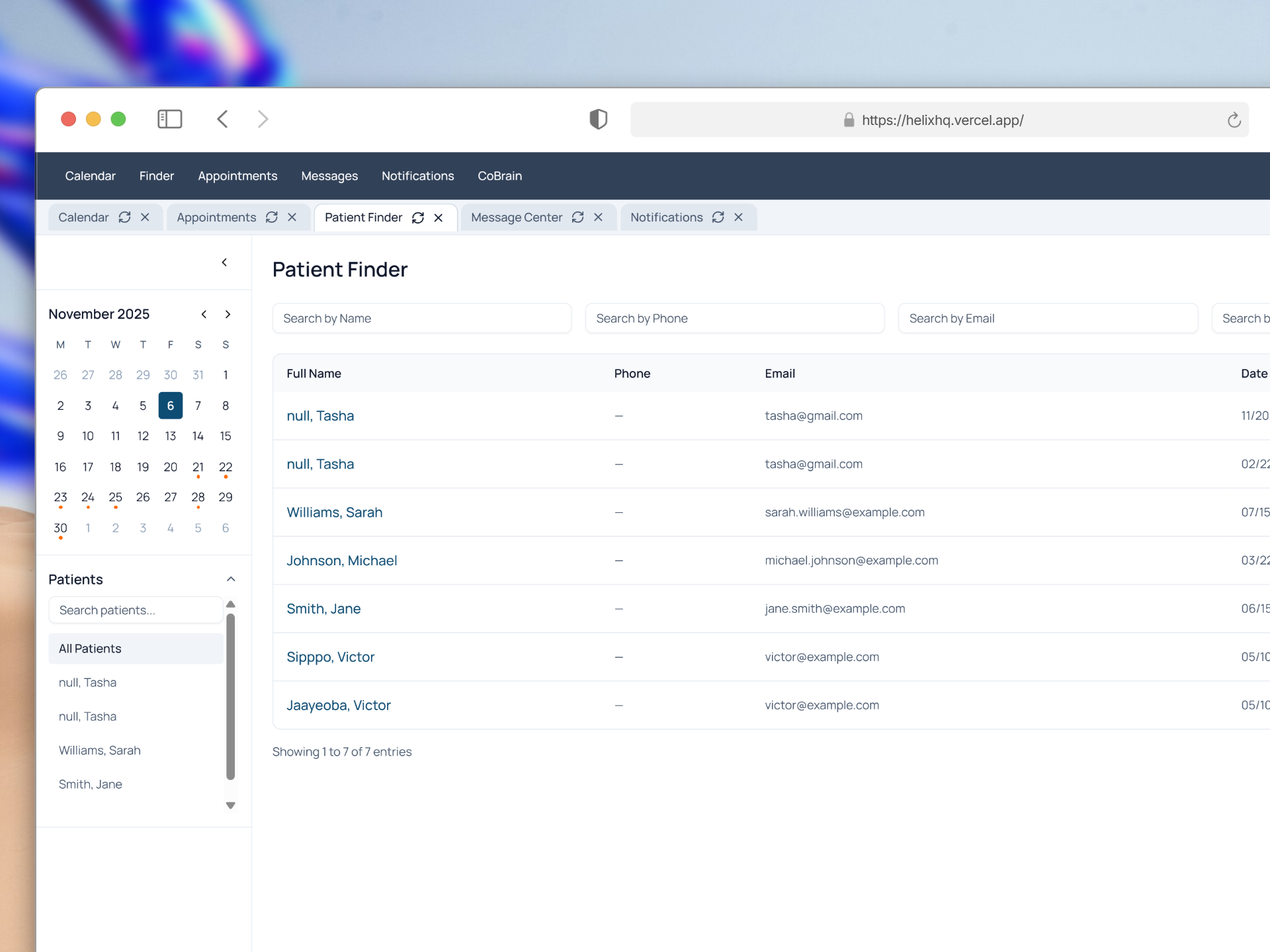 Patient Finder · Search patients by name, phone, or email inside a browser-style, multi-tab workspace with a mini-calendar sidebar — open Calendar, Appointments, and Message Center side by side. |
- The problem
- The idea: describe the task, not the clicks
- How a request flows
- Signature engineering: a bounded plan → execute → summarize chain
- The four actions in detail
- Writing records from natural language
- Speed where it counts: client-side data caching
- The doctor workspace
- Roles & auth
- Tech stack
- Project structure
- Getting started
- Environment variables
- Notes & known rough edges
- Credits
A clinic EMR is a database with a hundred forms in front of it. In a busy African clinic — high patient volume, thin staffing, limited time per visit — those forms are where the day disappears. Every lookup is a navigation. Every note is a screen of fields. The doctor ends up serving the software instead of the patient.
Helix keeps the database and replaces the forms with an agent. The doctor states an intent in one sentence; Helix figures out which record operation it maps to, runs it, and returns a summary written for a clinician. The mechanical layer — which endpoint, which parameters, which shape of data — is the machine's job now.
The embedded assistant is called CoBrain. It sits one click away anywhere in the workspace (the "Quick CoBrain" popover) and accepts typed or spoken input.
| A doctor says… | CoBrain does |
|---|---|
| "What's on my schedule today?" | Fetches every appointment for the current day, summarizes patients / times / reasons |
| "Show me the last encounter for patient 123" | Pulls encounter history (notes, vitals, diagnoses) and leads the summary with clinical findings |
| "When is patient 88 next in?" | Retrieves that patient's appointments and recent encounters, prefers encounter data as the source of truth |
| "Book patient 99 for 3pm today with reason malaria test" | Composes a natural-language EMR write and creates the record through the external EMR service |
Everything the agent can do is a closed set of four actions — not an open-ended tool sandbox. That's a deliberate safety choice for a medical context: the model chooses which record operation to run, but it can never invent one, and it can never reach outside the four routes below.
flowchart LR
    A["Doctor's request<br/><sub>typed or spoken</sub>"] --> B["<b>Planner</b><br/>Gemini 2.5 Flash · temp 0<br/><sub>Zod-validated JSON</sub>"]
    B --> C{"action?"}
    C -->|fetch_today_schedule| D["/api/appointments<br/><sub>filter → today's window</sub>"]
    C -->|fetch_patient_encounters| E["/api/patients/:id/encounters"]
    C -->|fetch_patient_appointments| F["/api/patients/:id/appointments<br/>+ encounters<br/><sub>pick preferred context</sub>"]
    C -->|ai_emr_create_record| G["/api/ai-emr<br/><sub>NL prompt → record write</sub>"]
    D --> H["<b>Summarizer</b><br/>Gemini 2.5 Flash<br/><sub>clinician-facing answer</sub>"]
    E --> H
    F --> H
    G --> H
    H --> I["{ plan, data, answer }"]

    classDef llm fill:#8E75FF,stroke:#5B3FD6,color:#fff;
    classDef route fill:#0E4D6B,stroke:#0a3a52,color:#fff;
    classDef io fill:#e6eef2,stroke:#0E4D6B,color:#0E4D6B;
    class B,H llm;
    class D,E,F,G route;
    class A,I io;
The whole assistant lives in one route — app/api/assistant/route.ts — and it is intentionally not a LangChain tool-calling agent. Letting an LLM freely call tools against live patient records is exactly the failure mode you don't want in a clinic. Helix constrains it to a two-model chain where the model's only creative decision is picking one of four named actions and filling a typed payload.
sequenceDiagram
    autonumber
    participant D as Doctor
    participant P as Planner<br/>(Gemini + Zod parser)
    participant X as Executor<br/>(switch → internal routes)
    participant S as Summarizer<br/>(Gemini)

    D->>P: "Show the last encounter for patient 123"
    Note over P: plannerPrompt.pipe(model).pipe(plannerParser)
    P-->>X: { action: "fetch_patient_encounters",<br/>patient_id: 123 }
    Note over X: plain switch — no tool invention possible
    X->>X: GET /api/patients/123/encounters
    X-->>S: retrieved data + a "preferred_context" hint
    Note over S: summaryPrompt.pipe(model)
    S-->>D: clinician-facing summary<br/>(encounter findings first)
Stage 1 — Planning. plannerPrompt.pipe(model).pipe(plannerParser) runs the request through Gemini, and plannerParser — a LangChain StructuredOutputParser built from a Zod schema — forces the output into JSON or fails. The schema is strict:
const plannerSchema = z.object({
  action: z.enum([
    'fetch_patient_encounters',
    'fetch_patient_appointments',
    'fetch_today_schedule',
    'ai_emr_create_record',
  ]),
  patient_id: z.number({ coerce: true }),
  limit: z.number({ coerce: true }).optional(),
  payload: z.object({
    date, reason, summary, status, symptoms, diagnosis, note,
    follow_up, medications, vitals, tests, encounter_type, prompt,
  }).partial().optional(),
  notes: z.string().optional(),
})
The action field is a four-value enum — the model can choose, but not extend. If a request can't be satisfied by any action, the planner is instructed to pick the closest one and explain the gap in notes.
Stage 2 — Execution. A plain switch on plan.action maps the choice to an internal Next.js route. No dynamic dispatch, no reflection — a reviewer can read every path the agent can take. The base URL is derived from the incoming request (or VERCEL_URL / APP_BASE_URL as a fallback), so it works the same locally and on Vercel.
Stage 3 — Summarizing. The retrieved data is handed to a second Gemini call (summaryPrompt.pipe(model)) that writes the clinician-facing answer. Where the executor identified a preferred_context (see below), it's injected as an explicit "primary source of truth" hint so the summary leads with the right record.
One traceable response. The route returns { plan, data, answer } in a single NextResponse.json — the plan the model chose, the raw data it acted on, and the prose — so every answer is auditable back to its source rows. Both stages run at temperature: 0 for reproducible planning and summaries.
The assistant is non-streaming by design (
.invoke(), one JSON response). There are no latency benchmarks in this codebase — the engineering win here is architectural: a medical agent whose action space is provably bounded, not a speed claim.
| Action | What the executor does | Endpoint(s) |
|---|---|---|
fetch_patient_encounters |
Retrieves encounter history for a patient (limit optional) |
GET /api/patients/:id/encounters |
fetch_patient_appointments |
Fetches appointments and encounters in parallel, then sets preferred_context to the latest encounter (falling back to the latest appointment) |
GET /api/patients/:id/appointments + .../encounters |
fetch_today_schedule |
Pulls all appointments and filters to a [today, tomorrow) window client-side, plus supplemental encounters |
GET /api/appointments |
ai_emr_create_record |
Builds a natural-language EMR prompt and creates/modifies a record via the AI-EMR proxy | POST /api/ai-emr |
The preferred_context mechanism is the quiet clever bit: for a "what's going on with this patient?" style question, appointment metadata (time, reason) is far less useful than the last encounter (diagnosis, vitals, plan). So the executor pre-selects the encounter as the source of truth and tells the summarizer to trust it first — the model doesn't have to guess which record matters.
The ai_emr_create_record path turns a doctor's sentence into a structured EMR write without the model ever touching the database directly. buildAiPrompt() reconstructs a clean instruction:
- Start from the planner's
payload.prompt(the doctor's verbatim instruction) — or synthesize one from the original message. - Flatten any structured details the planner extracted (
date,vitals,medications,diagnosis,follow_up, …) into readablekey: valuelines appended under "Important structured details". - Truncate to 900 characters (
truncatePrompt) so the downstream service gets a bounded prompt.
That composed prompt is POSTed to app/api/ai-emr/route.ts, a thin proxy that requires both prompt and patient, attaches a Token-scheme Authorization header from API_KEY, and forwards to the external EMR service ({API_BASE}/ai/emr). The proxy exists so the API token never reaches the browser and so CORS is handled server-side.
The agent is deliberate; the UI stays snappy because it rarely re-hits the API. Five Zustand stores cache API data on the client with a 5-minute freshness window and skip the network entirely on a cache hit:
// stores/appointments-store.ts
if (!forceRefresh && state.lastFetched && state.currentEndpoint === apiEndpoint) {
  if (Date.now() - state.lastFetched < state.cacheDuration) {
    return // 📦 still fresh — no fetch
  }
}| Store | Caches | Notable |
|---|---|---|
| appointments-store.ts | Global + per-patient appointments | Cache key includes endpoint and selected patient; optimistic update/delete |
| patients-store.ts | Paginated patient list | Supports ordering / page / search params |
| patient-records-store.ts | Per-patient appointments, encounters & tests | Keyed by patient ID via Map, each with its own cache timestamp |
| encounter-detail-store.ts | Individual encounters by ID | De-duplicates in-flight requests so concurrent opens fetch once |
| calendar-store.ts | Selected calendar date | Pure UI state |
Cache duration is tunable per store via setCacheDuration, and clearCache / forceRefresh bypass it after a write.
The dashboard is a browser-style, multi-tab workspace — open Calendar, Patient Finder, Appointments, Message Center, and Notifications as independent tabs and switch between them without losing state (tab state lives in contexts/TabContext.tsx and contexts/PatientTabContext.tsx).
- Calendar — Day / Week / Month views with appointment indicators, a mini-calendar sidebar, and hover/click popovers showing appointment ID, patient, reason, time, and status.
- Patient Finder — search the patient roster by name, phone, or email in a sortable table.
- CoBrain — the agent, reachable from the top bar anywhere in the app, with voice input.
- Messages & Notifications — message center and clinic notifications, backed by Firestore.
Helix serves two user types, distinguished by a userType field ('doctor' | 'patient') written to each user's Firestore document at sign-up — see lib/firebase/auth.ts. contexts/AuthContext.tsx subscribes to onAuthStateChanged, loads that Firestore profile, and exposes { user, userData, loading } via the useAuth() hook so the UI can gate doctor vs patient views.
- Doctors — full workspace: tabbed calendar, patient finder, CoBrain, records, messaging.
- Patients — profile & health info, appointment booking, and AI chat.
Email/password and Google sign-in are both supported through the Firebase client SDK (no admin SDK); Google sign-in defaults new users to the patient role.
| Layer | Technology |
|---|---|
| Framework | Next.js 16 (App Router, Route Handlers) · React 19 · TypeScript 5 |
| AI orchestration | LangChain 0.3 (langchain, @langchain/core) |
| Model | Google Gemini 2.5 Flash via @langchain/google-genai (ChatGoogleGenerativeAI) |
| Structured output | LangChain StructuredOutputParser + Zod schema (typed planning) |
| Auth & data | Firebase client SDK — Firebase Auth + Cloud Firestore |
| State / caching | Zustand 5 — five API-caching stores with a 5-min freshness window |
| UI | Radix UI (27 primitives) · Tailwind CSS 4 · react-day-picker calendar |
| API layer | Next.js Route Handlers proxying an external EMR API (Token auth, CORS) |
helix/
├── app/
│   ├── (doctor)/                # Doctor route group
│   │   └── dashboard/           # ★ Tabbed clinical workspace (calendar, finder, messages)
│   ├── (patient)/               # Patient route group
│   │   ├── patient-dashboard/   # Patient home
│   │   └── patient/complete-profile/
│   ├── api/
│   │   ├── assistant/route.ts   # ★ CoBrain — the plan→execute→summarize agent
│   │   ├── ai-emr/route.ts      # ★ Natural-language record writes → external EMR (Token auth)
│   │   ├── ai/chat/route.ts     # Patient chat (Gemini fallback / placeholder)
│   │   ├── appointments/        # list · create · [id] · cancel · reschedule
│   │   ├── patients/            # list · create · create-via-ai · [id] · encounters · tests
│   │   ├── encounters/          # encounter records
│   │   ├── chat/                # conversation history
│   │   └── webhooks/            # pharmavigilance · register · test
│   ├── page.tsx                 # Landing page
│   └── layout.tsx
├── components/                  # auth · doctor · patient · landing · ui (Radix)
├── contexts/                    # AuthContext · TabContext · PatientTabContext
├── hooks/                       # use-appointments · use-notifications · use-toast · use-mobile
├── lib/
│   ├── api/                     # config + appointments/encounters/patients/tests clients
│   ├── firebase/                # config · auth · chat · messaging · notifications
│   └── utils.ts
├── stores/                      # ★ 5 Zustand caching stores
└── public/
Prerequisites: Node.js 18+ and a package manager (npm, pnpm, or bun — lockfiles for npm and pnpm are checked in).
git clone https://github.com/victorjayeoba/helix.git
cd helix
npm install
Create a .env.local (see below), then:
npm run dev # http://localhost:3000Scripts: dev · build · start · lint
Create .env.local in the project root:
# Firebase (client SDK)
NEXT_PUBLIC_FIREBASE_API_KEY=your_firebase_api_key
NEXT_PUBLIC_FIREBASE_AUTH_DOMAIN=your_auth_domain
NEXT_PUBLIC_FIREBASE_PROJECT_ID=your_project_id
NEXT_PUBLIC_FIREBASE_STORAGE_BUCKET=your_storage_bucket
NEXT_PUBLIC_FIREBASE_MESSAGING_SENDER_ID=your_sender_id
NEXT_PUBLIC_FIREBASE_APP_ID=your_app_id

# Gemini — required for the CoBrain agent to plan & summarize
GOOGLE_GENERATIVE_AI_API_KEY=your_gemini_api_key
GEMINI_API_KEY=your_gemini_api_key

# External EMR API (proxied via /api/ai-emr, Token-scheme auth)
API_KEY=your_external_api_key| Variable | Used for |
|---|---|
NEXT_PUBLIC_FIREBASE_* |
Firebase Auth + Firestore (client SDK) |
GOOGLE_GENERATIVE_AI_API_KEY |
The agent's Gemini calls in /api/assistant — without it the agent throws |
GEMINI_API_KEY |
The patient-chat fallback route (/api/ai/chat) |
API_KEY |
Token auth to the external EMR service behind /api/ai-emr |
Honest state of the code, so you're not surprised reading the source:
- The npm package name in
package.jsonis stillmy-v0-project— a v0 scaffold leftover, nothelix. - lib/firebase/config.ts contains hard-coded fallback Firebase credentials (project
helix-9fce1) used when the env vars are absent. Move these to env-only before any real deployment. - The AI assistant is non-streaming and there are no performance benchmarks in the repo — treat "fast" in the copy as a product goal, not a measured number.
/api/ai/chatis a placeholder that returns a canned response unlessGEMINI_API_KEYis set; the real agent is/api/assistant.
| Victor Jayeoba | Author — victorjayeoba.me |
| David Adedeji | Collaborator — LinkedIn |