ℹ This repository is managed by the VTEX Tech Writing team.
This repository contains all the files for the guides featured in the VTEX Developer Portal.
We invite you to join us and learn how to contribute to our documentation. Your help makes a huge difference in improving our documentation experience. Below are several ways you can do it:
You can provide feedback on any page in the Developer Portal by clicking the Feedback button in the top corner of the page.
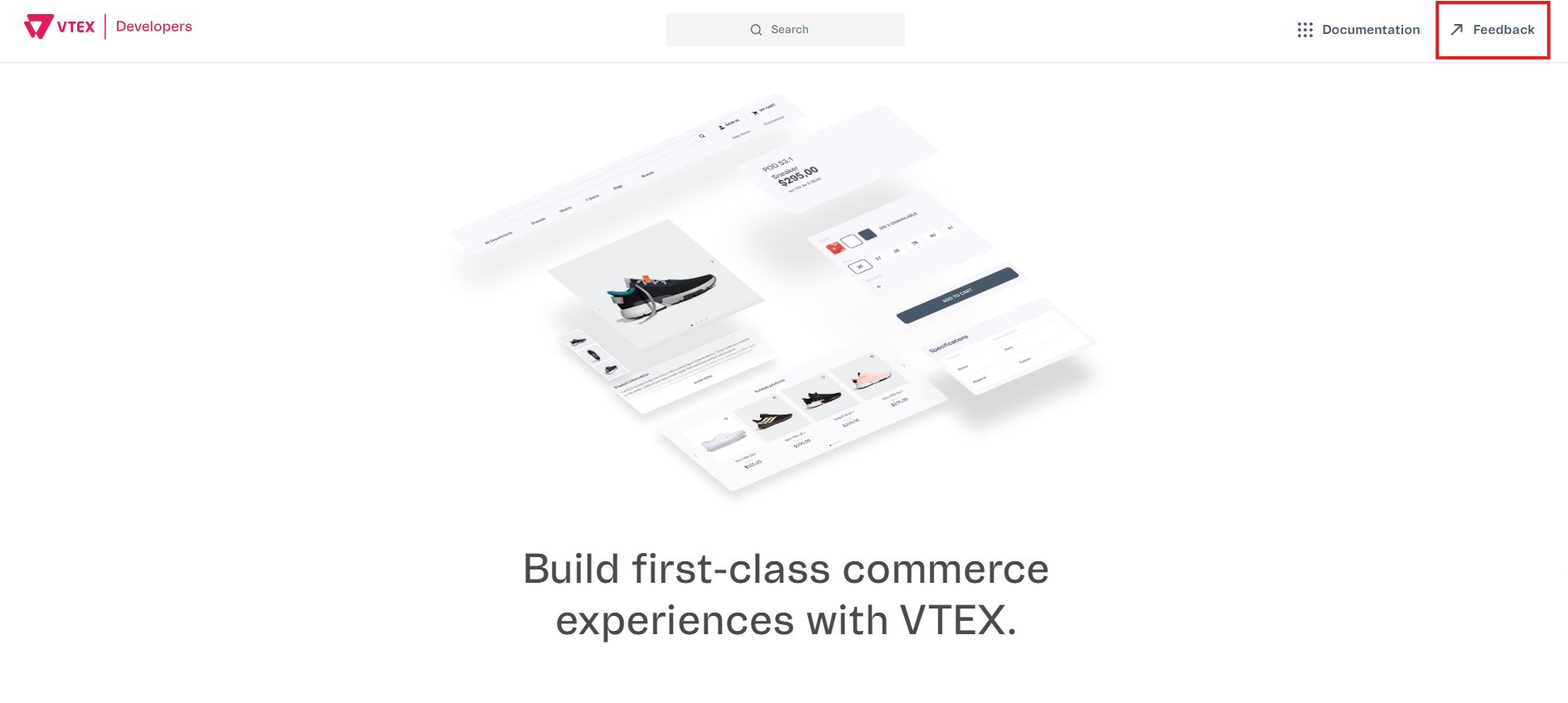
By clicking Feedback, a new browser window will open with a form where you can share your feedback. Here's the information you need to include in the form:
- Platform: Select Developer Portal from the three available options: Help Center, Developer Portal, or VTEX Learning Center.
- URL (Optional): Enter the exact URL of the specific page you're providing feedback on, such as
https://developers.vtex.com/docs/guides/getting-started-with-storefront-solutions. Leave this field blank if you're giving a general feedback. - Feedback type: Select the type of feedback you want to give:
| Feedback type | Description |
|---|---|
| Comment | Leave a comment about the documentation. |
| Question | Ask any questions you have about the documentation content. |
| Error | Report inaccurate information or issues, such as an unavailable page. |
| Improvement | Suggest improvements to the content. |
- Feedback: Describe your feedback based on the selected Feedback type.
- Suggestions (Optional): Propose changes or improvements to the content.
- Attachment (Optional): Upload relevant files, such as screenshots, images, or spreadsheets, to support your feedback.
- Follow-up: If you'd like us to contact you about your feedback, select
Yes. On the next page of the form, provide your name and email so we can reach out to you.
You can submit feedback about any page in the Developer Portal by responding to the Was this helpful? option.
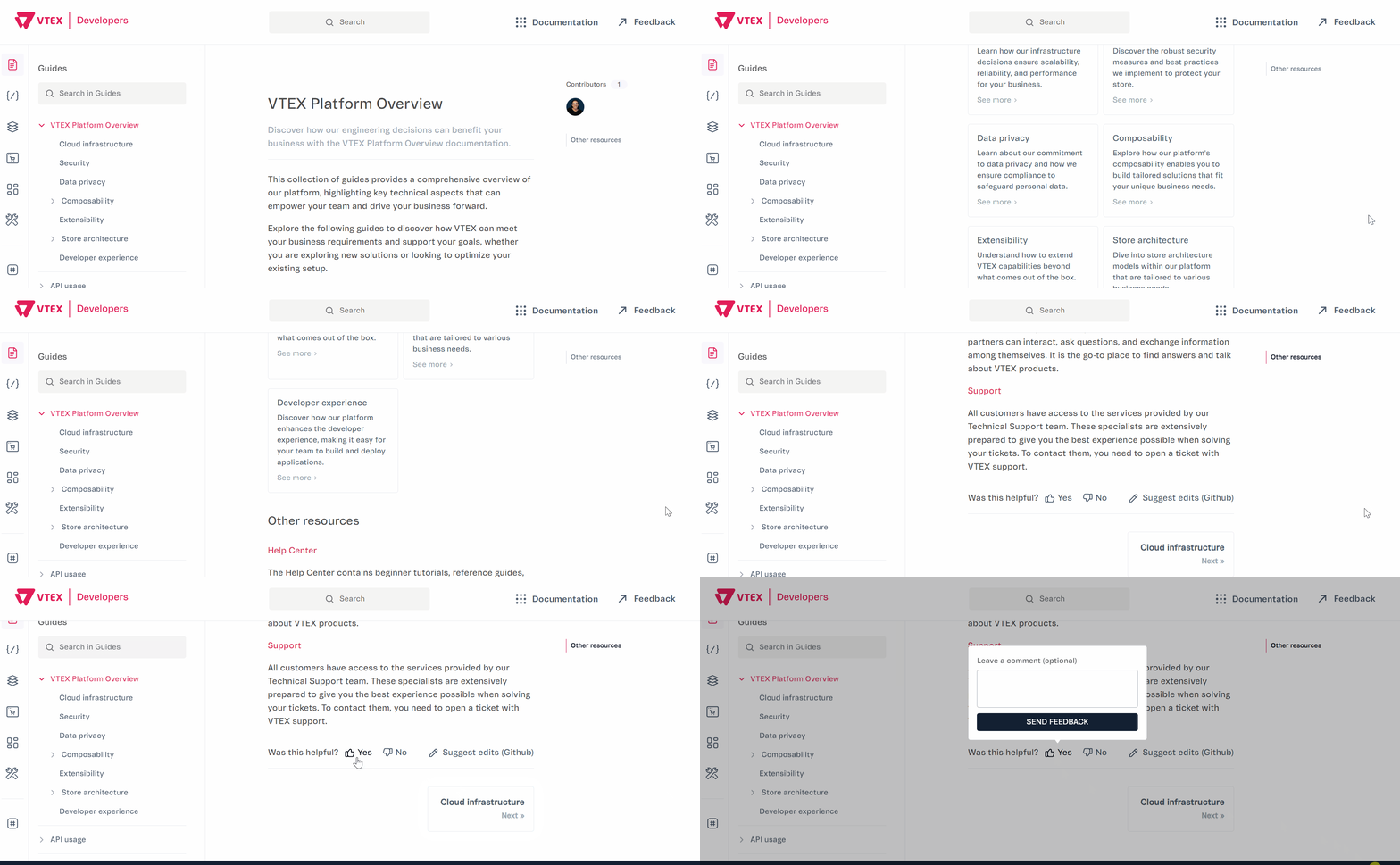
Select your answer and leave a comment to explain your feedback. Click Send feedback to submit it.
You can contribute to any page in the Developer Portal by clicking Suggest edits (GitHub).
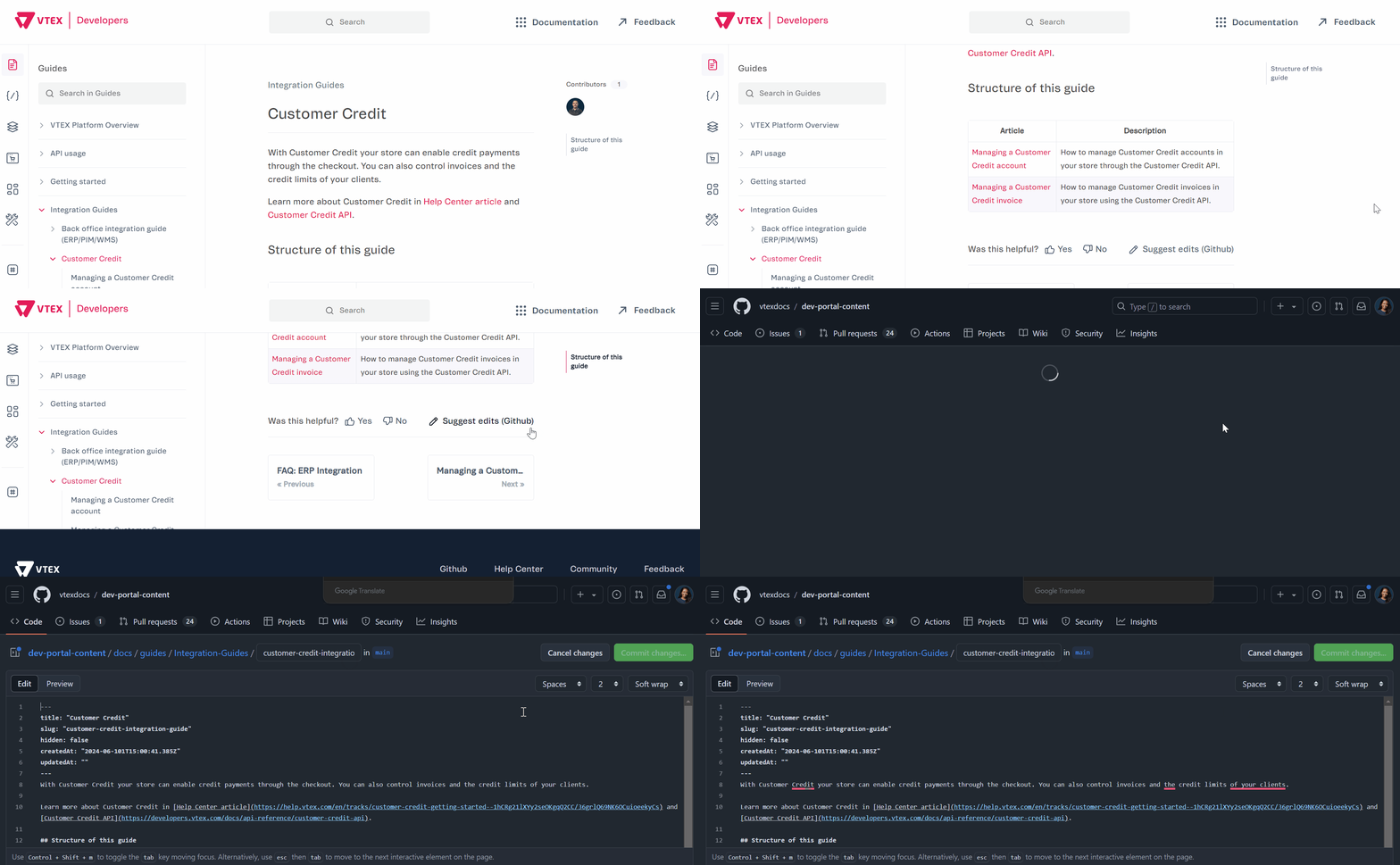
By clicking Suggest edits (GitHub), a new browser window will open with the documentation repository page. Follow these steps to contribute using Suggest edits (GitHub):
- On the documentation repository page, edit the documentation file to include your suggestions.
⚠ Make sure your suggestions follow the documentation guidelines and the code of conduct, and keep the documentation structured as in the template.
- Click
Commit changes…. - In the Propose changes modal, complete the following:
| Field name | Description |
|---|---|
| Commit message | Write a short description of your commit, for example, Fix typo. |
| Extended description (Optional) | Provide a detailed description of your changes. |
| Create a new branch for this commit and start a pull request | Name your branch to open a pull request, allowing the team to review your suggestions. |
- Click
Propose changes. - Create a pull request with your changes by completing the following:
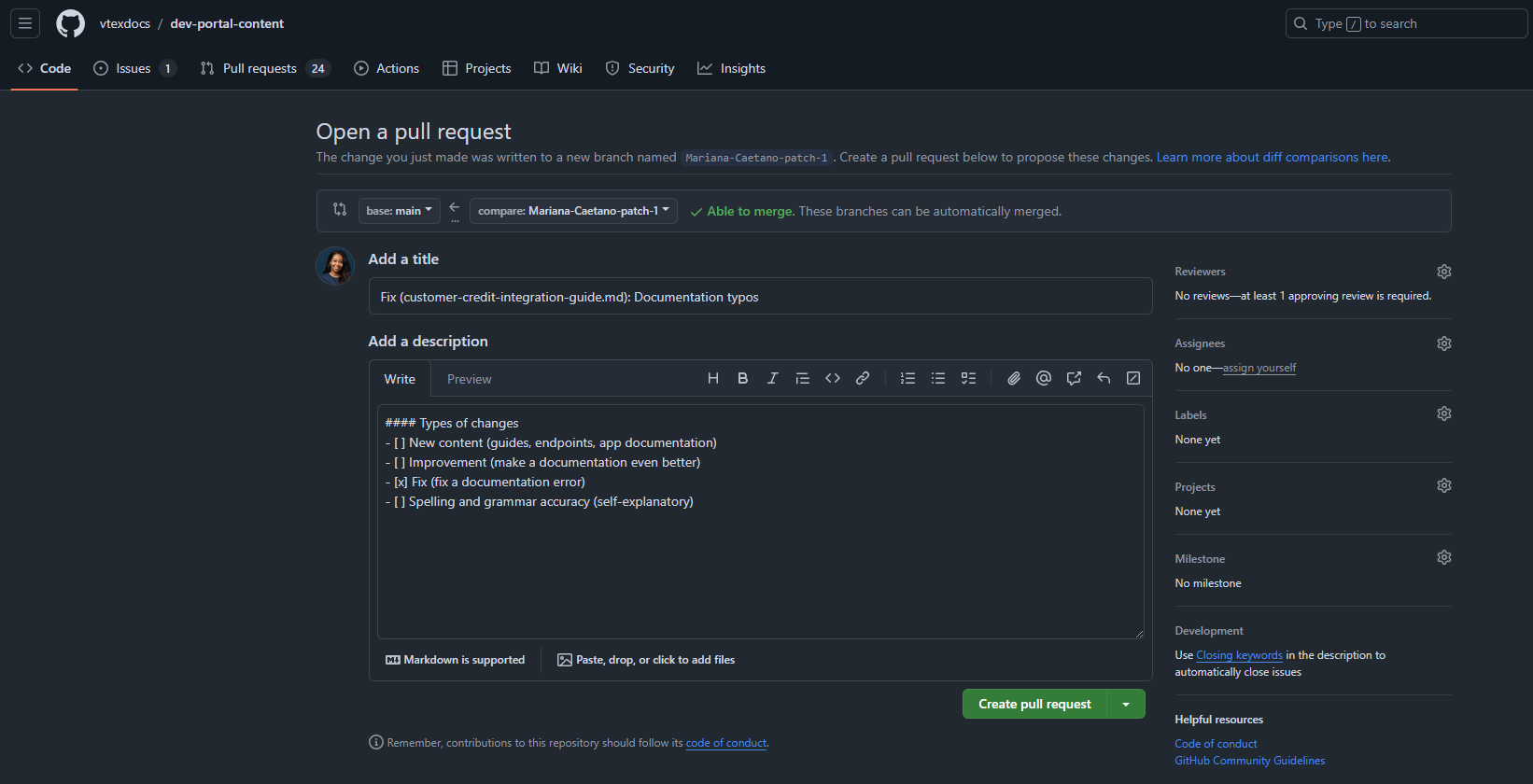
| Field name | Description |
|---|---|
| Add a title | Enter a title for your pull request by adding the type of change, the filename, and what you changed, for example, Fix (customer-credit-integration-guide.md): Documentation typos. |
| Add a description | Check the type(s) of change(s) you are proposing: New content, Improvement, Fix, or Spelling and grammar accuracy. Also, feel free to provide more details in your description to help the team review your suggestion. |
| Reviewers | Click Reviewers and select the group vtexdocs/vtex-education. |
- Click
Create pull request.
Once you create a pull request, our team will review your changes as soon as possible and follow up with you in the pull request comments.
⚠ Pull requests go through a review process to ensure quality and consistency. Our team may request changes before approving them.
This repository uses several GitHub Actions to ensure documentation quality and provide helpful previews. Here's a detailed overview of each action:
Trigger: Pull requests
Purpose: Generates preview links for modified markdown/MDX files.
Dependencies:
actions/checkout@v3: Checks out the repositorytj-actions/branch-names@v7: Gets branch name informationtj-actions/changed-files@v36: Detects changed markdown filesactions/github-script@v6: Runs JavaScript in the workflowthollander/actions-comment-pull-request@v2: Comments on PRs with preview links
Trigger: Pull requests
Purpose: Checks documentation quality using textlint with the write-good rule.
Dependencies:
actions/checkout@v2: Checks out the repositoryactions/setup-node@v1: Sets up Node.js environmenttsuyoshicho/action-textlint@v3: Runs textlint checks and reports issues
Trigger: Repository dispatch, manual workflow, or daily at 17:00 UTC
Purpose: Performs comprehensive link checking and creates issues for broken links.
Dependencies:
actions/checkout@v3: Checks out the repositorylycheeverse/lychee-action@v1.5.4: Performs link checkingpeter-evans/create-issue-from-file@v4: Creates issues from check results
Trigger: Pull requests to main branch
Purpose: Updates and manages images in MDX files.
Dependencies:
actions/checkout@v3: Checks out the repositorytj-actions/changed-files@v29.0.2: Detects changed filesstefanzweifel/git-auto-commit-action@v4: Commits image updates- Node.js packages:
front-matter,image-downloader
Trigger: Pull requests (opened or synchronized)
Purpose: Checks for broken links in modified markdown files.
Dependencies:
actions/checkout@v3: Checks out the repositoryactions/setup-node@v3: Sets up Node.js environmenttj-actions/changed-files@v45: Detects changed markdown filesreviewdog/action-setup@v1: Sets up Reviewdog- Node.js packages:
node-fetch,@actions/core
Trigger: Pull requests (opened or synchronized)
Purpose: Ensures documentation follows VTEX style guidelines.
Dependencies:
actions/checkout@v3: Checks out the repositoryactions/setup-node@v3: Sets up Node.js environmenttj-actions/changed-files@v45: Detects changed markdown filesreviewdog/action-setup@v1: Sets up Reviewdog- Node.js packages:
@actions/core
Trigger: Push to main branch or merged pull requests
Purpose: Automatically generates changelog entries based on commit messages.
Dependencies:
actions/checkout@v4: Checks out the repositoryactions/setup-node@v4: Sets up Node.js environment Commit types supported:- new: New guides, troubleshooting articles, or release notes
- fix: Bug fixes for typos, broken links, or markdown
- media: Media asset updates
- update: Content updates
- remove: File removals
- loc: Localization changes
- docs: README documentation updates
- feat: New features
- test: Test updates
Trigger: Pull requests
Purpose: Provides preview links for navigation changes.
Dependencies:
actions/checkout@v3: Checks out the repositorytj-actions/branch-names@v7: Gets branch name informationtj-actions/changed-files@v36: Detects navigation file changesactions/github-script@v6: Runs JavaScript in the workflowthollander/actions-comment-pull-request@v2: Comments on PRs with preview links
Trigger: Pull requests
Purpose: Lints markdown files for consistent formatting.
Dependencies:
actions/checkout@v1: Checks out the repositoryreviewdog/action-markdownlint@v0: Runs markdown linting with reviewdog integration
Trigger: Push to main/master (when docs/**/*.md files change), or manual workflow_dispatch
Purpose: Indexes changed documentation files into the VTEX Docs search system for hybrid search (BM25 + vector similarity). Uses content-hash-based skip optimization to avoid re-indexing unchanged files. Supports manual full_reindex mode to reprocess all documents.
Dependencies:
actions/checkout@v4: Checks out the repository withfetch-depth: 2for diff comparisonjq(pre-installed): JSON processing for file lists and API responsescurl(pre-installed): HTTP requests to the indexing API
Required Secrets:
INDEXING_URL: Base URL of the VTEX Docs APIINTERNAL_ACCESS_KEY: API consumer key withindex-documentspermission
In this section, we will address the following topics related to the Developer Portal:
The Troubleshooting page allows users to navigate content through:
- Primary category: the article's folder within
docs/troubleshooting - Type: values added to
symptomFilters - Area: values added to
domainFilters
Troubleshooting primary categories are determined by the folder where the article is saved. Use the category that best matches the broad operational context of the issue.
The current troubleshooting categories are:
| Category | Description |
|---|---|
| API and integrations | API usage, payload issues, resource updates, integration contracts, external provider flows, and related Admin configuration for integrations |
| VTEX IO and app development | VTEX IO app lifecycle, CLI usage, dependencies, workspaces, installation, publishing, and Admin settings related to app behavior and configuration |
| Storefront | Storefront behavior, rendering, customization of components and blocks, FastStore implementation, routes, overrides, schema usage, and Admin settings that affect storefront behavior |
| Content Management (CMS) | Issues related to accessing and using VTEX CMS tools, including CMS, Headless CMS (Legacy), Site Editor, and Layout, such as permissions and login, finding and editing content, publishing updates to the storefront, previewing changes where supported, and understanding how content changes propagate |
| Checkout and shopping experience | Checkout completion, cart behavior, purchase blockers, storefront issues that affect the shopping experience, and Admin settings related to checkout behavior |
| Analytics and data collection | Analytics behavior, GTM, GA, dataLayer, event collection, measurement consistency, and Admin settings related to analytics configuration |
These filters appear in the Troubleshooting UI under Type. Each troubleshooting article should usually have 1 to 2 values in symptomFilters.
The existing values and their context are:
| Type | Description |
|---|---|
| Access restriction | Permission, authorization, authentication, or access-related failures |
| Setup issue | Incorrect setup, environment mismatch, dependency setup, or missing configuration |
| Installation failure | Installation, linking, plugin, or dependency installation failures |
| Loading failure | Content, feature, or resource not loading or not becoming available |
| Performance degradation | Slow behavior, delayed publishing, degraded performance, or timeouts |
| Publishing failure | Publish, release, deploy, or availability-after-publish failures |
| Rendering mismatch | Wrong storefront output, missing visual behavior, display inconsistency |
| Runtime error | Explicit CLI, app, GraphQL, or runtime execution errors |
| Measurement inconsistency | Analytics, GTM, GA, UTM, or dataLayer inconsistency |
| Validation error | Schema, API, dependency, version, or payload validation failures |
These filters appear in the Troubleshooting UI under Area. Each troubleshooting article should usually have 1 to 3 values in domainFilters.
The existing values and their context are:
| Area | Description |
|---|---|
| Analytics | General analytics behavior, tracking setup, and event consistency |
| Apps | App install, dependency, and publish issues |
| Catalog | Catalog data, SKU configuration, and product-related behavior |
| Checkout | Checkout flow, cart behavior, purchase completion, and session-related storefront behavior |
| CMS | CMS access, plugins, pages, and content publishing |
| DNS | DNS, hostname, SSL, and domain pointing issues |
| FastStore | FastStore storefront, performance, schema, and publishing topics |
| Google Analytics | GA and GA4 tracking behavior |
| Google Tag Manager | GTM setup, debugging, and event collection |
| Headless CMS (Legacy) | Legacy Headless CMS access, content modeling, page publishing, plugin usage, and legacy content delivery behavior |
| License Manager | User roles, permissions, and resource access management |
| Pricing and Promotions | Price display, price configuration, discount behavior, promotional rules, and offer inconsistencies |
| Releases | Releases module, build status, and deployment delivery |
| Routes/Rewriter | Routes, redirects, and rewrite behavior |
| Search | Search provider integration, result rendering, and search-driven storefront data |
| Site Editor | Site Editor access, block-level content editing, storefront customization, preview, and publishing behavior |
| Store Framework | VTEX IO Store Framework storefront implementation and behavior |
| VTEX IO | VTEX IO platform, CLI usage, workspaces, app lifecycle, and account-level app behavior |
ℹ️ If you wish to add or remove a troubleshooting filter value, you have to manage it in the devportal repository.
See below some examples of categorization and filters applied to the troubleshooting article front matter:
-
dev-portal-content/docs/troubleshooting/vtex-io-and-app-development/i-cant-install-vtex-io-cli.md- Primary category: VTEX IO and app development
- Symptom filters: Installation failure, Setup issue
- Domain filters: VTEX IO
-
dev-portal-content/docs/troubleshooting/content-management-cms/unable-to-access-headless-cms.md- Primary category: Content Management (CMS)
- Symptom filters: Access restriction, Setup issue
- Domain filters: CMS, License Manager, VTEX IO
-
dev-portal-content/docs/troubleshooting/checkout-and-shopping-experience/i-cant-complete-a-purchase-on-a-faststore-website.md- Primary category: Checkout and shopping experience
- Symptom filters: Access restriction, Setup issue
- Domain filters: Checkout, FastStore, DNS
When classifying troubleshooting content, apply the following rules:
- Use domainFilters as the primary discovery axis.
- Use symptomFilters as the secondary refinement axis.
- Treat the primary category (folder) as the broad navigation layer, not as the main retrieval mechanism.
- For hybrid articles, prioritize:
- the product or area the user is most likely to associate with the issue as the main domain filter
- the dominant symptom as the main troubleshooting refinement
- additional domain filters only when they materially improve discovery
To keep the troubleshooting taxonomy consistent as the section grows, follow these guidelines:
- Apply 1 primary category per article.
- Apply 1 to 2 symptomFilters per article in most cases.
- Apply 1 to 3 domainFilters per article in most cases.
- Only promote niche filter values when recurring article volume justifies them.
- Only propose new primary categories when the current structure creates repeated ambiguity for users and editors.
- Prioritize the user's mental model over internal team ownership or root-cause attribution when deciding how to classify an article.