- AI ready - Includes Claude Code, OpenAI Codex, Google Gemini
- Fast context switching - No VM overhead; instant user switching
- Passwordless - switch accounts without a prompt (after setup)
- Shared workspace - joint access to
/Users/Shared/sv-$USER - Defense in depth - limited user account +
sandbox-exec - Clean uninstall - Complete removal with
sv uninstall
- Run Browser Automation from within the sandbox that can be used for testing web interactions.
- To run
xcodebuildorswiftsee Sandboxing xcodebuild and swift for details. - To run other sandboxed applications inside sandvault, use the
-xoption. See Sandboxing other apps for details. - It's not possible to run GUI applications from within the sandbox; see Running GUI Applications for details.
SandVault has limited access to your computer:
- Cannot access your home directory
- Runs with standard user privileges
- Cannot modify system files
- Has no access to mounted drives
- writable:  /Users/Shared/sv-$USER         -- only accessible by you & sandvault-$USER
- writable:  /Users/sandvault-$USER         -- sandvault's home directory
- readable:  /usr, /bin, /etc, /opt         -- system directories
- no access: /Users/*                       -- other user directories

- writable:  /Volumes/Macintosh HD          -- accessible as per file permissions
- no access: /Volumes/*                     -- cannot access mounted/remote/network drives
Install via Homebrew:
brew install sandvaultInstall via git:
# Clone the repository
  git clone https://github.com/webcoyote/sandvault

# Option 1: add the sandvault directory to your path
  export PATH="$PATH:/path/to/where/you/cloned/sandvault"

# Option 2: add to your shell configuration for easy access
  echo >> ~/.zshrc  'alias sv="/path/to/where/you/cloned/sandvault/sv"'
echo >> ~/.bashrc 'alias sv="/path/to/where/you/cloned/sandvault/sv"'# Run Claude Code in the sandbox
# shortcut: sv cl
sv claude
# Run OpenAI Codex in the sandbox
# shortcut: sv co
sv codex
# Run Google Gemini in the sandbox
# shortcut: sv g
sv gemini
# Run command shell in the sandbox
# shortcut: sv s
sv shellThe default mode for sandvault runs commands as a limited user (basically sudo -u sandbox-$USER COMMAND). Sandvault also configures the limited sandvault account so that you can run commands via SSH (basically ssh sandbox-$USER@$HOSTNAME), and everything works the same. Use the -s or --ssh option to use SSH mode with sv, or use tmux or screen (for users so inclined).
# Run using impersonation
# sv COMMAND
  sv codex

# Run using ssh
# sv -s/--ssh COMMAND
sv --ssh gemini# Run shell command in sandvault and exit
# Usage:
# sv shell [PATH] -- [SHELL_COMMAND]
# Example:
sv shell /Users -- pwd # output: /Users
# Run AI agent with optional arguments
# Usage:
# sv <agent> [PATH] [-- AGENT_ARGUMENTS]
# Example:
sv gemini -- --continue
# Clone local/remote Git repository into /Users/sandvault-$USER/repositories/<git-repository> and open there
# Usage:
# sv <agent|shell> --clone URL_OR_LOCAL_PATH [-- AGENT_OR_SHELL_ARGS]
# Examples:
sv codex --clone https://github.com/webcoyote/sandvault.git
sv codex -c ~/src/my-app
sv shell --clone https://github.com/webcoyote/sandvault.git
sv shell -c ../my-app
Use a full or relative path with a directory name for local clones.
For local Git repositories, sandvault also wires remotes:
- Your local Git repository gets/updates remote `sandvault` -> `/Users/sandvault-$USER/repositories/<git-repository>`
- This lets you run `git fetch sandvault` from the original local Git repository to pull commits made in the sandvault Git repository.
# Send input via stdin
# Usage:
# <producer> | sv shell [PATH] [-- SHELL_COMMAND]
# Examples:
echo "pwd ; exit" | sv shell /Users # output: /Users
echo ABC | sv shell -- tr 'A-Z' 'a-z' # output: abc
cat PROMPT.md | sv geminiBy default, SandVault installs AI tools via Homebrew on the host side. With --native-install (-N), tools are instead installed inside the sandbox using their own installers:
- Claude Code — installed via
curl -fsSL https://claude.ai/install.sh | bash - Codex — installed via
npm install -g @openai/codex - Gemini — installed via
npm install -g @google/gemini-cli
Tools are installed on first run and reused on subsequent runs.
# Install and run Claude Code natively
sv --native-install claude
sv -N claude

# Works with all AI agents
sv -N codex
sv -N gemini
To make native install the default, set SANDVAULT_ARGS:
# Add to your shell profile (~/.zshrc, ~/.bashrc, etc.)
export SANDVAULT_ARGS="--native-install"

# Now 'sv claude' uses native install automatically
sv claudeSet SANDVAULT_ARGS to supply default arguments that are prepended to the command line:
# Add to your shell profile (~/.zshrc, ~/.bashrc, etc.)
export SANDVAULT_ARGS="--verbose --ssh --browser"

# Now these are equivalent:
sv claude
sv --verbose --ssh --browser claude
Shell quoting is supported, so arguments with spaces work:
export SANDVAULT_ARGS='--clone "my project"'Explicit command-line arguments are appended after SANDVAULT_ARGS, so they are processed afterwards.
# Build sandvault but do not run a command
  sv build
  sv b


# Rebuild sandvault, including updating all file permissions and ACLs in the shared volume
  sv build --rebuild
  sv b -r

# Fix permissions when using a restrictive umask (e.g. 077)
  sv --fix-permissions
  sv --fix-permissions build

# Uninstall sandvault (does not delete files in the shared volume)
  sv uninstall


# Misc commands
  sv --version
sv --helpIn addition to running in a different macOS user account, sandvault also runs applications using macOS sandbox-exec, which further limits what resources are accessible.
Some applications, like swift, already run inside a sandbox. Because macOS does not support nested (i.e. recursive) sandboxes, these applications fail to run.
Read on for solutions.
For swift (and xcodebuild, which runs swift), you can set the following variables in your build scripts to run inside sandvault:
For swift:
ARGS=()

# Disable sandboxing when running inside sandvault to avoid nested sandbox-exec
if [[ -n "${SV_SESSION_ID:-}" ]]; then
    ARGS+=(--disable-sandbox)
fi

swift build "${ARGS[@]}" "$@"
For xcodebuild:
ARGS=()

# Disable sandboxing when running inside sandvault to avoid nested sandbox-exec
if [[ -n "${SV_SESSION_ID:-}" ]]; then
    export SWIFTPM_DISABLE_SANDBOX=1
    export SWIFT_BUILD_USE_SANDBOX=0
    ARGS+=("-IDEPackageSupportDisableManifestSandbox=1")
    ARGS+=("-IDEPackageSupportDisablePackageSandbox=1")
    # shellcheck disable=SC2016 # Expressions don't expand in single quotes # that is intentional
    ARGS+=('OTHER_SWIFT_FLAGS=$(inherited) -disable-sandbox')
fi

xcodebuild \
    build \
    "${ARGS[@]}" \
...If the app you intend to run does not support disabling it use of sandbox-exec like xcodebuild and swift you can run andvault without utilizing sandbox-exec:
# Disable use of sandbox-exec (app still runs as sandvault user) using -x / --no-sandbox
  sv -x           claude
  sv --no-sandbox codex
  sv --no-sandbox shell $HOME/projects/my-app -- xcodebuild ...
Disabling sandbox-exec has the following security implications:
- No protection against reading/writing removable drives (
/Volumes/...) - No protection against writing files with
o+w(0002) file permissions
# To find all files on your computer that are "world writable" (perms: `o+w` / 0002)
# run this command from your account (not in sandvault):
  find / \
       -path "/Users/sandvault-$USER" -prune \
    -o -path "/Users/sv-$USER" -prune \
-o -perm -o=w -print 2>/dev/nullIf your sandbox is misbehaving you can fix it with a rebuild or uninstall/reinstall. They're both safe and will not delete files in the shared sandbox folder.
# Force rebuild
sv --rebuild build


# Uninstall then reinstall
sv uninstall
sv build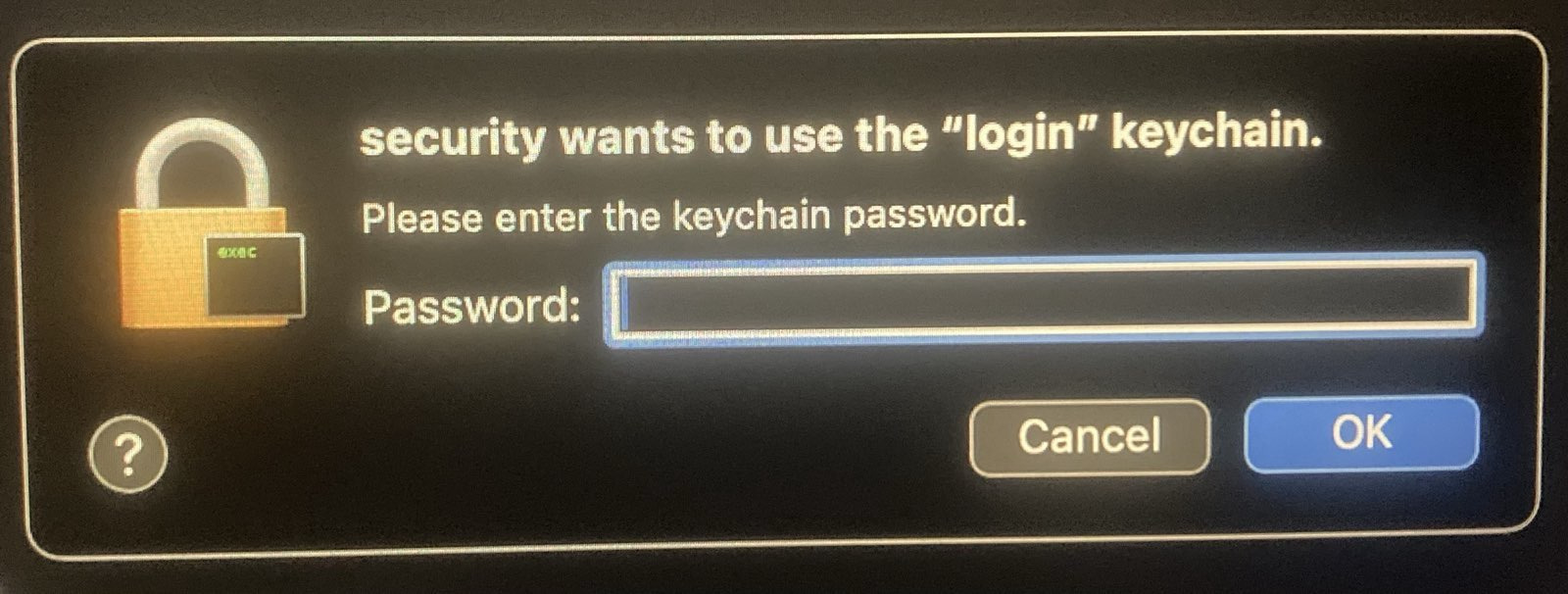
If you see a security popup above, it may be because files in the shared sandvault directory don't have the correct ACLs, which occurs when another user's files are copied into the sandvault shared directory (/Users/Shared/sv-$USER). This can be corrected by running the rebuild command sv --rebuild build, or adding the rebuild flag to any command, e.g. sv -r shell. This only needs to be done once.
If you see "Permission denied" errors when running sv, your shell may have a restrictive umask (e.g., 077 instead of the default 022). Check with:
umaskSandVault detects this and warns you. To fix it for the current session, add --fix-permissions:
# Fix permissions (standalone or with build)
sv --fix-permissions
sv --fix-permissions build
If you previously installed Homebrew under a restrictive umask, you may also need to fix its directory permissions:
sudo chmod -R o+rX /opt/homebrewIf you're using sandvault, you're probably the type of person who also sets custom shell configuration files, and you'd be disappointed if you had to use default zsh while running sv shell. Here's how to configure your custom configuration for sandvault:
- Ensure sandvault has been installed by running a command like
sandvault build,sandvault shell,sandvault claude, etc. - Copy your desired configuration files (e.g.
.zshrc,.zprofile, etc.) to/Users/Shared/sv-${USER}/user/.
Next time you run sandvault, your files will be copied to the sandvault user home directory, and your zsh configuration files will be sourced:
.zshenv → .zprofile → .zshrc → .zlogin → .zlogout
Note: Earlier versions of sandvault supported configuration files in
guest/home/user/, which didn't work for Homebrew installations. Consequently, this is no longer supported, and you'll get an error message asking you to moveguest/home/userto/Users/Shared/sv-${USER}/user/.
SandVault supports headless Chrome for browser automation from within the sandbox. Chrome runs on the host side and the sandbox connects to it via the Chrome DevTools Protocol (CDP) over localhost.
# Launch with browser support
sv --browser claude
sv --browser shell
Inside the sandbox, the SV_BROWSER_ENDPOINT environment variable contains the CDP endpoint URL (e.g. http://127.0.0.1:52858).
// Playwright
const browser = await chromium.connectOverCDP(process.env.SV_BROWSER_ENDPOINT);

// Puppeteer
const browser = await puppeteer.connect({ browserURL: process.env.SV_BROWSER_ENDPOINT });
From the host, you can query the endpoint URL:
# Prints the CDP endpoint URL (or errors if browser is unavailable)
sv --endpoint
See also ./tests/browser/*.js for examples of using Playwright and Puppeteer.
- Chrome is launched headless on the host side with a dynamic port (
--remote-debugging-port=0), and sandvault connections vialocalhost - Chrome stays running across sandbox sessions and is stopped when the last
--browsersession exits - Chrome uses an isolated user data directory, separate from your personal Chrome profile
Google Chrome or Chromium must be installed in /Applications/.
TL;DR: Sorry, macOS security limitations prevent this from working.
It would be great to be able to run GUI applications (e.g. browsers, Claude Desktop) in the sandbox account to limit their access to main account resources.
The issue seems to be that an application cannot report to a WindowServer that's owned by a different user.
Internet posts suggest it's possible using sudo su and sudo launchctl bsexec, but those answers are from long ago and it seems likely that Apple improvements to macOS security have closed those doors.
In the event you do find a solution, send a PR please :)
After exploring Docker containers, Podman, sandbox-exec, and virtualization, I needed something that:
- Works natively on macOS without virtualization overhead
- Provides meaningful isolation without too much complexity
- Runs Claude Code with
--dangerously-skip-permissions - Runs OpenAI Codex with
--dangerously-bypass-approvals-and-sandbox - Runs Google Gemini with
--yolo - Maintains a clean separation between trusted and untrusted code
SandVault uses macOS's Unix heritage and user account system to create a simple but effective sandbox.
- ClodPod runs Claude Code inside a macOS virtual machine.
- Chamber is a proof-of-concept app for running Claude Code inside a macOS virtual machine.
- Claude Code Sandbox runs Claude Code in a Docker container (Linux)
Apache License, Version 2.0
SandVault Copyright © 2026 Patrick Wyatt
See LICENSE.md for details.
We welcome contributions and bug reports.
See CONTRIBUTORS.md for the list of contributors to this project.
This project builds on the great works of other open-source authors:
- Claude - AI coding assistant
- Codex - AI coding assistant
- Homebrew: 🍺 The missing package manager for macOS (or Linux)
- Shellcheck: finds bugs in your shell scripts
- uv: An extremely fast Python package and project manager, written in Rust
- Claude Code Hooks Mastery: Quickly master how to use Claude Code hooks to add deterministic (or non-deterministic) control over Claude Code's behavior
- StatusLine: project status information for Claude Code
... as well as GNU, BSD, Linux, Git, Sqlite, Node, Python, netcat, jq, and more. "We stand upon the shoulders of giants."