This article records some insights and observations when using Intlayer, an i18n framework.
While developing other projects, I received an invitation from the Intlayer framework developers, so I decided to try using this framework to implement multi-language support. After actual use, I found that this framework indeed has many commendable aspects.
Intlayer integrates very smoothly with mainstream frameworks and supports:
- React (including Create React App)
- Vite + React
- Next.js
- Vue + Vite
- Nuxt
- Express
- NestJS
- Preact
The official documentation (https://intlayer.org) is quite clear, with detailed explanations from basic setup to advanced features. Even for first-time users, you can quickly get started through the documentation and complete basic i18n implementation. This is very important for developers, as good documentation can significantly reduce the learning curve.
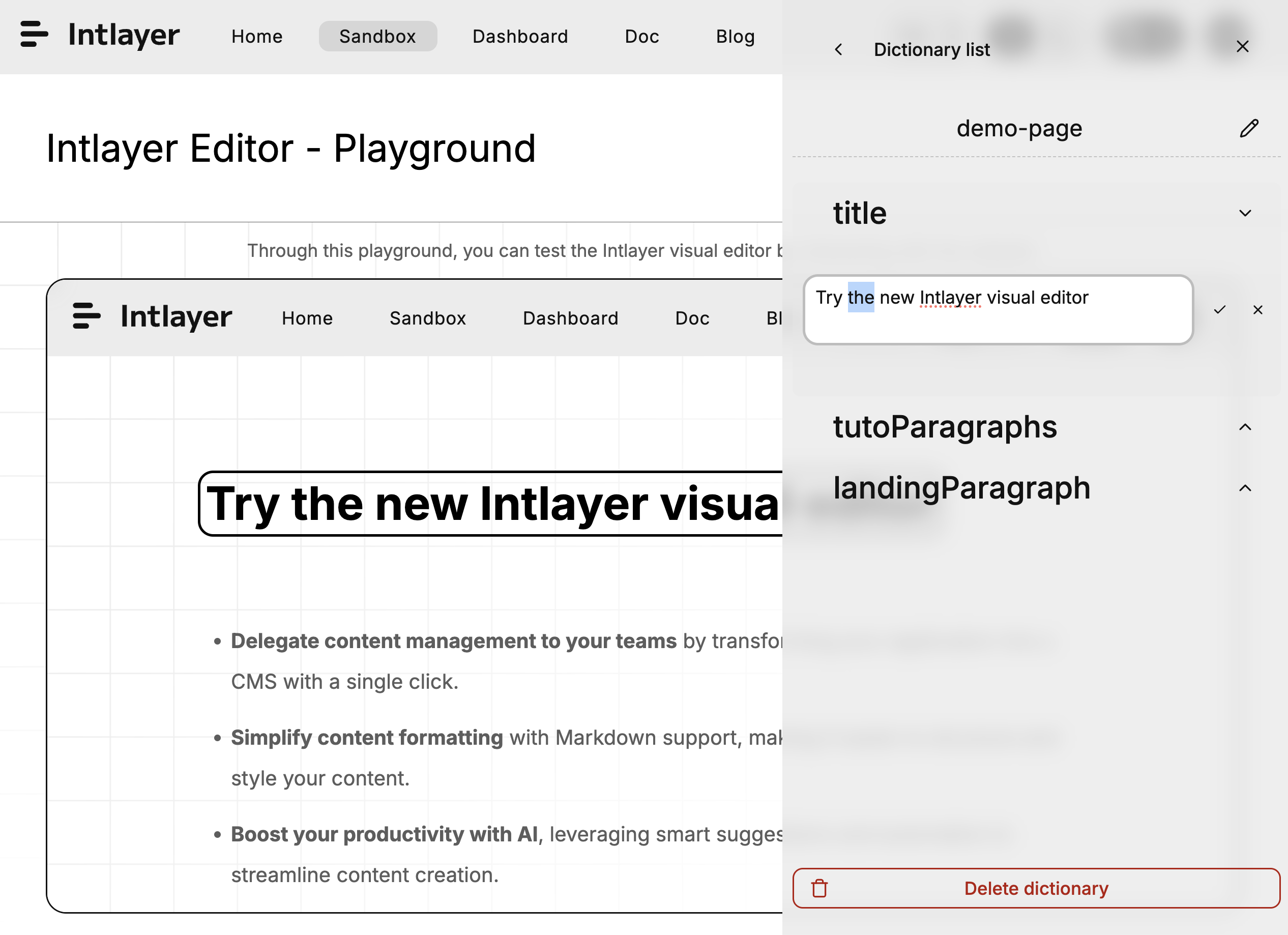
This is a very practical feature of Intlayer. Through the visual editor, you can:
- Adjust multi-language content in real-time: No need to modify code, directly edit content in the browser
- Visual preview: For cross-language projects, text length varies greatly between different languages (e.g., Chinese vs. English). Through the Visual Editor, you can see the actual effect in real-time, avoiding UI being broken by overly long text
- AI-assisted translation: The editor has built-in AI translation functionality, which can quickly generate translated content, greatly improving efficiency
This feature is particularly suitable for projects that require frequent content adjustments, or teams that need non-technical personnel (such as product managers, designers) to participate in content management.
Compared to react-i18next that I was familiar with before, Intlayer adopts a different approach:
Traditional approach (react-i18next):
- Need to maintain multiple JSON files (such as
en.json,zh-TW.json,ja.json) - Content is separated from components, which easily leads to:
- Some languages missing translation keys
- Difficulty tracking which component a translation key corresponds to
- Need to frequently switch between code and JSON files
Intlayer's approach:
- Content is defined next to components (such as
Component.content.ts) - Content is tightly integrated with components, improving maintainability
- TypeScript type safety, automatically checking for missing translations
- Easier to track and manage content
This "side-by-side" approach makes content management more intuitive and friendly, especially in large projects, where you can clearly know which translation content each component uses.
Intlayer provides powerful CLI tools that can:
- Automatically detect missing translations: Running
npx intlayer fillcan find all missing translation keys - AI automatic translation generation: Use OpenAI, Claude, or local models to automatically generate translated content
- Quickly expand languages: When you need to add language support, the CLI tool can quickly generate all necessary translation files
This feature makes expanding new languages very fast, without needing to manually translate one by one, greatly improving development efficiency.
In the SudokuLab project, we need to support five languages:
- Traditional Chinese
- Simplified Chinese
- English
- Japanese
- Korean
After using Intlayer, the entire multi-language implementation process became very smooth:
- Setup phase: Quickly complete basic configuration through documentation
- Development phase: Define content next to components, TypeScript automatically checks types
- Translation phase: Use CLI tools to quickly generate translations, then fine-tune through Visual Editor
- Maintenance phase: Content is tightly integrated with components, easy to track and manage
Intlayer is a well-designed i18n framework, particularly suitable for:
- Projects that need to support multiple languages
- Projects that require frequent content adjustments
- Teams that need non-technical personnel to participate in content management
- Developers who value type safety and development experience
If you are looking for a modern i18n solution, Intlayer is definitely worth trying. For more information, please refer to the official website.