Small project that trains and serves a multi-label classifier for text (email descriptions). It includes utilities to extract emails, label data using a local or remote LLM, store/fetch data from Supabase, and serve predictions via a FastAPI server.
src/— main source code. Key files:api_server.py— FastAPI app exposing/predict,/data/random,/data/relatedarticles, and/healthendpoints.DataLabeler.py— scripts to label data via local LM (LM Studio) or OpenRouter.GmailEmailExtractor.py,DataExporter.py,DataImporter— helpers for data ingestion/export.
models/— trained model and TF-IDF vectorizer (joblib files).data/— raw and processed datasets..config/credential.example.json— example credentials file (see below).

How each component is used in the project to create a multi-label classifier AI model
SILAJU - AI-Powered Content Classification and Generation System
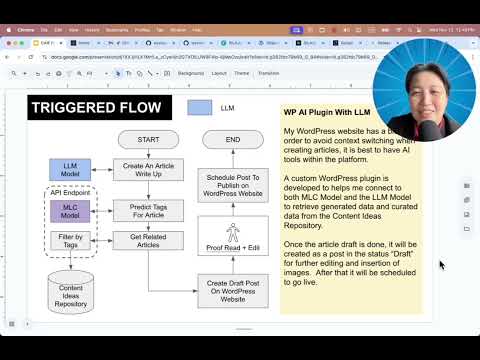
[EXPLAINER VIDEO] SILAJU - AI-Powered Content Classification and Generation System
![[EXPLAINER]SILAJU - AI-Powered Content Classification and Generation System](https://img.youtube.com/vi/8MqnxaS48zA/0.jpg)
- Python: >= 3.13 (see
pyproject.toml) - Recommended: create a virtual environment and install dependencies listed in
pyproject.tomlusing uv.
Quick install (from project root):
# create and activate a venv
python3 -m venv .venv
source .venv/bin/activate

# install dependencies with pip (reads pyproject metadata)
pip install -e .If you want to use uv to install all Python dependencies (recommended for speed and reproducibility):
# install uv (if not installed)
pip install uv

# install all dependencies listed in pyproject.toml
uv pip install -e .pip install fastapi uvicorn pandas scikit-learn joblib openai openrouter supabaseThe repository includes an example credentials file at .config/credential.example.json. The runtime code (e.g., src/api_server.py and src/DataLabeler.py) expects your runtime credentials to be placed at .config/credentials.json (note the plural).
Copy the example and fill in your keys:
cp .config/credential.example.json .config/credentials.jsonOpen .config/credentials.json and replace the placeholder values. The file contains two main sections: web and supabase.
Example structure (trimmed):
{
	"web": {
		"client_id": "YOUR_CLIENT_ID_HERE",
		"project_id": "YOUR_PROJECT_ID_HERE",
		"client_secret": "YOUR_CLIENT_SECRET_HERE",
		"OPENROUTER_API_KEY": "YOUR_OPENROUTER_API_KEY_HERE"
	},
	"supabase": {
		"URL": "https://YOUR_PROJECT_ID.supabase.co",
		"KEY": "YOUR_ANON_PUBLIC_KEY"
	}
}
How to obtain each key
-
Google OAuth credentials (
web.client_id,web.client_secret,web.project_id):- Go to Google Cloud Console: https://console.cloud.google.com/
- Create a new project (or select an existing one).
- In the left menu go to "APIs & Services" → "OAuth consent screen" and configure if prompted.
- Go to "Credentials" → "Create Credentials" → "OAuth client ID" → Choose "Web application".
- After creation you will have a Client ID and Client Secret — paste them into
client_idandclient_secret. - The
project_idis shown on your project dashboard in the Cloud Console.
Notes: If you use any Google API (for Gmail extraction), you may need to add authorized redirect URIs to the OAuth client depending on how you run the extractor. For local scripts, a redirect URI is often not required if using service account or installed app flows — check the extractor code if unsure.
-
OpenRouter API Key (
web.OPENROUTER_API_KEY):- Sign up at https://openrouter.ai/ (or your chosen OpenRouter provider).
- Create or view your API keys from the dashboard.
- Place the key under
web.OPENROUTER_API_KEY.
Note:
src/DataLabeler.pysupports a local LM (LM Studio) whenUSE_LOCAL_AI = True. If you use LM Studio locally, OpenRouter key may be unused. -
Supabase (
supabase.URL,supabase.KEY):- Create a project at https://app.supabase.com/ and note the project
URL(format:https://<project>.supabase.co). - In your project go to Settings → API → Project API keys.
- Copy the
anon(public) or a service role key depending on what the server needs (the app uses the client to read/write data; the anon key is often sufficient for read-only requests but use a role key for write sensitive operations).
- Create a project at https://app.supabase.com/ and note the project
Security
- Do NOT commit
.config/credentials.jsonto git. Add it to.gitignore. - Keep secrets safe. Consider using environment variables or a secret manager in production.
From the project root, with your virtualenv activated and .config/credentials.json populated:
# run the FastAPI server (reload for development)
python -m uvicorn src.api_server:app --reload --host 0.0.0.0 --port 8000
Endpoints to try
- POST
/predict— body:{ "description": "Some text to classify" }— returns the 5 binary labels. - GET
/data/random— fetch a sample row from Supabase tableemail_data(requires Supabase configured). - GET
/health— basic health and model timestamp.
src/DataLabeler.pycan use a local LM (LM Studio) or OpenRouter. ToggleUSE_LOCAL_AIat the top of the file.- If using local LM Studio, set it up and point
LOCAL_AI_BASE_URLaccordingly (defaulthttp://localhost:1234/v1).
- Model artifacts expected by
api_server.pyare inmodels/— filenames include a timestamp. UpdateMODEL_TIMESTAMPinapi_server.pyif you add new artifacts. - A WordPress Plugin was developed to use with this API. Check out the project here : https://github.com/wycoconut/silaju-ai-plugin