

Note
Local, offline prose editor powered by a language model running on your own machine. Paste or write text, pick an editorial mode, and triage inline tracked changes as they stream in. No cloud, no subscription, no data leaving your machine.
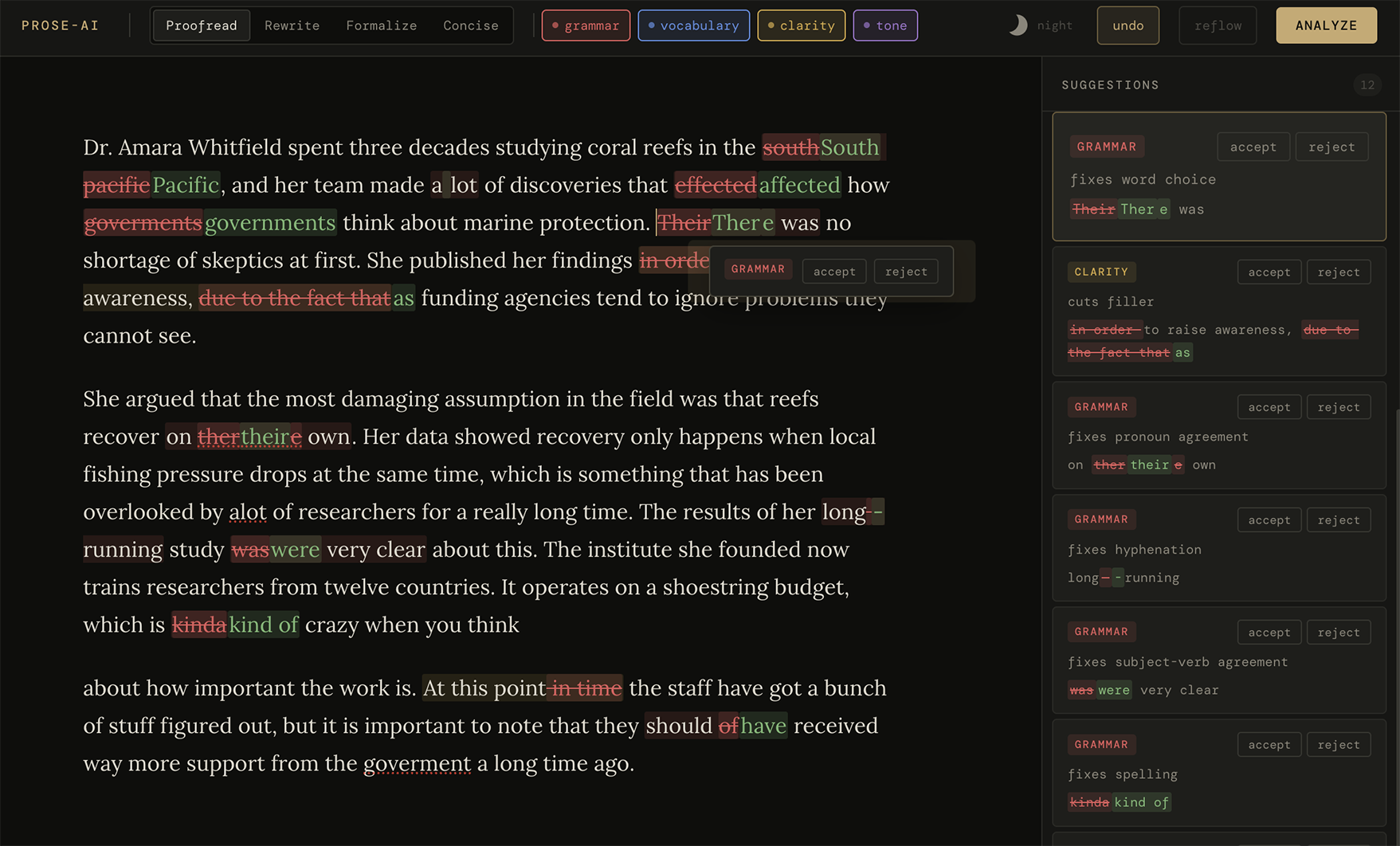
Four editorial modes. Proofread, Rewrite, Formalize, and Concise. Proofread lets you toggle the suggestion types you care about (grammar, vocabulary, clarity, tone).
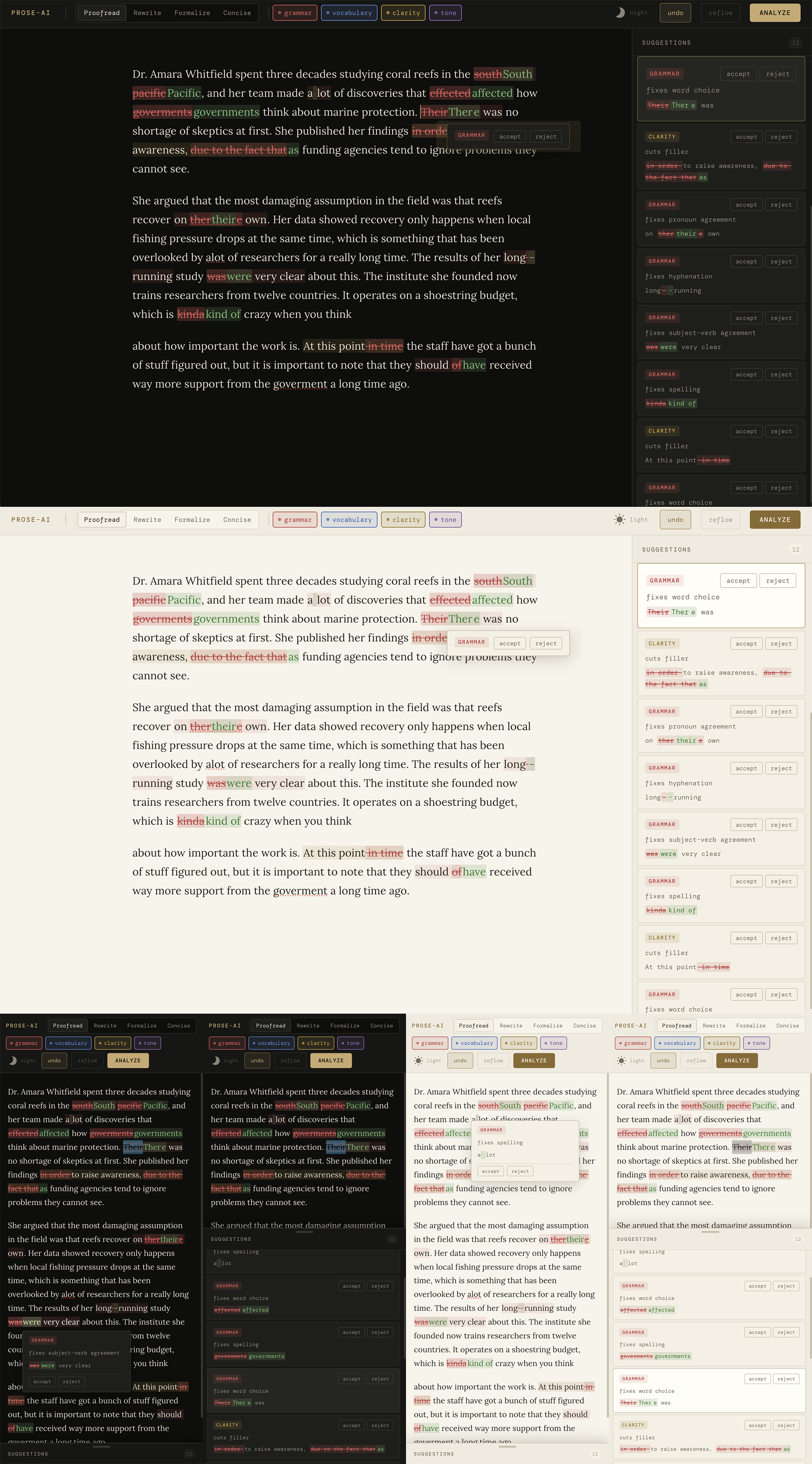
Light and dark themes. A sun/moon toggle in the toolbar morphs between a warm paper theme and the original ink-dark one, cross-fading the whole UI like a sunset into dark mode. First visit follows your OS preference, and your choice persists locally after that.
Inline tracked changes. Suggestions render directly in your prose as changesets: deletions struck out in place, insertions highlighted, unchanged words untouched. Sub-word edits expand to whole words; punctuation-only edits stay surgical. Underneath, the document holds only your original text (insertions are a visual overlay), so copy, paste, and saves stay clean until you accept.
Streaming suggestions. prose-ai splits the document into paragraph chunks and analyzes them concurrently. Each suggestion lands in the editor the moment the model finishes writing it; the first change appears in seconds while the rest of the document is still processing. Triage from the start, no waiting for the full run.
Triage anywhere. On desktop, a single click on a change opens a mini accept/reject popup right at the pointer and locates its card in the sidebar (pinned to the top of the list and expanded). On mobile, a tap opens a tooltip with the full details and actions. The sidebar always lists suggestions in document order.
Undo button. A pointer twin of ctrl+z in the toolbar, accepted suggestions included. It lights up amber whenever there is something to take back.
Context-aware chunks. Each chunk carries the preceding paragraphs as read-only context, so a pronoun whose antecedent lives in the previous paragraph is not flagged as unclear.
Synonyms. Highlight any word or phrase for contextual alternatives via the bubble menu.
Crash recovery. If the backend dies mid-run (Metal under memory pressure aborts the whole process), the run pauses with its suggestions intact and the status shows what completed. Press analyze to resume the unfinished chunks; the supervisor in start.sh restarts the server automatically.
Nothing lost on reload. The document and any suggestions you have not triaged yet persist locally and come back on the next visit.
Small screens. Below 768px the sidebar becomes a bottom sheet that peeks in when suggestions exist. On desktop, drag the sidebar edge to resize it.
Note
Editorial defaults (Oxford commas, em-dash handling, minimal suggestion spans, etc.) live in src/llm/prompt.js in the SHARED_RULES section. Adjust them to match your own style guide.
- Rapid-MLX serves the language model on Apple Silicon with an OpenAI-compatible API
- qwen3.5-4b-4bit is the default model; it won the speed/quality bake-off on a base M4 (see
benchmarks/). The model ladder and all tuning constants live insrc/llm/config.js - Bun as the JS runtime and package manager
- Vite as the dev server and bundler
- Tiptap as the rich text editor
The frontend speaks plain OpenAI chat completions, so any compatible backend works; point BACKEND_URL in src/llm/config.js at Ollama, LM Studio, or anything else. Rapid-MLX is the default because it is the fastest option tested on Apple Silicon, and the qwen3.5 family needs its chat_template_kwargs support to disable thinking mode.
Important
Rapid-MLX requires Apple Silicon. On other platforms, install an OpenAI-compatible backend of your choice and update BACKEND_URL and MODEL in the config.
curl -fsSL https://raullenchai.github.io/Rapid-MLX/install.sh | bashThe first analyze downloads the model (~2.4 GB) automatically. To pre-pull it instead:
rapid-mlx pull qwen3.5-4b-4bit# install dependencies
bun i
# start everything: supervised model server + dev server
./start.shOpen http://localhost:5173.
start.sh health-checks the backend, launches it under a supervisor loop if needed (auto-restart on crash), warms the model, and starts Vite. The served model name comes from the .model file; keep it in sync with MODEL in the config.
# unit tests
bun test

# chunked pipeline benchmark against the current backend
./bench.sh

# chunk-budget × concurrency parameter sweep
./bench.sh --sweep --quick
Results land in benchmarks/ alongside the historical runs that picked the current model and tuning.
by xero & claude code
CC0 1.0 Universal. Public domain, no rights reserved.