| English | 简体中文 |
PowerText is a text renderer for Pillow that supports emojis, multi-font matching, automatic word wrapping, and text truncation (auto-ellipsis).
python -m pip install PowerTextAlternatively, you can install from source:
git clone https://github.com/xiaosuyyds/PowerText.git
python -m pip install .import power_text
import re
from PIL import Image, ImageFont
import emoji
# Regex for Japanese Kana
jap = re.compile(r'[\u3040-\u309F\u30A0-\u30FF]')
img = Image.new("RGB", (1150, 630), (255, 255, 255))
# Note: Please ensure you have these font files or replace them with your local font paths
font1 = ImageFont.truetype(r'PINGFANG MEDIUM.TTF', 24)
font2 = ImageFont.truetype(r'unifont-16.0.02.otf', 24)
font3 = ImageFont.truetype(r'Segoe UI.ttf', 24)
# Note: For fonts like Noto Color Emoji, pay attention to the font size (e.g., 109),
# otherwise they may fail to load correctly.
font_emoji = ImageFont.truetype("NotoColorEmoji.ttf", 109)
power_text.draw_text(
img,
(10, 10), # Starting xy coordinates
"""
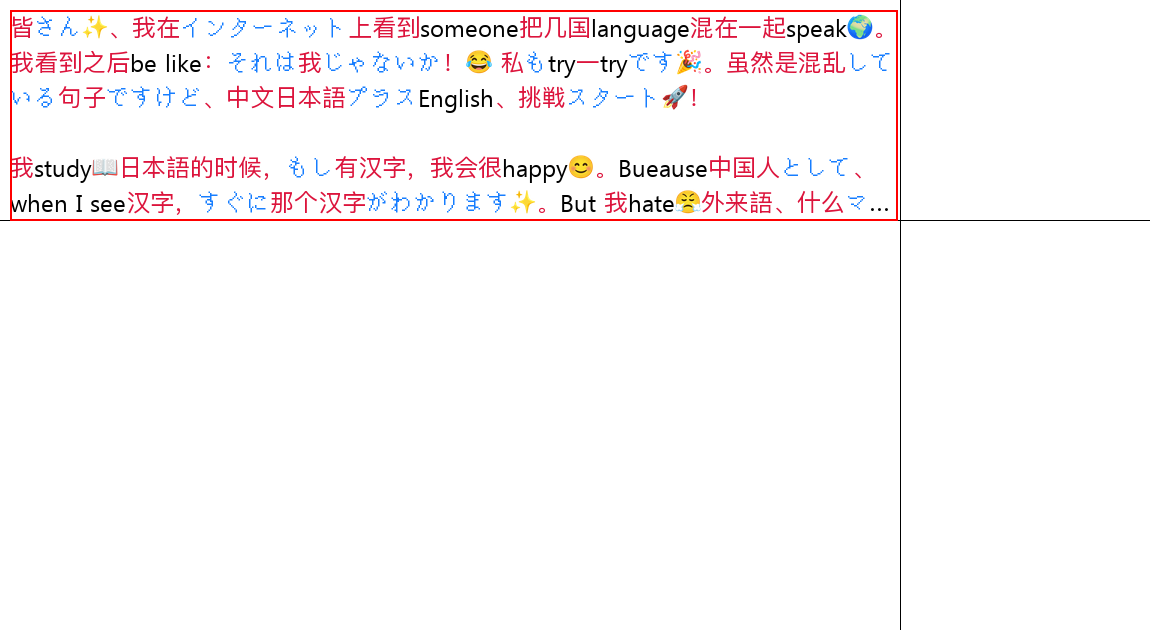
皆さん✨、我在インターネット上看到someone把几国language混在一起speak🌍。我看到之后be like:それは我じゃないか!😂 私もtry一tryです🎉。虽然是混乱している句子ですけど、中文日本語プラスEnglish、挑戦スタート🚀!
我study📖日本語的时候,もし有汉字,我会很happy😊。Bueause中国人として、when I see汉字,すぐに那个汉字がわかります✨。But 我hate😤外来語、什么マクドナルド🍔、スターバックス☕、グーグル🔍、ディズニーランド🏰、根本记不住カタカナhow to写、太難しい😭。
以上です✌️,byebye👋!
awa
""".strip(),
[
# Match Latin characters and numbers using font3 (Segoe UI), default color
power_text.Font(font3, lambda data: data['text'].lower() in "abcdefghijklmnopqrstuvwxyz0123456789"),
# Match Japanese Kana using font2 (unifont), colored blue
power_text.Font(font2, lambda data: jap.match(data['text']) is not None, (22, 125, 255)),
# Match emojis using font_emoji (Noto Color Emoji), set 'size' for automatic scaling to match text
power_text.Font(font_emoji, lambda data: emoji.is_emoji(data['text']), size=24),
# Fallback for other characters (e.g., CJK ideographs) using font1 (PingFang), colored red
power_text.Font(font1, lambda _: True, (220, 20, 60))
],
(0, 0, 0), # Default font color (black)
max_x=886, # Maximum width (auto line wrap if exceeded)
max_y=200, # Maximum height (auto truncation if exceeded)
end_text="..." # Truncation symbol
)
img.show()The output of the above code is as follows (Source Code):

- murainbot-plugin-codeshare: Uses PowerText for multi-color code rendering.
Copyright 2025-2026 Xiaosu.
Distributed under the terms of the MPL 2.0 License.