
English | 日本語


CausticsBaker is an editor-only plugin that computes caustics with hardware ray-traced photon mapping inside a region placed in the Unreal Engine 5.8 viewport, then bakes the result to a texture.
Projection targets are detected automatically from meshes inside the box, so you can place caustics much like a decal without assigning every Receiver individually. Both dielectric materials such as glass and conductors such as metals are supported.
Important
This plugin uses Renderer Private APIs and supports Unreal Engine 5.8 only. Compilation intentionally stops on any other UE version to prevent undefined behavior.
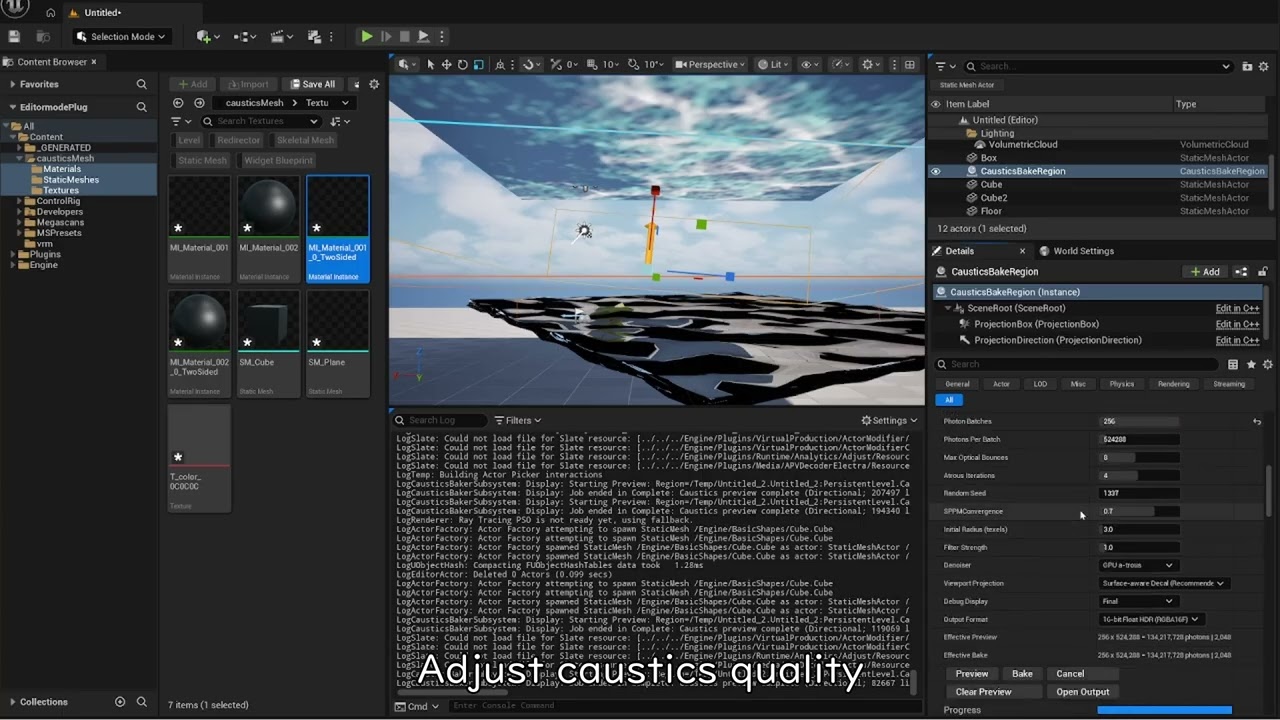
This video covers the complete workflow: placing a Region, assigning the light and Casters, previewing, and baking.
- Photon mapping through Unreal Engine's hardware ray-tracing material pipeline
- Decal-like region placement with the
Caustics Bake Regionprojection box - Receiver-free
Surface-aware Decal, strict validation withStrict Front Surface, and legacy unrestricted 2D projection - Automatic Receiver detection inside the projection box, with an optional Receiver Filter
- Photon emission from Directional, Point, and Spot Lights
- Static Mesh, Instanced Static Mesh, and Hierarchical Instanced Static Mesh Casters and Receivers
- Per-Caster, opt-in Abbe-number dielectric dispersion mapping the C/d/F spectral lines to RGB
- Owen-scrambled Sobol sampling, GGX VNDF, Fresnel, Snell refraction, total internal reflection, Beer–Lambert absorption, and Russian roulette
- A four-level medium stack for tracing multiple closed dielectrics
- Receiver-normal-aware SPPM density estimation and a GPU à-trous denoiser that protects dispersion boundaries
- Optional Intel Open Image Denoise pass for Bake
- HDR viewport Preview plus Raw, Guide, and other debug views
- Linear HDR
RGBA16Fand standard sRGBBGRA8output - Cancellation between batches, asynchronous GPU readback, and stale-result detection
- No engine modifications and no Custom Primitive Data allocation
| Item | Requirement |
|---|---|
| Unreal Engine | 5.8 |
| OS | Windows 64-bit |
| RHI | DirectX 12 |
| Shader Model | SM6 |
| Ray Tracing | Hardware Ray Tracing with the full ray-tracing shader pipeline |
| GPU | DirectX Raytracing-capable GPU |
| Runtime | Editor only |
Enable at least the following under Project Settings > Engine > Rendering, then restart the Editor:
- Default RHI: DirectX 12
- D3D12 Targeted Shader Formats: Shader Model 6
- Support Hardware Ray Tracing
- Support Compute Skin Cache, if requested by UE
Also enable Visible in Ray Tracing on components used as Casters or Receivers.
- Close Unreal Editor.
- Extract the distribution package to
<Project>/Plugins/CausticsBaker. - Confirm that the descriptor is located at
<Project>/Plugins/CausticsBaker/CausticsBaker.uplugin. - Open the project. If necessary, enable
Caustics Bakerin the Plugins window and restart. - Wait for the initial Global Shader compilation to finish.
Warning
Do not install multiple versions of CausticsBaker in the same project. When updating, close the Editor before replacing the old plugin directory.
Place this repository at <Project>/Plugins/CausticsBaker, then build the Editor target with a Visual Studio 2022 C++ toolchain compatible with UE 5.8.
- Place a
Caustics Bake Regionin the level from Place Actors. - Use the Region's
Depth / Width / Heightto overlap the projection box with the Caster and the target surfaces. - Assign one Directional, Point, or Spot Light in
Light Actor. - Add entries to
Castersand select the Static Mesh, ISM, or HISM components that generate the caustics. - Configure each Caster's
Optical Modeand optical values when needed. - Normally, leave
Receiver Filter (Optional)empty. - Keep
Viewport Projectionset toSurface-aware Decalin most cases, then clickPreview. - Choose the desired quality and output format, then click
Bake. - Save the generated Texture asset from the Content Browser.
The Region's local axes are used as follows:
| Local axis | Meaning |
|---|---|
+X |
Projection direction |
Y |
Output texture U |
-Z |
Output texture V |
The projection box extends from the Region origin along local +X. Guide rays travel in this direction and select the first Receiver layer found at each projected UV.
| Viewport Projection | Behavior |
|---|---|
Surface-aware Decal (Recommended) |
The default. Even without a Receiver Filter, the result is projected automatically onto the frontmost receiving surface selected by the Guide. Plane distance and orientation checks prevent the same pattern from being duplicated onto unrelated walls, floors, or ceilings in a large box. |
Strict Front Surface |
Uses tighter distance and normal tolerances for strict verification of the correspondence between the Guide and the physical simulation. |
Unrestricted 2D Decal (Legacy) |
Repeats the same 2D map unconditionally on every visible surface in the box. This is useful for artistic projection, but overlapping surfaces and large boxes can duplicate or stretch the pattern. |
The output is a single projected Texture2D, so surfaces that overlap in depth at the same projected UV cannot store independent values. The default Surface-aware Decal displays only the frontmost surface selected by the Guide. If surfaces at different depths need independent physical results, split them into Regions with different projection directions.
On an oblique surface, one projected texel covers a larger area on the Receiver. Since v1.2.9, matching uses the Guide tangent-plane distance rather than X depth, while the SPPM search radius is adjusted by a capped 1/sqrt(cos) factor corresponding to projected area. This prevents the search footprint from growing without bound with a larger box or a shallow angle. A larger Region still increases the physical area covered by each texel, so raise Resolution or split the Region when fine detail is required.
When Receiver Filter (Optional) is empty, ray-tracing-visible Static Mesh, ISM, and HISM components intersecting the projection box automatically become Receivers. Components registered as Casters are excluded from automatic Receiver detection.
Use Receiver Filter when projection must be restricted to specific meshes. Adding any filter entry switches from automatic detection to explicit-filter mode.
If an explicitly selected Receiver lies beyond the current Depth, Auto Fit Depth To Receiver Filter automatically extends Depth when the Receiver is within Width and Height and lies along local +X.
| Optical Mode | Purpose |
|---|---|
Auto from Material (Top Surface) |
Reads optical type, IOR/F0, roughness, tint, and normal from the simplified top-level material supplied in the ray-tracing payload. Optical Tint / F0 multiplies the recovered color and acts as a fallback when no color is available. |
Dielectric Override (Glass) |
Explicit glass settings for IOR, roughness, transmission tint, absorption, and Solid/Thin behavior. |
Conductor Override (Metal) |
Explicit metal settings for roughness and reflected F0 color. |
Substrate Auto mode uses the simplified topmost Slab or Single Layer Water representation available to ray tracing. It does not reproduce an arbitrary Substrate stack. Some UE 5.8 materials do not provide transmission color or a usable top closure in the RT payload; for reliable colored glass, select Dielectric Override (Glass) and set Optical Tint / F0.
Enable Dispersion is a per-Caster opt-in and is disabled by default. In Auto, the IOR recovered from the RT payload is treated as the reference IOR n_d, and dispersion is applied only when the material is actually classified as a dielectric. The setting is ignored for Conductor Override.
Abbe Number ranges from 5 to 200; lower values produce stronger dispersion. The implementation uses the C/d/F spectral lines—red 656.27 nm, green 587.56 nm, and blue 486.13 nm—with a two-term Cauchy approximation, keeping the green IOR equal to the configured n_d. The definition follows SCHOTT's Abbe number.
| Example material | n_d |
Abbe Number V_d |
|---|---|---|
| Fused silica | About 1.4585 | About 67.8 |
| SCHOTT N-BK7 | 1.5168 | 64.17 |
| SCHOTT N-SF11 | 1.7847 | 25.68 |
These values are starting points. Prefer the relevant material data sheet for the actual product, composition, and temperature. The R/G/B values of Light Color, Optical Tint, and Absorption are evaluated at the corresponding three wavelengths.
For a closed glass sphere or a similar object, start with the following settings:
| Item | Starting value |
|---|---|
| Optical Mode | Dielectric Override (Glass) |
| Thickness Mode | Solid (Closed Mesh) |
| Index of Refraction | 1.5 |
| Roughness | 0.001 |
| Optical Tint | White |
| Absorption | 0 |
| Denoiser | Start with None to inspect the shape, then enable if needed |
| Initial Radius | Start at 1.0 texel |
Larger Source Angle on a Directional Light, larger Source Radius on a Point or Spot Light, and higher Caster roughness all broaden the caustics. To inspect a sharp pattern, first reduce the light source size toward zero.
Increasing the photon count will not sharpen the pattern if the Receiver is outside the optical focus. For objects such as spheres, move the Receiver forward and backward to find the focal distance.
| Operation | Resolution | Batches | Photons / Batch | Total photons | Max Bounces | à-trous |
|---|---|---|---|---|---|---|
| Standard Preview | 512² | 8 | 131,072 | 1,048,576 | 6 | 2 |
| Bake preset | 2048² | 32 | 524,288 | 16,777,216 | 8 | 4 |
Set Preset to Custom (Preview and Bake) to change the following for both Preview and Bake:
- Resolution: rounded to a power of two from 256 to 4096
- Photon Batches
- Photons Per Batch
- Max Optical Bounces—the final arrival at a Receiver is not counted; Metal normally needs at least 1, while closed Solid Glass normally needs at least 2 for entry and exit
- Atrous Iterations
- Random Seed
- SPPM Convergence
- Initial Radius
- Filter Strength
Without dispersion, the total photon count is Photon Batches × Photons Per Batch. If any Caster has dispersion enabled, Photons Per Batch is interpreted per wavelength. The baker traces correlated RGB triplets that share the same emission, GGX, Fresnel, and RR samples, so the actual count is three times higher. Power in each channel is normalized by the per-wavelength photon count, so enabling dispersion alone does not reduce energy to one third.
Increasing these values reduces noise but also increases processing time and GPU load. A smaller Initial Radius preserves more detail but increases noise when photon density is insufficient. With dispersion, photon-tracing time and temporary Photon buffer usage are roughly tripled for both Preview and Bake, while the output Texture size remains unchanged.
Effective Preview / Effective Bake displays the effective resolution, wavelength count, per-wavelength and actual total photon counts, bounce count, and filter iteration count derived from the current settings.
Clicking Preview automatically clears the previous Preview before calculation starts. If the new calculation or preflight validation fails, the old result is still removed so that a result caused by previous shadows or placement cannot be mistaken for the new Preview.
GPU a-trous: An edge-aware filter guided by unbiased inter-batch variance, normal, Receiver depth, coverage, luminance difference, and chromaticity difference. It considers variance on both the center and neighboring texels and reduces color bleeding across rainbow boundaries.GPU a-trous + Intel OIDN: Adds Unreal Engine's bundled Intel OIDN after à-trous for Bake only.None: Displays the density-estimation result directly and is useful for evaluating fine concentration lines.
Debug Display provides Final, Raw, Density Filtered, OIDN Result, Guide Depth, Guide Normal, Guide Coverage, and Guide Receiver ID.
The default output path is /Game/Caustics/T_Caustics_<ActorName>. An existing Texture2D with the same name is updated.
| Output Format | Source | Compression | sRGB | Purpose |
|---|---|---|---|---|
16-bit Float HDR (RGBA16F) |
TSF_RGBA16F |
TC_HDR |
Off | Default format preserving linear HDR irradiance |
8-bit LDR (BGRA8) |
TSF_BGRA8 |
TC_Default |
On | LDR format handled as a standard color Texture |
For 8-bit output, RGB is divided by 8-bit White Level, clamped to 0–1, then encoded to sRGB. For example, with a White Level of 2, a linear HDR value of 2 becomes 255 in the 8-bit texture. Increase White Level if the result is clipped to white.
Both formats use the following conventions:
- RGB: caustic irradiance derived from the light and Caster, without the Receiver material color
- Alpha: Receiver coverage
- Address X/Y: Clamp
- Texture Group: Effects
- Mips: standard automatic generation
The generated package is marked Dirty but is not saved automatically. The plugin does not create a runtime Decal Actor or Material, but the baked Texture2D is a standard asset that can be used independently from a Material or another system.
Show implementation overview
- Create a temporary 64×64 SceneCapture that references the same Editor World.
- Set only the capture View to Plugin GI and Ray Traced Translucency.
- Build the Receiver Guide from projection rays and store depth, shading normal, Persistent Primitive ID, and coverage. The Guide uses 2×2 supersampling for Preview and 4×4 for Bake.
- Process one photon batch per capture.
- Sample a Directional Light from the Caster bounds projected into a light-space rectangle, or a Point/Spot Light from the solid angle enclosing the Caster group.
- In Photon RayGen, use a per-photon multidimensional Owen-scrambled Sobol sequence to evaluate incident-direction-aware GGX VNDF, Fresnel, Snell refraction, total internal reflection, absorption, and a wavelength-specific medium stack.
- Organize photon records with an integer atomic count, prefix scan, 8×8 tile binning, and scatter.
- Update SPPM density estimation with a cone kernel using world distance, compatibility with the compressed Receiver normal, and Receiver ID.
- Apply GPU à-trous and Intel OIDN when requested.
- After
FRHIGPUTextureReadbackcompletes, update the Texture2D on the Game Thread.
Preview reconstructs World Position and geometric normal from Scene Depth. By default, the HDR result is added in Pre-PostProcess only to surfaces matching the Guide's tangent-plane distance, orientation, and coverage. Only Unrestricted 2D Decal repeats the same 2D value on all visible surfaces inside the Region. The main viewport's GI settings are not modified.
| Symptom / message | What to check |
|---|---|
| Cannot select Light Actor | Select a Directional, Point, or Spot Light Actor from the Outliner, not a component. The Details eyedropper can also be used. |
| Point/Spot Light produces no result | Use v1.2.8 or later. Confirm that Attenuation Radius reaches the Caster, there is no occluder between the light and Caster, and the reflected or refracted path reaches a Receiver inside the projection box. Set Max Optical Bounces to at least 1 for Metal and normally at least 2 for closed Solid Glass. |
| Directional Light produces caustics from a Caster in shadow | Since v1.2.8, the incoming photon ray extends at least 100 m toward the light—or four Region diagonals for a very large Region—so walls and ceilings outside the projection box can be tested before the Caster. If light does reach the Caster, however, reflected or refracted caustics entering an area shadowed from ordinary direct light can be physically correct. |
Receiver guide rays did not intersect... |
Confirm that the projection box intersects the Receiver and that the Region's local +X points toward the target. |
| A large Region duplicates the pattern onto another wall, floor, or ceiling, or creates a huge bright area | Use v1.2.9 or later and set Viewport Projection to Surface-aware Decal. Unrestricted 2D Decal intentionally projects the same map at every depth. |
| Fine detail is missing on a large Region or an oblique wall/ceiling | Use Surface-aware Decal, raise Resolution, or split the setup into Regions with a different projection direction for each required surface. |
| Receiver ID does not match | Check Receiver Filter, Visible in Ray Tracing, and component registration. Clear Receiver Filter if it is not needed. |
| Translucent Caster is rejected | Set r.RayTracing.ExcludeTranslucent 0 and verify the Caster's Visible in Ray Tracing setting. |
| Translucent caustics are white | Select Dielectric Override (Glass) and set the intended Optical Tint / F0. Even when Auto can recover a color, Tint is applied as a multiplier. |
| Glass pattern is blurry | Check Glass Override, Solid mode, roughness, light source size, Initial Radius, and the Receiver's focal distance. Start with Denoiser set to None. |
| 8-bit output clips to white | Increase 8-bit White Level. RGB values at or above White Level are clamped to 255. |
| Preview or Output is marked Out of Date | Run Preview or Bake again after changing the Region, light, Caster/Receiver, material, or Bake settings. |
| The asset is not saved after Bake | The asset is created or updated but is not saved automatically. Save it from the Content Browser or use Save All. |
| Duplicate plugin error | Ensure that only one copy of CausticsBaker exists under the project's Plugins directories. |
- UE 5.8, Win64, and Editor only
- One Directional, Point, or Spot Light per Region
- Static Mesh, ISM, and HISM only
- No Skeletal Mesh, Landscape, or Geometry Collection support
- No volumetric caustics
- Dispersion is a three-wavelength approximation for the current RGB output; continuous spectra, XYZ reconstruction, wavelength-dependent source SPDs, and complex IOR for metals are not supported
- The physical Guide and the default
Surface-aware Decalsupport only the frontmost Receiver layer when multiple Receivers overlap along the projection direction; use separate Regions for layers at different depths - No direct baking into Receiver UVs
- No automatic runtime Decal or Material generation
- Substrate uses only the simplified top-level Surface available to ray tracing
- Nanite follows the native or fallback geometry supplied by UE to the TLAS, so an exact match with rasterized geometry is not guaranteed
The plugin package can be built with the UE 5.8 AutomationTool:
& 'D:\Unreal\UE_5.8\Engine\Build\BatchFiles\RunUAT.bat' BuildPlugin `
  -Plugin='<absolute-path>\CausticsBaker.uplugin' `
  -Package='<output-directory>' `
  -TargetPlatforms=Win64 `
  -StrictIncludes
Automation Tests are registered under CausticsBaker.*. GPU tests require an Editor project with DX12, SM6, and Hardware Ray Tracing enabled.
& '<UE_5.8>\Engine\Binaries\Win64\UnrealEditor-Cmd.exe' '<Project>.uproject' `
  -unattended -nop4 -nosplash -NoSound -RenderOffscreen `
  '-ExecCmds=Automation RunTests CausticsBaker' `
  '-TestExit=Automation Test Queue Empty'
For v1.3.0, the verified automated coverage includes the Win64 Editor build, PCD3D_SM6 Global Shader compilation, RGB dispersion slabs, Cauchy/Abbe optics, photon counting, HDR/8-bit output, Point/Spot/Directional Lights, occlusion, Solid Glass, SPPM, and Receiver coverage.
For a reproducible investigation, please include the following when possible:
- Exact Unreal Engine version
- GPU and driver version
- Screenshot showing the Region, Light, and Caster settings
- Complete error text from the Output Log
- Minimal reproduction steps
Original CausticsBaker code and documentation are released under the MIT License.
- The material ray-tracing integration was based in part on the MIT-licensed historia-Inc/CustomRaytracingShader.
- The optional Bake denoiser uses Apache-2.0-licensed Intel Open Image Denoise supplied by Unreal Engine 5.8. OIDN itself is not included in this repository or the plugin package.
- Unreal Engine itself is not included. Building and using the plugin requires a separately licensed Unreal Engine 5.8 installation.
See THIRD_PARTY_NOTICES.md for copyright notices and the terms of external dependencies.