


🚀 想要跨平台的 AI 调试体验?
如果你希望在悟空、WorkBuddy、Cursor 等工具中通过自然语言直接调用此技能,请切换到 mcp-version 分支。该版本遵循通用 MCP 标准,实现“一次安装,多端兼容”。
AI-powered visual bug detection and fixing tool for GUI apps.
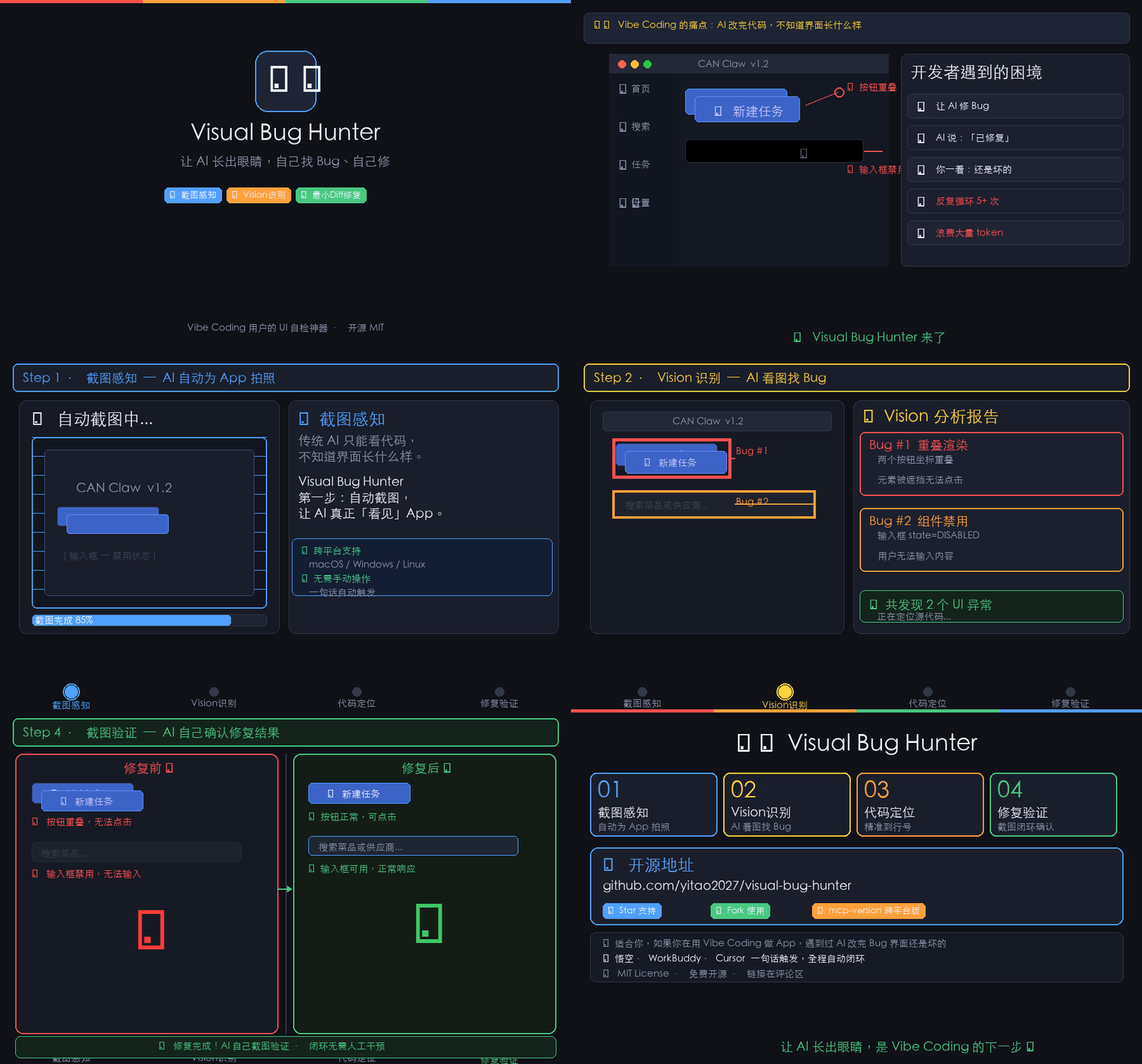
Let AI "see" and "click" like a human tester to find UI bugs, locate the exact code, and apply minimal fixes. Perfect for Vibe Coding users who want their AI agents to self-verify UI changes.
When building GUI apps with AI (Tauri, Electron, Tkinter, Qt), you often face:
- "The button doesn't work!" → Is it disabled? Is the event handler missing?
- "Elements are overlapping!" → Did the AI render the same widget twice?
- "The layout is broken!" → Where in the 1000-line file is the styling wrong?
Visual Bug Hunter solves this by closing the loop:
- See: Analyze screenshots with Vision AI.
- Click: Test UI interactions programmatically.
- Locate: Scan code for common UI anti-patterns.
- Fix: Generate minimal diffs (not full file rewrites).
- Verify: Screenshot again to prove the fix worked.
pip install visual-bug-hunterOr from source:
git clone https://github.com/yitao2027/visual-bug-hunter.git
cd visual-bug-hunter
pip install -e .Find potential UI bugs without running the app:
vbh scan /path/to/your/projectProvide a screenshot to detect visual anomalies:
vbh analyze --screenshot bug.png --project /path/to/projectAutomatically start a Python/Tkinter or macOS app and capture its initial state:
vbh test --app my_app.py| Module | Function |
|---|---|
| Utils | Cross-platform screenshot capture (screencapture, scrot). |
| Analyzer | Vision AI prompt engineering for UI bug detection. |
| Locator | AST-based scanning for disabled widgets and duplicate renders. |
| Reporter | Generates structured JSON reports with code snippets. |
| CLI | User-friendly command-line interface. |
- Disabled Widgets: Finds
setEnabled(False),state=DISABLED, etc. - Duplicate Renders: Detects multiple
.pack()or.grid()calls on the same widget.
Contributions are welcome! Please read the BUG_RULES.md to understand our core workflow.
- Fork the repository.
- Create your feature branch (
git checkout -b feature/amazing-feature). - Commit your changes (
git commit -m 'Add some amazing feature'). - Push to the branch (
git push origin feature/amazing-feature). - Open a Pull Request.
Distributed under the MIT License. See LICENSE for more information.
- Built for the Vibe Coding community.
- Inspired by the need for AI agents that can self-verify their own UI work.