
Downloads by device · Vision Pro from Windows/Linux · iPhone/iPad · Mac
A simple launcher for playing Jak on your Apple devices.
Once Dark Eco is installed, add your own game files, choose a game, and play. Game import, controls, graphics, and saves are managed inside the app; optional iCloud sync carries saves and settings between your Apple devices. Everyday setup and play happen in the app, without terminal commands.
Dark Eco is built for iPhone, iPad, and Apple Vision Pro, with an experimental Apple silicon Mac version as well.
| Device | Controls and availability |
|---|---|
| iPhone and iPad | Touch controls or a gamepad. |
| Mac (Apple silicon) — experimental | Native Jak 1 app preview. Earlier data import and title-screen boot demonstrated; this package's launch and gameplay remain unverified. |
| Apple Vision Pro | Gamepad or PSVR2 Sense controllers. Sense motion gestures are currently a Jak 1 feature. |
Vision Pro also has an experimental immersive third-person mode, with Jak visible in the world around you. See game support below for what is available and what remains unfinished.
OpenGOAL provides the reconstructed game code, compiler, and runtime foundation. Dark Eco adds native Apple ports and Metal graphics, a Swift/SwiftUI launcher and game library, on-device file import, iCloud sync, Apple-device controls, and Vision Pro presentation.
Bring compatible game data from your own legally obtained PlayStation 2 copy;
Dark Eco does not include or download the games. Game code is compiled ahead
of time into the signed app, with no PS2 emulation, JIT, or jailbreak requirement.
This is the Dark Eco app repository. The current app source is on
v2.0; builders and agents
should use that branch rather than this historical landing branch. The Xcode project and scheme retain the
internal name GOALPad. Its OpenGOAL engine dependency lives in
jak-pad and is pulled in automatically
when cloning with submodules; players start here.
Play · Controls · Build from source · Contributors and agents
The progress below does not certify Mac gameplay. Mac shares application and runtime code with the other platforms, but current feature parity and full Mac gameplay have not been tested.
| Game | Ordinary windowed play | Apple Vision Pro immersion |
|---|---|---|
| Jak and Daxter: The Precursor Legacy | Playable; the established Dark Eco baseline. A full-game completion pass is not certified. | Mostly finished, but still incomplete. Experimental third-person view with Jak visible. Known issues remain with sky coverage, stereo effects, HUD/interaction prompts, and collected-orb/3D HUD icon placement and depth. |
| Jak II | Almost finished, but still incomplete. Known renderer, cutscene and performance issues remain. Mission-start simulator tests are not a full-game or physical-device acceptance pass. | Not started. Planned after the remaining Jak 1 immersive issues are resolved. |
| Jak 3 | Planned; work has not started. | Planned; work has not started. |
All Apple platforms build from one shared app and engine source. The normal visionOS build includes the experimental Jak 1 immersive mode, and Build 290 provides separate iPhone/iPad and Vision Pro packages from that same source. Collected-orb and 3D HUD icons still have placement/depth problems, and immersive HUD behaviour still needs wearer acceptance. Earlier source reconciliation was tracked in #16. Jak II and Jak 3 immersion are planned to use a normal DualSense controller.
Optional first-person play, Sense-tracked hands and additional OpenGOAL mods are research, not shipped features. See the ten-mod shortlist and staged plan.
For development evidence and open work, see HANDOFF and ROADMAP. The known issues above remain the player-facing status.
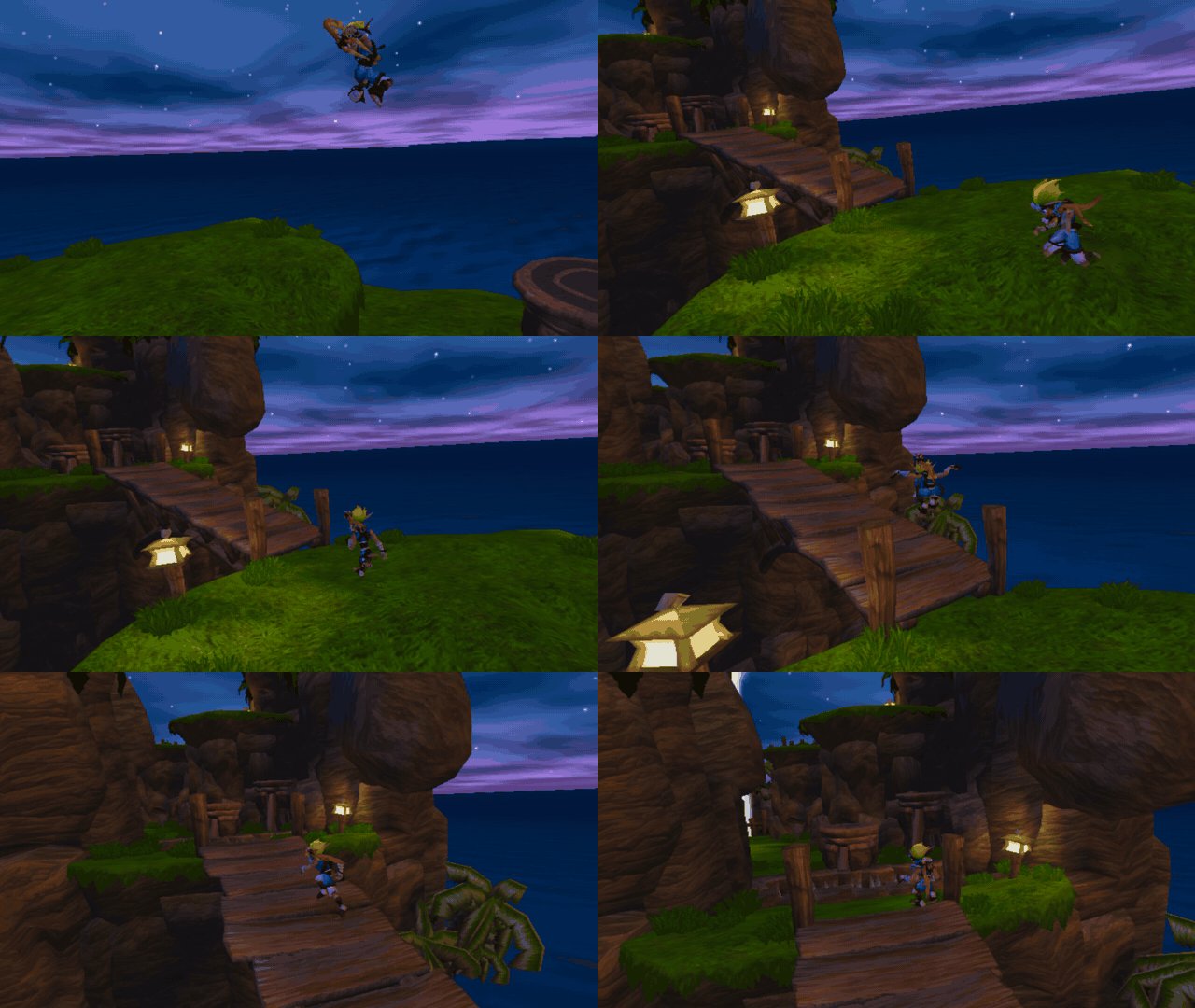
Zach's own Vision Pro recording of Dark Eco's experimental Jak 1 immersive mode. This is an in-development build; the remaining issues are listed above.
Vision Pro from Windows or Linux: use the Build 290 IPA walkthrough
and DarkEco-visionOS-2.0-build290-preview.ipa.
iPhone and iPad: use the Build 290 IPA guide
and DarkEco-iOS-2.0-build290-preview.ipa. Both are in the
Build 290 release.
Both IPA downloads and their supporting files were independently downloaded and verified.
Build 290 includes the app-folder import alternative, working Jak II internal resolution selection, texture-remap and short streamed-audio corrections, safer Jak 1 shutdown, and the sewer ocean-prefix and race-manager stack fixes. It retains the earlier Fit to Screen, portrait text and automatic Duo layout. Jak II still has known renderer and cutscene failures; this is a test preview.
The latest simulator results cover 98 authored mission starts: 81 pass and 17 fail, combining Build 289b and 290 attempts. These are short mission-start checks, not a playthrough. See Build 290 validation for the build split, test-fixture exception and remaining issues.
Updating an existing installation: back up saves and update in place with the same signing identity when possible. Keep your installed game data; you do not need to re-import solely for this update or the race fix. Two isolated Build 290 mission-start checks passed with unchanged Build 288 prepared data. That is a limited compatibility check, not a guarantee for every import or device. A different App ID or signer can create a separate save container.
Build 286 and older packages remain under earlier packages.
Apple Silicon Mac: use the native Build 270.1 app guide.
See downloads by device for package versions and earlier releases. These packaged previews use local saves; the maintainer's iCloud identity is not included.
The Vision Pro guide covers Apparition setup, the sign-in server setting, pairing, installation, your own Jak game-data import and refreshes. No Mac is needed to install that published preview. It requires visionOS 26.5+ and uses local saves; fresh-recipient installation and gameplay through this route remain unverified.
Check the Dark Eco releases for an available build and follow that release's installation and signing instructions. Use the package for your device: iPhone/iPad, Mac, or Vision Pro. A signed package is not necessarily provisioned for every device.
Distribution is through GitHub source and release artifacts, not the App Store or TestFlight. If no suitable package is published, use the source-build steps below. Current project deployment targets require iOS/iPadOS 26.5, macOS 26.5, or visionOS 26.5 or newer.
- Open Dark Eco and choose Jak and Daxter or Jak II in the Library.
- If Set Up Game Data appears, choose Continue.
- Select Choose game data… and choose a supported source for that game:
- A supported ISO, or a ZIP/7z containing exactly one ISO, when disc preparation is enabled in that build.
- A compatible prepared game data folder containing OpenGOAL's
iso/andfr3/output. Use data for the selected game.
- Keep Dark Eco open and in the foreground while it prepares and imports the data. The setup screen reports progress and explains unsupported sources.
- When setup finishes, choose Play Now.
On-device disc preparation currently accepts Jak 1 SCUS-97124 (NTSC v1, Black Label) and Jak II SCUS-97265 (NTSC-U v2). Other disc revisions may be rejected; the prepared-folder path remains an alternative for compatible data.
The setup screen is the authority for the formats supported by your particular build. When disc preparation is available, the picker leaves files selectable and Dark Eco checks the selection afterwards. Without disc preparation for the selected game, the picker offers prepared folders only. A selected file can still be an unsupported format or disc revision.
If tapping a file in the iPhone or iPad picker does nothing, try its icon or switch to List view. Build 290 also offers Use a file in the Dark Eco folder…: copy your ISO, ZIP, or 7z directly into Files → Browse → On My iPhone / On My iPad → Dark Eco, then select it inside setup. This uses the same game-data validation. Recipient-device import acceptance remains pending. The copied source uses extra storage until you remove it after a successful import; keep the installed game-data and save folders.
Keep Dark Eco's installed game-data copy on your device. Once setup succeeds, the app no longer needs the original import source. No game data is fetched from the internet or supplied with this repository.
- iPhone / iPad: use the on-screen touch controls or a compatible game controller.
- Mac (experimental): a complete gameplay/control pass remains unvalidated.
- Apple Vision Pro: use a compatible game controller. A normal DualSense is the intended controller for future Jak II and Jak 3 immersive play.
- Jak 1 experimental Sense controls: supported builds can use PSVR2 Sense gestures for punch, spin, and jump. Gesture support is a Jak 1 experiment; it is not a requirement for ordinary play.
The original game menus explain the normal buttons. On a PlayStation-layout controller, Cross jumps, Square punches, and Circle spins in Jak 1.
In Jak 1 builds with Sense motion enabled, either-hand forward jabs punch, side-to-side shakes spin, and raising both controllers together jumps; repeat the jump gesture for a double jump. Normal buttons remain available if you prefer them. Availability and gesture tuning depend on the build.
Save and load through the game's own menus. Dark Eco keeps each game's saves separate, using OpenGOAL-compatible memory-card files.
Settings provides Import Saves and Export Saves. Optional Sync Saves in Settings' iCloud section can synchronize between your Apple devices; gameplay uses local saves and works offline. Export a backup before replacing an installation or changing signing identities. An app update should be installed in place, without first deleting the existing app and its data.
Use an Apple silicon Mac, Xcode with the required Apple SDKs, and the build prerequisites. These instructions build Dark Eco for Apple devices; upstream PC launcher instructions are not the app setup path.
git clone --branch v2.0 --recurse-submodules https://github.com/zschwendi/dark-eco.git dark-eco
cd dark-eco
The OpenGOAL submodule is pinned by this repository. Preserve that pin rather than substituting upstream's current branch. For an existing clean checkout:
git submodule sync -- OpenGOAL
git submodule update --init --recursive
Prepare both games' public source packs and generated code before opening Xcode. These steps compile open-source code, not retail game assets. Run them sequentially, using the same host build directory:
Scripts/prepare-jak1-source-object-pack.sh
Scripts/prepare-jak2-source-object-pack.sh
Scripts/generate-jak1-aot.sh "$PWD/OpenGOAL/build/Release/bin"
Scripts/generate-jak2-aot.sh "$PWD/OpenGOAL/build/Release/bin"
open GOALPad.xcodeproj
Choose the GOALPad scheme, select your Apple destination, and configure your own signing team, bundle identifiers, and iCloud capabilities when installing on hardware. The embedded GOALPadJak2Runtime framework is part of Dark Eco, not a separate app. See Building for detailed commands, signing requirements, and platform validation notes. Do not use the retired standalone Jak II app or old App Store/reviewer-launcher instructions.
Start here before changing anything:
- Read AGENTS.md and the authoritative Project Overview.
- Read the top of HANDOFF.md for the latest source/build state, then ROADMAP.md for the current priorities.
- Inspect the parent and nested OpenGOAL Git state. Preserve dirty work, saves and user game data. Older immersive/windowed worktrees and branches are history and evidence, not separate delivery lanes; new work uses the one shared source.
- Work on the smallest scoped change. Follow the current task's device authorization and run relevant checks; a simulator pass is not physical-device acceptance.
- Record exact commands, results, remaining issues, and the next step in the handoff.
The unified product branch is v2.0. Runtime changes belong in the pinned
OpenGOAL fork; app/lifecycle/import UI
changes belong here. Preserve per-game data and save isolation. Do not begin
Jak II immersion until the remaining Jak 1 immersive blockers are resolved.
| Location | Purpose |
|---|---|
GOALPad/ |
SwiftUI app, settings, imports, saves, Apple hosts, native bridge |
GOALPad.xcodeproj/ |
Shared Apple application project |
OpenGOAL/ |
Pinned engine fork: runtime, compiler, GOAL source, Metal renderer |
Scripts/ |
Code generation, packaging, and focused checks |
docs/ |
Architecture, build instructions, and validation reports |
tests/native/ |
Native test harnesses |
Do not commit disc images, extracted retail data, saves, signing material, or secrets.
Dark Eco is by Zach Schwendiman / Zephyr Studios. It is built on the OpenGOAL team's work: their GOAL language tools, reconstructed game code, runtime, and data formats make this port possible. Dark Eco adds the Apple app, native ARM64 ahead-of-time path, and Metal/Apple-platform integration.
This is an unofficial community project, unaffiliated with Sony Interactive Entertainment, Naughty Dog, or the OpenGOAL team.