一个面向 Codex CLI 工作流的 Remote Notifier 非官方增强分支。
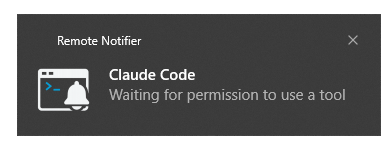
核心使用场景:Codex 可以运行在 Remote SSH 连接的 Linux 服务器上,但“任务完成”、 “等待回答”、“计划完成”和“等待授权”等提醒会通过 VS Code Router 回传,并显示在你正在使用的 本机 Windows 10/11 上。即使 VS Code 被浏览器或其他窗口遮挡,也能收到持续显示的 Windows 系统通知,不需要一直盯着远端终端。同时也支持完全在本机使用:Codex、Router 和通知扩展 都运行在同一台 Windows 电脑上,无需配置 SSH。通知不只是提醒:点击后会返回产生通知的 VS Code 窗口,并聚焦原本已经存在的 Codex session,不会另开一个对话。
本项目 fork 自 ripper37/remote-notifier,
当前增强工作基于上游 v1.0.1。项目保留了上游的 MIT 许可证、完整 Git 历史,
以及本机 Presenter + 工作区 Router 的核心架构。
特别感谢原作者 Damian Dyńdo (@ripper37) 创建并开源 Remote Notifier。其跨本机、Remote SSH、WSL 和容器的通知路由设计,为本 fork 的 Codex 特化提供了可靠基础。
本 fork 由社区独立维护,与原作者及 OpenAI 均无隶属关系。上游项目的原始功能和 完整说明请参阅原仓库。
本 fork 不修改 Codex 本体。Codex 0.145+ 在新建集成终端中通过透明 shim 和 per-TUI sidecar 旁读 app-server 结构化事件;旧版本、普通终端和不支持的命令自动回退到轻量 Hook。 两条链路都只通过本机 Router 显示系统通知。
| Codex 场景 | 通知标题 | 精确模式触发条件 |
|---|---|---|
| 普通回答结束 | [任务完成] |
turn/completed: completed |
| 完整计划生成 | [计划完成] |
完成 turn 中包含结构化 Plan item |
| 等待用户或 MCP 回答 | [等待回答] 等 |
每个独立 JSON-RPC request id |
| 等待命令、文件或权限 | [等待…授权] |
对应的 app-server approval request |
| 安全缓冲界面开启 | [等待安全检查] |
活动 turn 中界面从关闭变为开启 |
| 每次官方错误出现 | 分类后的错误标题 | 每个 app-server error occurrence |
此外还增加了以下能力:
- 根据
session_id从 Codex 状态数据库或session_index.jsonl读取重命名后的会话名。 - 通知正文优先显示主机名和会话名;未重命名时改为显示回答摘要。
- 可配置摘要长度,默认截取前 16 个可见字符,并正确处理中文和组合字符。
- 精确模式不读取 transcript,也不依赖计时器或终端文字识别;sidecar 只旁读白名单字段, 不记录提示词、令牌或原始协议。
- 每个独立请求和真实状态变化都会投递;仅归并同一 request id 的重放、同一安全界面的重复 delta 和同一失败的终态确认,并完全绕过通用突发通知限流。
- 每次官方错误事件都会及时通知;非连接类自动重试错误立即通知,连接/重连错误在连续第 5 次失败后 通知,避免重连抖动刷屏。同样的错误文字后续再次出现也会再次通知。仅归并同一 occurrence id 的 传输重放和没有新增可见错误的最终 turn 确认。错误会按额度、上下文、 登录、网络、模型服务、模型不可用、请求/配置、响应长度、会话恢复、状态冲突和沙箱策略分类。
- 上游连接错误会继续按 HTTP 状态细分:
401/403登录、413上下文、429额度或限流、5xx模型服务、普通4xx请求/配置,超时、代理和客户端断开状态归为网络错误。 - 旧版或 Hook 回退记录若只给出
codexErrorInfo: other,Router 会对 Codex 的标准终止错误短语做 有限分类,例如流关闭、请求发送失败、DNS/TLS/代理、模型不支持和max_output_tokens; 若提供方把错误包在 JSON 中,只提取嵌套消息、类型和 HTTP 状态,不显示请求 ID 或原始信封。 - 错误正文会清除控制字符,并遮盖 Bearer/API key、URL 用户信息和常见查询参数中的凭据。
- 只有通知展示成功后才提交协议去重状态;若即时错误通知投递失败,随后到达的失败 turn 终态会再次补投, 不会因为过早去重而漏报。
- Hook helper 不读取 transcript、会话索引或 SQLite,内部总时限约 1.35 秒;Router 在
202 Accepted后异步完成兼容回退所需的 transcript 尾部和会话标题解析。Stop 回退会在约 0.75 秒内短轮询 最终记录,避免task_complete.error稍晚落盘时误报为完成。对于 Codex 不会调用 Stop Hook 的终止错误,Router 从UserPromptSubmit起按文件变更事件监听当前 transcript,只解析追加的task_complete.error,因此旧终端和普通 Hook 会话也不会漏掉流断开等最终失败。 - sidecar 在 Router 重载期间保留经过清洗的事件队列,并在 TUI 退出前最多等待 5 秒补投, 包括 session 文件和认证令牌被替换的情况。
- Windows shim 优先使用终端
PATH中的真实node.exe启动 sidecar,不再用 VS Code 的 Electron 宿主启动 Codex TUI;这会保留 ConPTY/TTY,避免stdin is not a terminal。 - Windows 上使用原生 reminder 场景,通知会保留到用户点击或关闭为止。
- Windows 11 支持时,全屏、D3D 或演示模式下使用系统
urgent重要通知;不支持时回退 reminder, 不创建抢焦点覆盖窗口。 - 点击通知会回到产生该通知的 VS Code 窗口,并聚焦承载该 Codex session 的既有集成终端; 不会创建新对话。
- 多个 VS Code 窗口各自保存工作区 Router 记录;即使旧终端仍持有重载前的端口,Helper 也会按
Hook 的
cwd找回对应工作区,不会把通知回退给最近打开的其他窗口。 - 主扩展和 Router 使用独立扩展 ID,避免被 Marketplace 上游版本自动覆盖。
- Hook 仅执行本地脚本和本地路由,不增加模型上下文,也不消耗额外模型 token。
这是本 fork 的核心增强之一。 Windows 通知不仅告诉你 Codex 已经停下来,还保存了产生通知的
VS Code 窗口、工作区、session_id 和集成终端映射。无论 Codex 在本机 Windows 运行,还是在
VS Code Remote SSH 连接的 Linux 服务器运行,点击通知都会尝试:
- 将产生通知的 VS Code 窗口切回前台。
- 找到该
session_id原本所在的集成终端。 - 显示并聚焦这个已有终端,不启动新的 Codex 对话。
会话 rename 只影响通知中的显示名称,不影响跳转依据。多个 VS Code 窗口使用独立 Focus Broker 和 Router 命令;窗口重载后,Helper 还会通过工作区会话文件恢复到新的 Router 端口,避免把点击 送到最近打开但不相关的窗口。如果原窗口或终端已经真正关闭,扩展会明确提示无法定位,不会静默 打开错误的 session。
- Windows 10/11 本机工作流已经完成自动化测试和手动端到端验证。
- Linux Remote SSH 到本机 Windows 的通知、轻量 Hook、已有终端映射和点击聚焦已经完成实机 端到端验证;点击后服务器 Router 日志确认聚焦到通知对应的命名 Codex 终端。
- 精确终端跳转已经实现:Hook 采集父进程链,Router 将
session_id映射到对应终端, 每个 VS Code 窗口使用独立的本机回环 broker 接收点击事件;每个 Router 实例还会生成 唯一的聚焦命令,避免多窗口中的同名命令被路由到错误工作区。 - 原窗口或终端已经关闭且无法恢复映射时,会聚焦当前 VS Code 并明确提示无法定位, 不会静默跳到错误终端。
- 不同 SSH 主机和复杂多窗口组合仍建议在首次安装后各做一次点击验证;核心 Remote SSH 链路 已不再只是自动化测试状态。
Remote Notifier Codex 包含两个 VS Code 扩展、一个 per-TUI sidecar 和一个兼容 Hook:
新建 VS Code 集成终端中的 codex shim
  -> sidecar -> codex app-server --stdio
  -> codex TUI --remote(前台,命令用法不变)
  -> 认证的 /codex/events
  -> 工作区侧 Remote Notifier Codex Router
  -> 本机侧 Remote Notifier Codex
  -> Windows 系统通知

不支持旁路的命令或 Codex 0.144.3
  -> ~/.local/bin/codex-attention-hook
  -> 认证的 /codex/events

点击 Windows 通知
  -> 顶层 VS Code URI Handler
  -> 产生通知的窗口侧 127.0.0.1 Focus Broker
  -> 通知指定的唯一工作区 Router 命令
  -> 对应的既有集成终端
- Remote Notifier Codex:UI 扩展,在本机显示 VS Code 或系统通知。
- Remote Notifier Codex (Router):工作区扩展,接收已校验的协议/Hook 事件并异步解析兼容元数据。
- Codex sidecar:与单个 TUI 同寿命,原样转发 WebSocket/JSONL,只提取通知所需白名单字段。
- codex-attention-hook:旧版和旁路不可用时使用的最小 Python 转发 helper。
上游提供的 code-notify CLI、HTTP 通知接口、图标映射、自定义声音以及
Claude Code/Gemini CLI 自动配置仍然保留。
- Windows 10/11 用于本机系统通知。
- VS Code
1.85.0或更高版本。 - Node.js 20+ 与 npm 10+,仅在参与项目开发时需要。
- Codex CLI
0.145.0或更高版本用于精确协议监测;0.144.3继续支持 Hook 回退。 - Remote SSH 场景中的远端 Linux 需要 Python 3。
本项目是 VS Code 扩展,不是 npm 命令行包。目前尚未发布到 VS Code Marketplace,
因此其他用户应安装构建好的 VSIX,而不是执行 npm install:
- 从本仓库的 Releases
下载同一版本中的两个文件:
remote-notifier-codex-*.vsixremote-notifier-codex-router-*.vsix
安装位置取决于使用场景:
| 场景 | Remote Notifier Codex(Presenter) | Codex Router |
|---|---|---|
| 纯本机使用 | 安装在 Local |
安装在 Local |
| Remote SSH | 安装在本机 Windows 的 Local |
安装在 SSH: <服务器名> 的远端 |
Remote SSH 场景下,Router 和 Hook 在服务器侧接收 Codex 事件;Presenter 留在本机 Windows, 负责显示系统通知。两端缺少任意一个扩展都无法完成服务器到 Windows 的通知链路。
先在 PowerShell 中进入两个 VSIX 文件所在的下载目录。纯本机场景只需执行:
code --install-extension .\remote-notifier-codex-1.0.5.vsix --force
code --install-extension .\remote-notifier-codex-router-1.0.22.vsix --force
Remote SSH 场景使用下面两条命令。将 YOUR_SSH_HOST 替换为 Windows
%USERPROFILE%\.ssh\config 中的 Host 别名,例如 public_jclou_4090_server:
# Presenter 安装到 Windows 本机
code --install-extension .\remote-notifier-codex-1.0.5.vsix --force

# Router 安装到指定 SSH 主机
code --remote ssh-remote+YOUR_SSH_HOST --install-extension `
  .\remote-notifier-codex-router-1.0.22.vsix --force
普通的 code --install-extension 安装到本机;增加
--remote ssh-remote+YOUR_SSH_HOST 后,扩展才会安装到对应服务器。--force 可以覆盖已经安装的
同版本 VSIX,适合安装修复后但版本号未变化的构建。第一次使用某个 SSH 主机时,请先在 VS Code
中成功连接一次,再执行远端安装命令。
两条命令执行成功后:
- 打开对应的本机或 Remote SSH 窗口。
- 按
Ctrl+Shift+P,执行Developer: Reload Window(中文界面为开发人员: 重新加载窗口)。Remote SSH 窗口需要等待重新连接服务器;不要刷新 浏览器页面。 - 关闭安装前打开的旧终端,执行
Terminal: Create New Terminal,再从新终端启动 Codex。
不方便使用命令行时,可以按以下简化流程安装:
- 按
Ctrl+Shift+P,执行Extensions: Install from VSIX...。纯本机使用时在本机窗口安装两个 VSIX;Remote SSH 使用时在本机窗口安装 Presenter,再在SSH: <服务器名>窗口安装 Router。 - 检查扩展位置:Presenter 应为
Local,Router 应为Local或当前的SSH: <服务器名>。 - 在最终使用的窗口中按
Ctrl+Shift+P,执行Developer: Reload Window。 - 窗口重新打开后新建集成终端,再继续配置 Codex 通知。
- 确认已经按上一节重新加载 VS Code 窗口,并在重新加载后新建了集成终端。
- 按
Ctrl+Shift+P打开命令面板,输入并执行Remote Notifier: Auto-configure notifications in current workspace for...。 - 选择
Codex。 - 如果 Codex 是在配置 Hook 之前启动的,请退出并从新终端重新启动或恢复 Codex session。
- Codex 首次检测到新 Hook 时,核对命令路径后进行一次信任审核。
Router 会把 helper 安装到:
~/.local/bin/codex-attention-hook
并在 $CODEX_HOME/hooks.json 中幂等添加 SessionStart、UserPromptSubmit、Stop、
PreToolUse 和 PermissionRequest Hook。Router 同时只为新建集成终端注入私有 codex
shim。支持的 codex、codex resume 和 codex fork 命令会启用精确旁路;TUI 内部
/resume 会获得独立的临时 app-server 连接,因此不会与当前会话争用协议连接。
profile、显式 --remote、未知参数及不支持的版本会保持原命令语义并自动走 Hook。
已重命名的会话:
主机名 · 会话名
未重命名的会话:
主机名 · 回答前 16 个可见字符
| 设置 | 默认值 | 说明 |
|---|---|---|
remoteNotifier.systemNotifications |
always |
Codex 增强构建默认始终使用系统通知 |
remoteNotifier.codexPersistentNotifications |
true |
Windows Codex 通知持续显示到点击或关闭 |
remoteNotifier.codexFullscreenUrgentNotifications |
true |
全屏或演示时使用 Windows 重要通知 |
remoteNotifier.codexProtocolMonitoring |
true |
新集成终端启用 Codex 0.145+ 精确旁路 |
remoteNotifier.codexPreviewLength |
16 |
会话名和回答摘要的最大可见字符数 |
remoteNotifier.notificationSound |
true |
是否播放系统通知声音 |
remoteNotifier.notificationSoundPath |
"" |
可选的自定义声音路径 |
remoteNotifier.iconMappings |
{} |
将通知图标键映射到本地图片路径 |
第一次触发Windows 重要通知 时,系统会请求授权;拒绝授权或系统版本不支持时仍使用普通 reminder。
| 命令 | 用途 |
|---|---|
Remote Notifier: Auto-configure notifications in current workspace for... |
安装或更新 Codex Hook |
Remote Notifier: Remove Codex notification configuration |
移除 shim、Hook 和 helper |
Remote Notifier: Test system notifications |
测试系统通知 |
Remote Notifier: Test VS Code notifications |
测试 VS Code 内通知 |
Remote Notifier: Show Session Info |
查看 Router 地址和脱敏 token |
仍可使用上游的 code-notify 命令发送任意通知:
code-notify "Build completed"
code-notify "Build" "Completed successfully"
code-notify -i ICON_CI -d system "CI" "Pipeline passed"
Router 只监听 127.0.0.1,使用随机 bearer token 验证请求。会话信息保存在
~/.remote-notifier/sessions/ 下的工作区独立文件中,并保留
~/.remote-notifier/session.json 作为旧版本兼容入口;这些信息不会经过外部通知服务。
npm run format:check
npm run lint
npm run typecheck
npm test
npm run package
当前测试基线为 243 项全部通过。
本项目遵循 MIT License。再次感谢 ripper37/remote-notifier 原作者及贡献者的工作。
An unofficial Remote Notifier fork specialized for Codex CLI workflows.
Primary use case: Codex may run on a Linux server through VS Code Remote SSH, while task-completed, answer-needed, plan-completed, and permission notifications are routed back to the local Windows 10/11 desktop. Persistent Windows notifications remain visible even when a browser or another window covers VS Code, so the remote terminal does not require constant attention. The extension also supports a fully local setup, with Codex, the Router, and notifications all running on the same Windows machine without SSH.
Notifications are actionable, not display-only: clicking one returns to the VS Code window that produced it and focuses the existing Codex session instead of opening a new conversation.
This project is forked from
ripper37/remote-notifier, with the
current enhancements based on upstream v1.0.1. It preserves the upstream MIT
license, complete Git history, and the local Presenter + workspace Router
architecture.
Special thanks to Damian Dyńdo (@ripper37) for creating and open-sourcing Remote Notifier. Its routing design across local workspaces, Remote SSH, WSL, and containers provides the foundation for the Codex-specific features in this fork.
This is an independently maintained community fork and is not affiliated with the upstream author or OpenAI. See the upstream repository for the original project and documentation.
This fork does not modify Codex. Codex 0.145+ uses a transparent shim in new integrated terminals and a per-TUI sidecar that observes structured app-server events. Older versions, ordinary terminals, and unsupported invocations fail open to a lightweight Hook path.
| Codex scenario | Notification | Exact-mode trigger |
|---|---|---|
| Normal response completed | [任务完成] |
turn/completed: completed |
| Complete plan produced | [计划完成] |
Structured Plan item in the completed turn |
| Waiting for user or MCP input | [等待回答] and peers |
Each distinct JSON-RPC request id |
| Waiting for command/file/permissions | Approval-specific | Matching app-server approval request |
| Safety buffering UI became visible | [等待安全检查] |
Off-to-on transition in the active turn |
| Every official error occurrence | Classified error | Each app-server error occurrence |
Additional enhancements include:
- Resolving renamed Codex sessions from the state database or
session_index.jsonlusingsession_id. - Showing the host and renamed session when available, with a direct final-answer preview for unnamed sessions.
- Configurable Unicode-aware preview truncation, defaulting to 16 visible characters.
- No timers, terminal text recognition, or transcript access in exact mode. The sidecar observes only whitelisted fields and never logs prompts, tokens, or raw protocol messages.
- Delivery of every distinct request and real state change. Only replay of the same request id, repeated safety deltas, and confirmation of the same terminal failure are collapsed; Codex bypasses the generic burst limit.
- Every official error event notifies promptly; non-connection retryable errors notify immediately, while reconnecting/connection failures notify after five consecutive failed attempts. A later occurrence with identical text notifies again. Only transport replay of the same occurrence id and a final turn confirmation with no new visible error are collapsed. Errors are classified as quota, context, authentication, network, model service, unavailable model, request/configuration, output length, session recovery, state conflict, sandbox/policy, or unknown.
- Upstream connection failures are refined by HTTP status:
401/403for authentication,413for context size,429for quota/rate limits,5xxfor model service failures, ordinary4xxfor request/configuration errors, and timeout, proxy, or client-disconnect statuses as network errors. - Older or Hook-fallback records that contain only
codexErrorInfo: otheruse bounded matching for standard Codex terminal errors including closed streams, request-send failures, DNS/TLS/proxy failures, unsupported models, andmax_output_tokens. Provider JSON envelopes are reduced to their nested message, type, and HTTP status; request ids and the raw envelope are omitted. Terminal UI text is still never scraped. - Error previews remove control characters and redact Bearer/API keys, URL user information, and credentials in common query parameters.
- Protocol deduplication is committed only after successful presentation. If an immediate error notification cannot be delivered, the failed turn terminal can retry it instead of being suppressed prematurely.
- A minimal Hook helper with an internal deadline of about 1.35 seconds. It
never reads transcripts, indexes, or SQLite; the Router performs bounded
compatibility parsing asynchronously after returning
202 Accepted. Stop fallback briefly polls for up to about 0.75 seconds so a late persistedtask_complete.erroris not mistaken for successful completion. Because Codex does not invoke Stop hooks for some terminal failures, the Router also watches transcript appends fromUserPromptSubmitand parses only structured terminal completion records. - The sidecar retains sanitized events while the Router reloads and allows up to five seconds for final delivery before TUI shutdown, including session-file and token replacement.
- On Windows the shim prefers the real
node.exeon the terminalPATHinstead of launching the Codex TUI through VS Code's Electron host. This preserves ConPTY/TTY handles and preventsstdin is not a terminal. - Persistent Windows reminder notifications that remain until opened or dismissed.
- Windows important notifications (
urgent) while full-screen, D3D, or presentation mode is active on supported Windows 11 builds, with a normal reminder fallback and no focus-stealing overlay. - Notification clicks that return to the originating VS Code window and focus the existing integrated terminal that owns the Codex session, without creating a new conversation.
- Workspace-scoped Router records for multi-window recovery. If an existing
terminal still has a pre-reload port, the helper matches the hook
cwdto the correct workspace instead of falling back to the most recently opened window. - Independent extension IDs that cannot be overwritten by the Marketplace versions.
- Local-only hook processing with no additional model context or token usage.
This is a core enhancement in this fork. A Windows notification retains
the originating VS Code window, workspace, session_id, and integrated
terminal mapping. Whether Codex runs locally on Windows or on Linux through VS
Code Remote SSH, clicking the notification attempts to:
- Bring the originating VS Code window to the foreground.
- Locate the integrated terminal that already owns the
session_id. - Reveal and focus that terminal without starting a new Codex conversation.
Renaming a session changes only its displayed label, not its routing identity. Per-window focus brokers and unique Router commands prevent another VS Code window from claiming the click. After a window reload, workspace-scoped session files lead existing terminals to the refreshed Router port. If the originating window or terminal is genuinely closed, the extension reports that it cannot be located instead of silently opening the wrong session.
- The Windows 10/11 local workflow has automated coverage and manual end-to-end testing.
- The Linux Remote SSH to local Windows path has completed live end-to-end validation, including the lightweight Hook, existing-terminal mapping, and a notification click confirmed by the server Router to focus the matching named Codex terminal.
- Exact terminal navigation is implemented by matching the hook's process
ancestry to a VS Code terminal process and mapping it to
session_id. A per-window loopback broker routes clicks back to the originating window, and a unique command generated by each Router instance prevents multi-window command dispatch from selecting another workspace. - If the original window or terminal is already closed and its mapping cannot be restored, the extension focuses the current VS Code window and reports that the terminal could not be located instead of selecting the wrong one.
- New SSH hosts and complex multi-window combinations should still receive one click-through check after installation, but the core Remote SSH path is no longer validated only by automated tests.
codex shim in a newly created VS Code integrated terminal
  -> sidecar -> codex app-server --stdio
  -> foreground codex TUI --remote (same user command)
  -> authenticated /codex/events
  -> Remote Notifier Codex Router in the workspace
  -> Remote Notifier Codex on the local UI side
  -> Windows system notification

unsupported invocation or Codex 0.144.3
  -> ~/.local/bin/codex-attention-hook
  -> authenticated /codex/events

Windows notification click
  -> topmost VS Code URI handler
  -> 127.0.0.1 focus broker in the originating window
  -> unique command for the originating workspace Router
  -> matching existing integrated terminal
- Remote Notifier Codex is the local UI extension that presents VS Code or operating-system notifications.
- Remote Notifier Codex (Router) runs with the workspace, locally or remotely, validates protocol/Hook events, and resolves fallback metadata.
- Codex sidecar lives for one TUI, forwards WebSocket/JSONL unchanged, and extracts only the notification whitelist.
- codex-attention-hook is the minimal fallback forwarder for older Codex versions and invocations that cannot use the sidecar.
The upstream code-notify CLI, HTTP endpoint, icon mappings, custom sounds,
and Claude Code/Gemini CLI auto-configuration remain available.
- Windows 10/11 for local system notifications.
- VS Code 1.85.0 or later.
- Node.js 20+ and npm 10+ only for project development.
- Codex CLI 0.145.0 or later for exact protocol monitoring; 0.144.3 remains supported through Hook fallback.
- Python 3 on a remote Linux host when using Remote SSH.
This project contains VS Code extensions, not npm command-line packages.
It has not yet been published to the VS Code Marketplace, so users should
install built VSIX packages rather than run npm install:
- Download both files from the same entry under this repository's
Releases:
remote-notifier-codex-*.vsixremote-notifier-codex-router-*.vsix
Install each extension in the appropriate location:
| Scenario | Remote Notifier Codex (Presenter) | Codex Router |
|---|---|---|
| Local only | Install under Local |
Install under Local |
| Remote SSH | Install under Windows Local |
Install under SSH: <host> |
With Remote SSH, the Router and hook receive Codex events on the server, while the Presenter remains on the Windows machine and displays the system notification. Both sides are required for the server-to-Windows path.
First, change to the download directory containing both VSIX files. For a local-only setup, run:
code --install-extension .\remote-notifier-codex-1.0.5.vsix --force
code --install-extension .\remote-notifier-codex-router-1.0.22.vsix --force
For Remote SSH, replace YOUR_SSH_HOST with a Host alias from the Windows
%USERPROFILE%\.ssh\config file, such as public_jclou_4090_server:
# Install the Presenter on Windows
code --install-extension .\remote-notifier-codex-1.0.5.vsix --force

# Install the Router on the specified SSH host
code --remote ssh-remote+YOUR_SSH_HOST --install-extension `
  .\remote-notifier-codex-router-1.0.22.vsix --force
Plain code --install-extension installs locally. The
--remote ssh-remote+YOUR_SSH_HOST argument is what installs the Router on the
server. --force replaces an already installed VSIX with the same version,
which is useful for patched builds that do not change their version number. If
this is the first time the host is used, connect to it successfully from VS
Code once before running the remote installation command.
After both commands succeed:
- Open the relevant local or Remote SSH window.
- Press
Ctrl+Shift+Pand runDeveloper: Reload Window. Wait for a Remote SSH window to reconnect; do not refresh a browser page. - Close terminals opened before installation, run
Terminal: Create New Terminal, and start Codex from the new terminal.
If the command line is unavailable, use this shorter interface workflow:
- Press
Ctrl+Shift+Pand runExtensions: Install from VSIX.... For local use, install both files in the local window. For Remote SSH, install the Presenter in a local window and the Router in theSSH: <host>window. - Verify that the Presenter is under
Localand that the Router is under eitherLocalor the intendedSSH: <host>. - In the window that will be used, press
Ctrl+Shift+Pand runDeveloper: Reload Window. - Create a new integrated terminal after the window reloads, then configure Codex notifications.
- Confirm that the VS Code window has been reloaded and that a new integrated terminal was created after the reload.
- Press
Ctrl+Shift+Pand runRemote Notifier: Auto-configure notifications in current workspace for.... - Select
Codex. - If Codex was running before the hook was configured, exit it and start or resume the session from the new terminal.
- Review and trust the hook once when Codex first detects it.
The Router installs the helper at:
~/.local/bin/codex-attention-hook
It idempotently adds SessionStart, UserPromptSubmit, Stop, PreToolUse,
and PermissionRequest hooks to $CODEX_HOME/hooks.json. CODEX_HOME defaults
to ~/.codex. The Router also injects its private codex shim only into new
integrated terminals. Supported codex, codex resume, and codex fork
invocations use exact monitoring. An in-TUI /resume picker receives a
separate temporary app-server connection instead of competing with the active
chat connection. Profiles, explicit --remote, unknown flags, and unsupported
versions retain their original command semantics and use Hooks.
Renamed session:
host · session name
Unnamed session:
host · first 16 visible characters of the answer
| Setting | Default | Description |
|---|---|---|
remoteNotifier.systemNotifications |
always |
Always use system notifications in this enhanced build |
remoteNotifier.codexPersistentNotifications |
true |
Keep Windows Codex notifications visible until opened or dismissed |
remoteNotifier.codexFullscreenUrgentNotifications |
true |
Use Windows important notifications during full-screen/presentation mode |
remoteNotifier.codexProtocolMonitoring |
true |
Enable the Codex 0.145+ sidecar in new integrated terminals |
remoteNotifier.codexPreviewLength |
16 |
Maximum visible characters for session names and answer previews |
remoteNotifier.notificationSound |
true |
Play the system notification sound |
remoteNotifier.notificationSoundPath |
"" |
Optional custom sound path |
remoteNotifier.iconMappings |
{} |
Map notification icon keys to local image paths |
Windows requests system permission the first time an important notification is needed. Denied permission or an unsupported build falls back to a normal reminder.
| Command | Purpose |
|---|---|
Remote Notifier: Auto-configure notifications in current workspace for... |
Install or update Codex hooks |
Remote Notifier: Remove Codex notification configuration |
Remove the shim, Hooks, and helper |
Remote Notifier: Test system notifications |
Test operating-system notifications |
Remote Notifier: Test VS Code notifications |
Test in-app notifications |
Remote Notifier: Show Session Info |
Show the Router URL and masked token |
The upstream code-notify command remains available:
code-notify "Build completed"
code-notify "Build" "Completed successfully"
code-notify -i ICON_CI -d system "CI" "Pipeline passed"
The Router binds only to 127.0.0.1 and authenticates requests with a random
bearer token. Session information remains in workspace-scoped files under
~/.remote-notifier/sessions/, with ~/.remote-notifier/session.json retained
for backward compatibility, and is not sent through an external notification
service.
npm run format:check
npm run lint
npm run typecheck
npm test
npm run package
The current test baseline is 243 passing.
This project is distributed under the MIT License. Thanks again to the authors and contributors of ripper37/remote-notifier.