




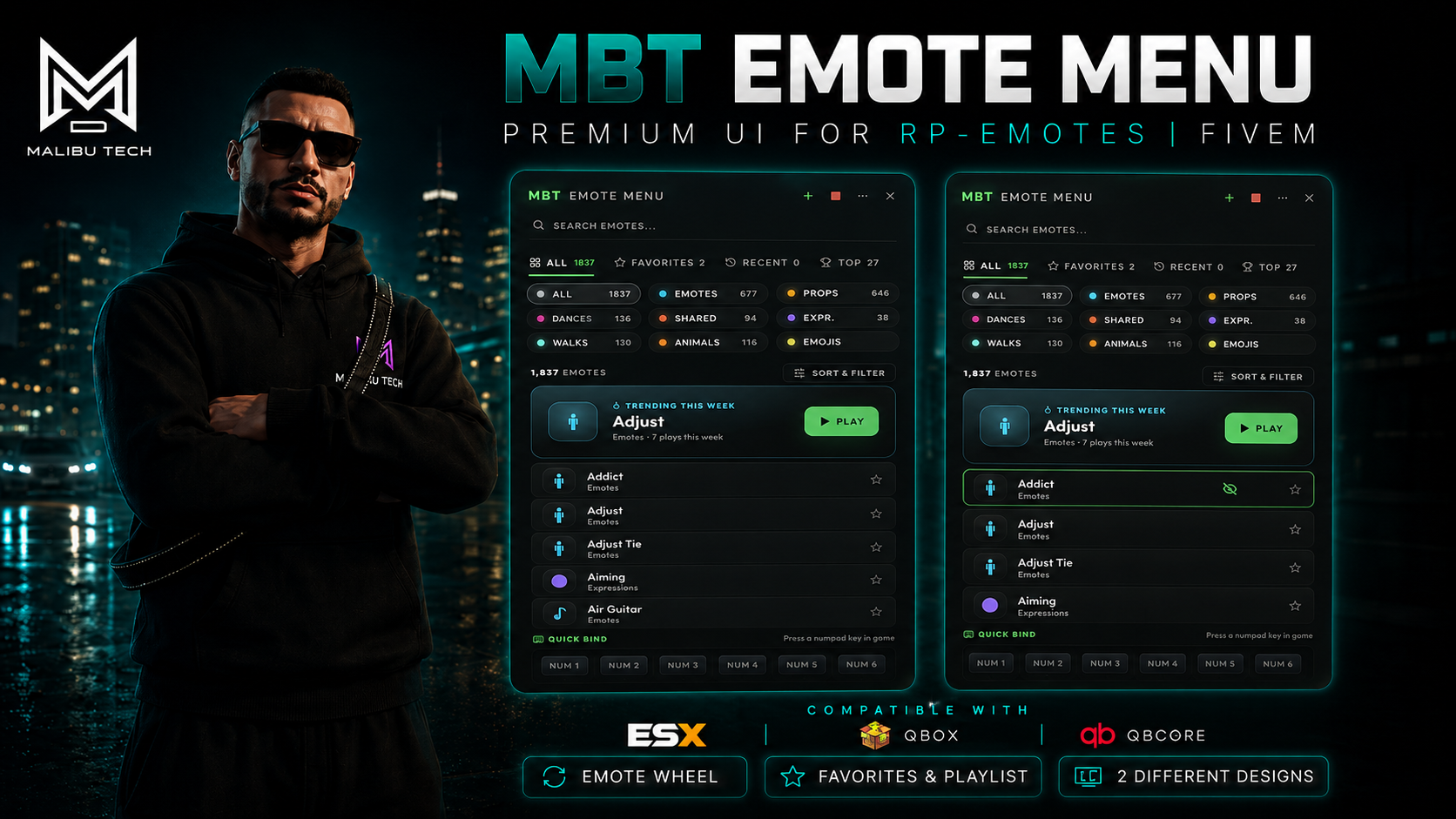
mbt_emote_menu is a premium NUI overlay that completely replaces the default rpemotes-reborn menu with a modern, responsive, and feature-rich interface built with React + TypeScript. Designed for serious RP servers that demand a polished player experience.
| Default Layout | Cinematic Layout |
|---|---|
 |
 |
- 1800+ emotes organized by category with silhouette icons (Emotes, Props, Dances, Shared, Expressions, Walk Styles, Animals, Emojis)
- Real-time search with instant filtering across all emotes
- Two layout modes (fully redesigned in 1.4) — Default (a bounded, draggable floating panel) and Cinematic (an edge-docked, vignette-blended immersive overlay)
- Left or right positioning — configurable panel side
- Draggable menu — click and drag the header to reposition (default layout)
- Fully responsive — optimized breakpoints for 720p, 1080p, 1440p, 4K, and ultrawide monitors (21:9, 32:9)
- Favorites system with import/export (JSON) and drag-to-reorder
- Recent emotes — automatically tracks your last played emotes
- Top emotes — ranked by your personal play count
- Trending this week (new in 1.4) — a server-wide hero spotlight showing the single most-played emote across everyone on the server, on a rolling 7-day window (aggregate counts only, no per-player tracking)
- Custom lists — create personal collections with custom names and icons
- Category filters — filter by Props, Shared, or browse All
- Sorting & filter — A-Z, Z-A, or by category, plus a one-click random emote
- Quick Bind — assign emotes to NUM1-NUM6 keys via right-click drawer
- Emote Wheel — hold-to-peek selector (up to 8 slots, no cursor needed). (new in 1.6) A radial / gesture mode lets you flick the mouse toward a slot, weapon-wheel style, instead of scrolling — switchable via
MBT.EmoteWheel.Mode - Personas / Loadouts (new in 1.6) — save named loadouts (e.g. "Cop", "Party") bundling your Quick Binds and Wheel slots, and switch between them in one click. The active loadout auto-saves as you edit; a non-deletable "Default" is always there as a fallback
- Keyboard navigation — arrow keys + Enter to browse and play emotes
- Smart search (new in 1.6) — search now matches an emote's prop and animation too, not just its name, so "radio" finds the walkie-talkie emotes
- Random emote button for spontaneous fun
- Emote preview — see the animation on your ped before committing (solo, invisible to others)
- Place in world — drop an emote at a precise spot via rpemotes-reborn's WASD placement flow, with a branded in-game HUD overlay
- Playlist system — queue multiple emotes in sequence with play/stop/clear controls
- Shared emote popup — inline accept/decline for sync emote invitations
- Partner finder — locate nearby players for shared animations
- Remember State — menu remembers your scroll position, tab, and filters after playing an emote (resets on ESC/X, configurable)
- Open Join — when you start a broadcast-eligible emote (dances, shared, ...), every player within radius gets a small anonymous pill (
Join: <emote> [Y]) and can press one key to play the same emote. Initiator is never named. Per-player opt-out via/mbt_openjoin off. Pill auto-dismisses when the initiator walks off or stops, no manual cleanup needed - What's That Emote? — passive discovery. Walk near someone who is emoting and a floating bubble above their head shows the emote name with a hotkey hint — one press copies it onto your own character. Off by default (opt-in via
MBT.Features.WhatsThat) - Nearby ribbon — when at least one player is in proximity, a dedicated ribbon surfaces above the category pills with your most-played shared / duet emotes, ranked by personal play count. One-click to start a duet with the closest player via the Partner Finder
- Premium motion language — entry / exit animations on every social surface (slide + scale-up + accent ring pulse on arrival, snappy 150ms scale-down on exit), tail anchors on the floating bubble, smooth tab transitions via the View Transitions API. Respects
prefers-reduced-motion
- RP Text —
/meand/docommands that float a styled pill above your head describing an action, visible to nearby players. Configurable channels with per-channel command name, range, and color. Server-side length clamp, sanitization, and throttle. Fully toggleable viaMBT.RpText.Enabled
- Photo Mode — a cinematic camera opened from a button in the menu header. Drag to orbit the camera around your character, scroll to zoom, pick a look filter (cinematic, noir, warm, vibrant, cool), toggle depth-of-field and a rule-of-thirds framing grid, then capture — the MBT watermark rides on every shot. Optionally, the server owner can wire a Discord webhook so players send shots straight to a channel (per-player throttled; the upload runs client-side via
screenshot-basic, so the webhook is handed to the uploading client — a write-only webhook, rotate it if abused). Usesscreenshot-basicwhen present, falls back to "hide HUD + your own screenshot key" otherwise. Fully tunable viaMBT.PhotoMode
- Auto-close on death — the menu closes itself if the player ped dies while it is open, avoiding stuck UI during the respawn / death camera
- Version Check — notifies server owners in console when a new release is available on GitHub
- Resource Name Guard — prevents the resource from starting if the folder is renamed (avoids silent breakage)
- Job-locked emotes — restrict specific emotes to certain jobs (police, mechanic, medic, etc.)
- Banned emotes blacklist — server owners can blocklist specific emote names server-side; both the catalog and the social broadcast layer filter them out
- Per-source rate limiting — every NetEvent the menu accepts is throttled per server ID (catalog request, job lookup, ecosystem status, social broadcast). Prevents a malicious or buggy client from flooding the server
- Anti-spam cooldown — client-side cooldown between back-to-back emote plays (
MBT.AntiSpam.CooldownMs, default 250ms), with a separate cooldown on social broadcasts (default 3s per source) - Large-server safety — Open Join announcements cap at the N closest recipients (
MBT.OpenJoin.MaxRecipients, default 30) so a 1000-player server doesn't fan-out into a network storm at busy zones - Anti-spoofing — server validates the initiator's replicated
mbtCurrentEmotestate bag against the announced emote before relaying, blocking clients that try to advertise an emote they aren't actually playing - Hardened roleplay text —
/meand/domessages are sanitized and length-clamped server-side, then rendered as escaped text (never raw HTML), so a player cannot inject markup onto other players' screens. The broadcast is distance-filtered and per-player throttled - Multi-framework support — auto-detects ESX, QBox, QBCore, or standalone
- MBT Meta Clothes integration — detects and connects with
mbt_meta_clothes - MBT Wearable Props integration — detects and connects with
mbt_wearable_props
Built-in translations for 6 languages: English, Italian, Spanish, French, German, Portuguese. Add your own by creating a new file in the locales/ folder.
| Dependency | Version |
|---|---|
| FiveM Server | Build 6116+ |
| OneSync | Enabled |
| rpemotes-reborn | Latest |
-
Download or clone this repository into your server's
resourcesfolder. -
Add to your
server.cfg:ensure rpemotes-reborn ensure mbt_emote_menu
Important:
mbt_emote_menumust start afterrpemotes-reborn. -
Configure
config.luato your liking (see Configuration below). -
Restart your server or run
ensure mbt_emote_menuin the live console.
All configuration is done in config.lua. Here's an overview of each section:
MBT.Language = 'en'           -- 'en', 'it', 'es', 'fr', 'de', 'pt'
MBT.Debug = false             -- Enable debug logs
MBT.RpemotesResource = nil -- Auto-detect or force: 'rpemotes-reborn', 'rpemotes', 'rp-emotes'MBT.Menu = {
Keybind = 'F4',
Command = 'mbt_emotes',
Layout = 'cinematic', -- 'default' or 'cinematic'
Position = 'right', -- 'left' or 'right'
CloseOnPlay = true,
RememberState = true, -- Remember scroll/tab/filters after playing (resets on ESC/X)
Watermark = true,
OverrideNativeMenu = true, -- Replaces rpemotes' NativeUI menu
}MBT.Features = {
Favorites = true,
RecentEmotes = true,
MaxRecent = 12,
QuickBind = true,
SharedPopup = true,
PreviewPed = true,
EmoteWheel = true,
EmotePlacement = true, -- "Place in world" button (needs rpemotes-reborn placement export)
OpenJoin = true, -- anonymous proximity group emotes
WhatsThat = false, -- peek-and-copy bubble above nearby emoting players (opt-in)
AdultEmotes = false, -- include 18+ emotes in the catalog
AbusableEmotes = false, -- include movement-exploit walk styles
}MBT.EmoteWheel = {
Key = 'K', -- Hold to open
Slots = 8, -- Max 8 slots
RemoveKey = 'X', -- Remove emote from current slot while wheel is open
Mode = 'radial', -- 'radial' = flick the mouse toward a slot · 'linear' = scroll
PointerSensitivity = 2.8, -- radial only: flick pointer speed
}MBT.Features.Personas = true -- Saved loadouts (Quick Bind + Wheel) you switch between
MBT.Personas = {
Max = 4, -- Maximum number of loadouts a player can create
}MBT.PhotoMode = {
Enabled = true, -- Camera button in the menu header
Watermark = true, -- MBT watermark on the framing overlay
DofDefault = true, -- Start with depth-of-field on
Filters = { --[[ look presets via timecycle modifiers ]] },
Discord = {
Enabled = false, -- Owner opt-in: "Send to Discord" button
WebhookUrl = '', -- Handed to the uploading client (write-only webhook)
ThrottleMs = 30000, -- Per-player cooldown between sends
},
}MBT.Trending = {
Enabled = true, -- Server-wide "Trending this week" hero card
WindowDays = 7, -- Rolling window length, in days
MinPlays = 10, -- Minimum window score for an emote to qualify
SaveIntervalMinutes = 10, -- How often counts are flushed to KVP
}MBT.RpText = {
Enabled = true, -- Master toggle
MaxLength = 110, -- Max characters per message
DurationMs = 6500, -- How long the pill stays up
ThrottleMs = 1000, -- Per-player cooldown between messages
HeadOffset = 0.25, -- Pill height above the head, in meters
Channels = { -- Rename a command to avoid clashing with another /me system
{ id = 'me', command = 'me', label = 'ME', range = 16.0, color = '00e676' },
{ id = 'do', command = 'do', label = 'DO', range = 16.0, color = '7fa8c9' },
},
}MBT.Theme = {
Accent = '00e676', -- Primary accent color
Background = '0C0E14',
Card = '141720',
Text = 'E8E8EE',
SubText = '6B7280',
Border = '1A1D26',
}MBT.JobPermissions = {
Enabled = true,
Framework = 'auto', -- 'auto', 'esx', 'qbox', 'qbcore', 'standalone'
Emotes = {
['handcuff'] = { 'police', 'sheriff' },
['mechanic'] = { 'mechanic', 'bennys' },
},
}Toggle visibility or reorder categories in the menu:
MBT.Categories = {
    { type = 'Emotes',       label = 'Emotes',      icon = 'smile',      visible = true },
    { type = 'PropEmotes',   label = 'Props',        icon = 'package',    visible = true },
    { type = 'Dances',       label = 'Dances',       icon = 'music',      visible = true },
    { type = 'Shared',       label = 'Shared',       icon = 'users',      visible = true },
    { type = 'Expressions',  label = 'Expressions',  icon = 'drama',      visible = true },
    { type = 'Walks',        label = 'Walk Styles',  icon = 'footprints', visible = true },
    { type = 'AnimalEmotes', label = 'Animals',      icon = 'dog',        visible = true },
    { type = 'Emojis',       label = 'Emojis',       icon = 'message-circle', visible = true },
}When MBT.Debug = true, detailed logs are printed in both server console and client F8 console (including the NUI frontend via [MBT NUI] prefix). Useful for troubleshooting emote loading and KVP storage.
The notification function in config.lua supports presets for ox_lib, ESX, QBCore, QBox, and native GTA notifications. Uncomment the preset that matches your server setup.
| Key | Action |
|---|---|
F4 |
Open / close emote menu |
K (hold) |
Open emote wheel |
Mouse Wheel |
Scroll wheel slots (while holding K) |
X |
Remove emote from wheel slot (while holding K) |
NUM1 — NUM6 |
Play quick-bound emote |
Right Click |
Open quick bind / wheel slot drawer on a card |
Arrow Keys |
Navigate emote list |
Enter |
Play focused emote |
ESC |
Close menu |
Q: Can I use this without rpemotes-reborn? No. This resource is a UI replacement that depends on rpemotes-reborn for all animation logic and emote data.
Q: Does it work with ESX, QBox, and QBCore? Yes. The job permission system auto-detects your framework (ESX → QBox → QBCore → standalone). You can also force a specific one in config.
Q: How do I add a new language?
Create a new file in locales/ (e.g., locales/jp.lua), copy the structure from en.lua, translate the strings, and set MBT.Language = 'jp' in config.
Q: My emotes don't show up.
Make sure rpemotes-reborn is started and running before mbt_emote_menu. Check the F8 console for errors.
Q: The menu looks wrong on my ultrawide monitor. The UI includes responsive breakpoints for all common resolutions including 2560x1080, 3440x1440, and 5120x1440. If you still experience issues, please open an issue with your resolution.
This project would not exist without rpemotes-reborn and the incredible work of its maintainers and contributors. rpemotes-reborn provides the entire animation engine, emote library, and shared emote logic that powers every feature in this menu. We are deeply grateful to the rpemotes-reborn team for building and maintaining such a solid foundation for the FiveM roleplay community.
mbt_emote_menu is a third-party UI overlay and is not affiliated with or endorsed by the rpemotes-reborn project. This resource is published with respect for the original project's license and guidelines. If you are part of the rpemotes-reborn team and have any concerns, please reach out to us directly.
Developed by Malibu Tech Team.
Special thanks to:
- rpemotes-reborn — for the emote engine and animation library that makes this all possible
- The FiveM community — for continuous feedback, testing, and inspiration
This project is licensed under the PolyForm Noncommercial License 1.0.0.
You are free to use and modify this software for noncommercial purposes only — personal use, hobby servers, research, and education. Any commercial use, redistribution for profit, or inclusion in paid products is prohibited without written permission from Malibu Tech Team.
This resource depends on rpemotes-reborn which is licensed under GPL-3.0. mbt_emote_menu does not include or redistribute any rpemotes-reborn source code — it communicates with rpemotes-reborn at runtime through FiveM exports and events.