Conversation


Ship a per-user x64 NSIS installer (budgetr-win.exe) via electron-builder 25.x
and a windows-latest release job alongside the existing Mac DMG path. Packaged
Windows builds show a hard three-screen privacy/permissions/data-folder gate
before any app chrome; Mac packaging, OCR extras, and the skippable Plaid
wizard are unchanged.

Co-authored-by: Kevin George <kGeee@users.noreply.github.com>

|
The latest updates on your projects. Learn more about Vercel for GitHub.
|


…preview

The fallback POST handler rejected non-win32 platforms, so the
BUDGETR_PRIVACY_GATE_FORCE local preview could never write the marker.
Packaged Windows still completes via Electron IPC; the HTTP path now
keys off BUDGETR_DESKTOP instead of process.platform.

Co-authored-by: Kevin George <kGeee@users.noreply.github.com>
Make the root README explicit that the first Windows Release artifacts are
intentionally unsigned and that More info → Run anyway is the normal first-open
path for non-developers.

Co-authored-by: Kevin George <kGeee@users.noreply.github.com>
windows-nsis must not reuse Mac CSC_LINK for Authenticode. Wire
WIN_CSC_LINK / WIN_CSC_KEY_PASSWORD when present, otherwise leave CSC
unset so the NSIS build stays unsigned. Fail the job if
budgetr-win.exe is missing before publish.

Co-authored-by: Kevin George <kGeee@users.noreply.github.com>

 kGeee
left a comment
kGeee
left a comment
kGeee
left a comment
There was a problem hiding this comment.
Verdict: COMMENT (hold merge) — head e4fe228
Both nits from 4a2b163 are fixed. No remaining code concerns with this delta. Still a draft, so this is not an approve. Do not merge.
What landed (e4fe228, 29/8, one file)
- Signing split:
windows-nsistakesWIN_CSC_LINK/WIN_CSC_KEY_PASSWORDonly. MacCSC_LINKis no longer in this job's env, so a Developer ID.p12cannot Authenticode-sign the NSIS installer. EmptyWIN_CSC_*unsetsCSC_LINKand the build stays unsigned (SmartScreen still the first-open path). No cert invented or committed. - Required artifact: new step fails the job if
web/dist/budgetr-win.exeis missing.fail_on_unmatched_files: falsecan stay on publish for optionallatest.yml/ blockmap.
Checklist (unchanged, still pass)
- NSIS x64 per-user, no UAC,
asar: false - Packaged-Windows-only privacy gate before
/overview/ chrome / Plaid; marketing /npm run dev/start.batnot blocked - No
/privacypages, no placeholder legal URLs - OCR
extraResourcesMac-only - SmartScreen called out in README
- Do not merge (still draft)
No secrets in the diff (secret names only). web CI was still in progress at review time; it does not exercise package:win (release is tag-only).
Remaining (all non-code)
- Still a draft
- First
v*/ Windows install proof (Not now quits, Open data folder, relaunch skips gate, no OCR on the Windows artifact) WIN_CSC_*repo secrets only when a real Authenticode cert exists — not for this PR
| - name: Assert Windows installer artifact | ||
| # cwd is web/ (job default). fail_on_unmatched_files stays false below so | ||
| # optional latest.yml / blockmap globs don't fail the job — but the | ||
| # NSIS installer itself is required. | ||
| shell: bash | ||
| run: | | ||
| if [ ! -f dist/budgetr-win.exe ]; then | ||
| echo "Required artifact missing: web/dist/budgetr-win.exe" >&2 | ||
| ls -la dist || true | ||
| exit 1 | ||
| fi | ||
| ls -lh dist/budgetr-win.exe |
There was a problem hiding this comment.
This closes the other nit. fail_on_unmatched_files: false can stay on publish so optional latest.yml / *.blockmap don't fail an unsigned first release, and this step fails the job if web/dist/budgetr-win.exe is missing. Job defaults.run.working-directory is web, so dist/budgetr-win.exe is the right path.
| if [ -z "$WIN_CSC_LINK" ]; then | ||
| unset CSC_LINK CSC_KEY_PASSWORD | ||
| else | ||
| export CSC_LINK="$WIN_CSC_LINK" | ||
| export CSC_KEY_PASSWORD="$WIN_CSC_KEY_PASSWORD" | ||
| fi | ||
| npm run package:win | ||
| env: | ||
| WIN_CSC_LINK: ${{ secrets.WIN_CSC_LINK }} | ||
| WIN_CSC_KEY_PASSWORD: ${{ secrets.WIN_CSC_KEY_PASSWORD }} | ||
| # Auto-discovery ON only when a Windows Authenticode cert is provided. | ||
| CSC_IDENTITY_AUTO_DISCOVERY: ${{ secrets.WIN_CSC_LINK != '' }} |
There was a problem hiding this comment.
This is the right split. windows-nsis no longer receives secrets.CSC_LINK, so an Apple Developer ID .p12 cannot Authenticode-sign the NSIS installer. Empty WIN_CSC_* still hits the unset CSC_LINK branch (GitHub expands a missing secret to ""), so the first artifacts stay unsigned and SmartScreen remains the documented path. Do not invent or commit a cert.
One ops note, not a code blocker: the Windows job will stay unsigned until WIN_CSC_LINK / WIN_CSC_KEY_PASSWORD exist in repo secrets. That's intended.
Capture the three-screen Windows first-run privacy gate via
BUDGETR_PRIVACY_GATE_FORCE local web preview (not a packaged .exe).

Co-authored-by: Kevin George <kGeee@users.noreply.github.com>
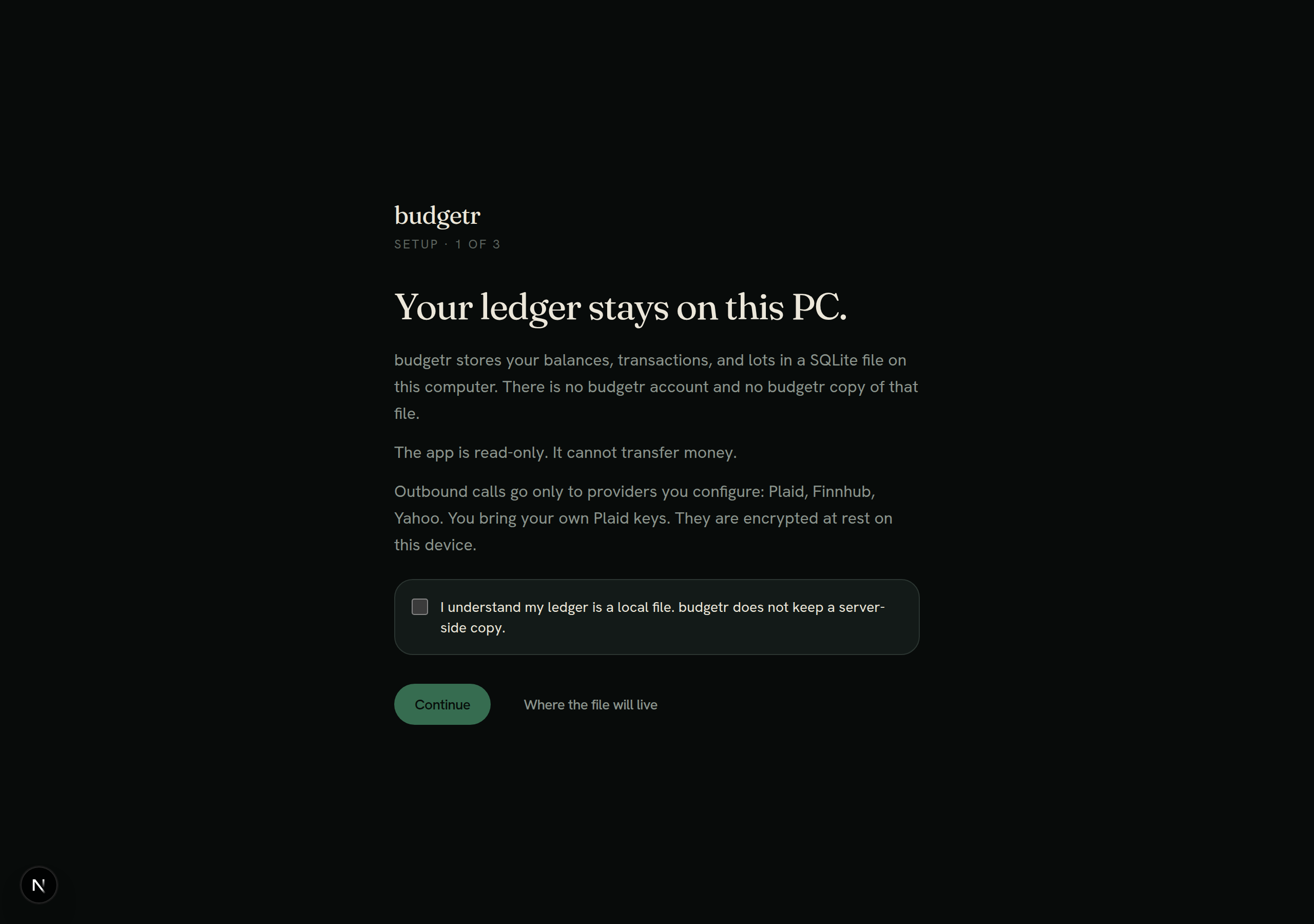
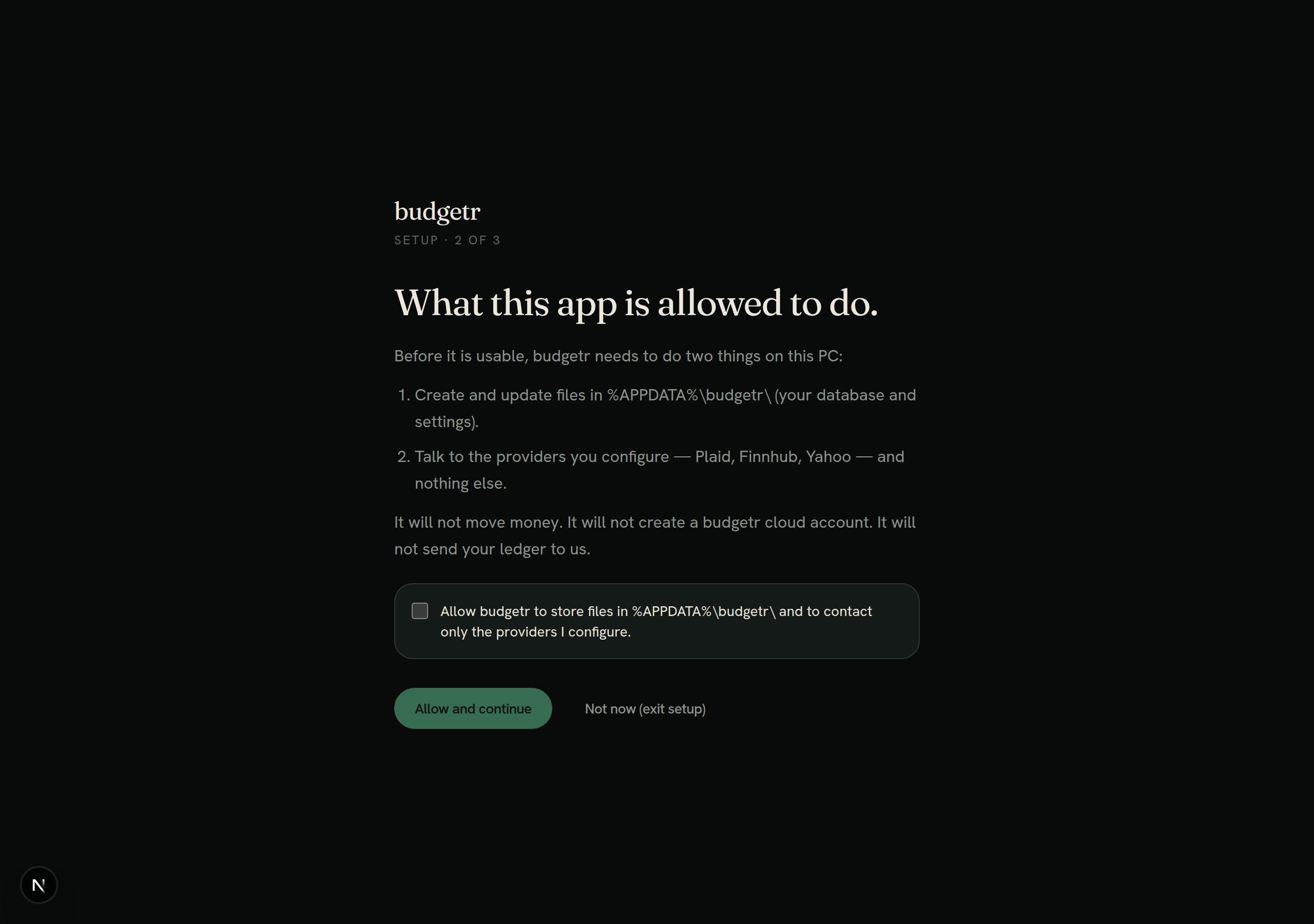
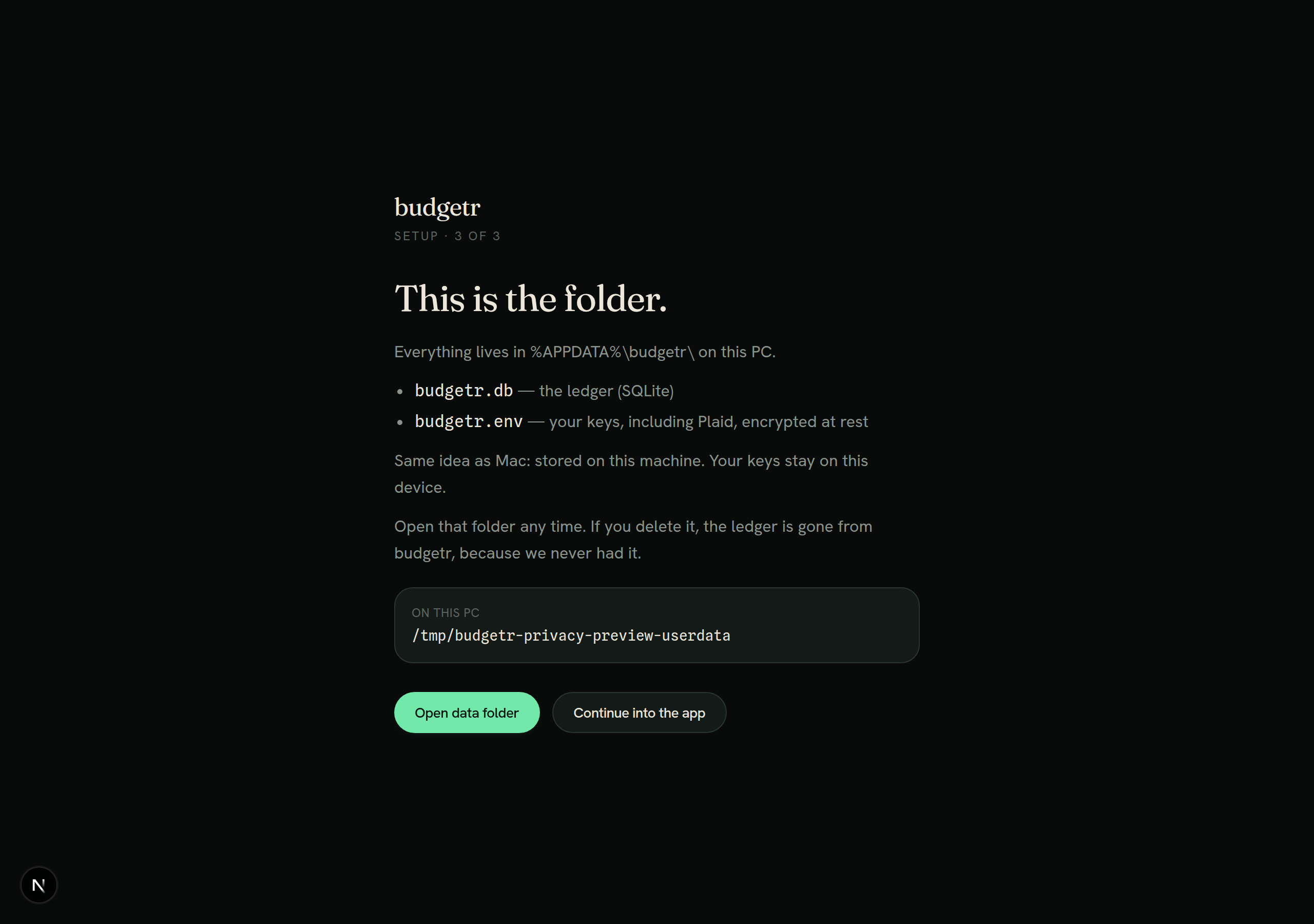
Privacy gate screenshots (forced local web preview)These are not shots of a packaged Windows BUDGETR_DESKTOP=1 \
BUDGETR_USER_DATA=/tmp/budgetr-privacy-preview-userdata \
BUDGETR_PRIVACY_GATE_FORCE=1 \
BUDGETR_LICENSE_DISABLED=1 \
PORT=3010 npm run dev
Screen 1 — Your ledger stays on this PC.
Screen 2 — What this app is allowed to do.
Screen 3 — This is the folder.
Committed on branch tip |
kGeee
left a comment
kGeee
left a comment
There was a problem hiding this comment.
Verdict: COMMENT (hold merge) — head 2aabf97
Screenshot gate PASS for the three-screen privacy gate UI. Tip is docs-only (no code delta since e4fe228). Still a draft, so this is not an approve. Do not merge. PR Merger stay off until undraft.
What landed (2aabf97)
- Three forced local Next.js preview shots committed under
.pr-screenshots/and attached on the PR:- Your ledger stays on this PC. (ack + Continue + “Where the file will live”)
- What this app is allowed to do. (ack + Allow and continue + “Not now (exit setup)”)
- This is the folder. (
%APPDATA%\budgetr\/budgetr.db/budgetr.envcopy + Open data folder / Continue into the app)
- Correctly disclosed as not a packaged Windows
.exe/ NSIS run. Screen 3’s resolved path showing/tmp/budgetr-privacy-preview-userdatais expected forBUDGETR_PRIVACY_GATE_FORCEon Linux preview; marketing copy still uses%APPDATA%\budgetr\. - Copy matches the Marketing Chief three-screen lock (ledger local, BYO Plaid / providers only, read-only). No
/privacyor placeholder legal URLs in the shots.
Carry-forward from e4fe228 (still pass)
- NSIS x64 per-user, no UAC,
asar: false - Packaged-Windows-only privacy gate; marketing /
npm run dev/start.batnot blocked - Signing split:
windows-nsisusesWIN_CSC_*only (MacCSC_LINKout of that job) - Job fails if
budgetr-win.exemissing; OCRextraResourcesMac-only - SmartScreen called out in README
- No secrets in tip (PNGs only); prior secret names only in workflow
Checks
webgreen- Vercel Preview Comments green
Soft (non-blocking)
- Dev “N” badge in the corner is from the forced web preview, not a packaged-Windows chrome claim.
Remaining blockers (non-code)
- Still a draft (no APPROVE / no merge)
- First
v*/ Windows install proof (Not now quits, Open data folder, relaunch skips gate, no OCR on the Windows artifact) WIN_CSC_*only when a real Authenticode cert exists
2 participants


Summary
Adds a releasable native Windows product path for budgetr (Electron + NSIS), without replacing the Mac DMG flow or the skippable Plaid onboarding wizard.
Packaging
electron-builder25.x Windows target: NSIS x64, artifactbudgetr-win.exeperMachine: false,allowElevation: false) — no admin/UACdesktop/scripts/make-ico.mjsbuildsicon.icofrom existing PWA iconsextraResourcesmoved undermaconly (not shipped on Windows)npm run package:win/package:mac(packageremains the Mac alias).github/workflows/release.yml:windows-nsisonwindows-latestalongsidemac-dmg, samev*tagCSC_LINK/CSC_KEY_PASSWORD. Windows Authenticode uses separateWIN_CSC_LINK/WIN_CSC_KEY_PASSWORDwhen present; otherwise CSC is unset and the NSIS build stays unsigned (SmartScreen expected). Mac Developer ID must not sign Windows.budgetr-win.exeexists before upload (fail_on_unmatched_files: falseonly for optionallatest.yml/ blockmap).asar: falseunchanged; secrets still live in per-userbudgetr.envFirst-run privacy gate (packaged Windows only)
Hard gate at
/desktop-setupbefore/overview, app chrome, or the Plaid wizard. Marketing site (MARKETING_ONLY),npm run dev, andstart.batare not blocked.Uses only the Marketing Chief three-screen copy (ledger location
%APPDATA%\budgetr\/budgetr.db, BYO Plaid, read-only). No/privacyor terms pages, no placeholder legal URLs, no invented privacy-policy copy.%APPDATA%\budgetr\copy plus the resolveduserDatapath; Open data folder / Continue into the appCompletion is persisted as
privacy-gate-donein ElectronuserData. Screen 1’s “Where the file will live” peeks at screen 3 without skipping screens 1–2.Window chrome
Windows uses a native frame (min/max/close + drag). macOS keeps
hiddenInsettraffic lights.Docs
Root README points non-devs at the Windows installer from Releases (not
start.bat) and explains the expected SmartScreen first-open warning for unsigned builds.Test plan
npm test -- lib/desktop-privacy-gate.test.tsnode desktop/scripts/make-ico.mjsproduces a valid.ico/overviewredirects to/desktop-setupuntil all three screens + acks complete, then dashboard loadsv*producesbudgetr-win.exe(assert step fails the job if missing)/onboardingstill available/skippablepackage:mac/ release job still green; no OCR binary on Windows artifactCSC_LINK(onlyWIN_CSC_*when set)