Add "Deploy to Azure" button#7
Conversation


 smwilk
left a comment
smwilk
left a comment
smwilk
left a comment
There was a problem hiding this comment.
Thanks for submitting a PR. I left a comment about initialization of the deploy process. Could you please confirm it?
| [](https://portal.azure.com/#create/Microsoft.Template/uri/https%3A%2F%2Fraw.githubusercontent.com%2Fhoisjp%2Fline-liff-starter%2Fmaster%2Fazuredeploy.json) | ||
|
|
||
| 1. Click the above "Deploy to Azure" button. | ||
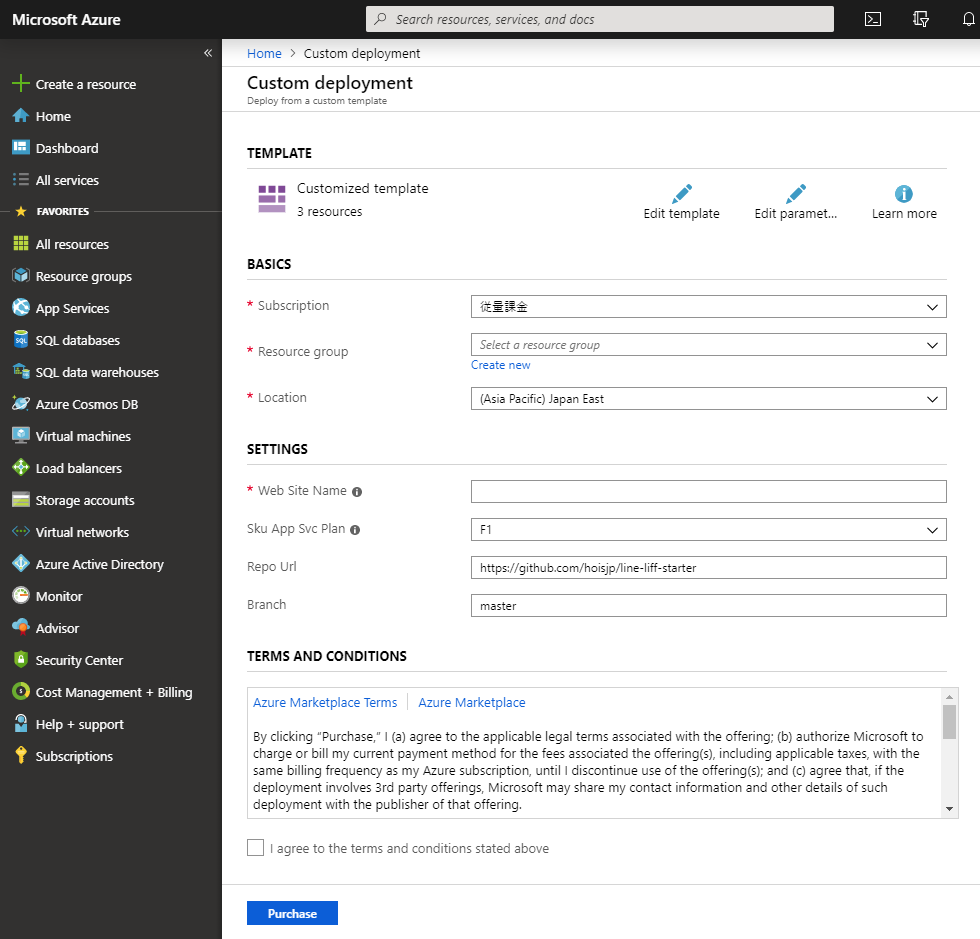
| 2. Fill in the required information on the "Custom deployment" page in Azure portal. |
There was a problem hiding this comment.
@hoisjp Thank you for submitting your pull request. When I hit the Deploy to Azure button, it redirects me to the Azure portal page. I'm not able to find Custom Deployment which is mentioned in the Deploying the application in the portal. Is this expected?
There was a problem hiding this comment.
@smwilk thank you for your review.
I tried again in an Incognito mode. I see "Custom Deployment" screen after hitting the button (and Azure account login) as expected like below.
There was a problem hiding this comment.
Thank you for sharing the screenshot. I'm currently seeking help from the Microsoft customer support team. I will keep you posted on the progress. Thank you for your patience.

|
@hoisjp Thanks for your patience.
Do you think there could be a workaround to this? |
2 participants


I added "Deploy to Azure" button which deploys Azure App Service (free plan by default) with one click action.
If a base repo can accept this merge, please tell me. I will change the forked URL to the base URL before merging.
e.g.
https://github.com/hoisjp/line-liff-starter=>https://github.com/line/line-liff-starter