Repository navigation
AdMob
AdMob is the right arm of Google Adsense on Mobile World. The AdMob project represents one of the mosts popular and easiest ways to monetise a Application. This library implements a set of modules that provide a practical, easy, and componentized way to deploy AdMob to your React Application.
You can check the Official Site and create a acount if you have not done so yet.
In order to associate you admob account with you App you will need two codes: The Application's ID and the AD Unit ID. Both this codes you can found in you AdMob Acount. However, in the development phase of you App, it is nescessary to use the test application's id and test unit id, otherwise you account can be banned from AdMob Plataform, see more.
To configure the Application's ID open the Manifest file located in android\app\src\main\AndroidManifest.xml and add the test id inside the application tag:
<application>

   ...

  <meta-data
    android:name="com.google.android.gms.ads.APPLICATION_ID"
    android:value="ca-app-pub-3940256099942544~3347511713"
  />
</application>
ca-app-pub-3940256099942544~3347511713 is the test Application ID that must be replaced later when you finish the project and build the release version of you React App.
To display any AD you will need a test AD Unit ID. There are one id for each type of AD, the table below will help you to choose the right one:
| Ad Type | Test ad unit ID |
|---|---|
| Banner | ca-app-pub-3940256099942544/6300978111 |
| Interstitial | ca-app-pub-3940256099942544/1033173712 |
| Interstitial Video | ca-app-pub-3940256099942544/8691691433 |
| Rewarded Video | ca-app-pub-3940256099942544/5224354917 |
Remember: When you finish you App, change the Application's ID and the AD Unit ID for the IDs provided by the AdMob Platform on your account.
Maybe the easiest type of Ad is the Ad Banner. The Ad Banner is an image, gif, text, or something like this that is placed in the screen and can be clicked by the user.
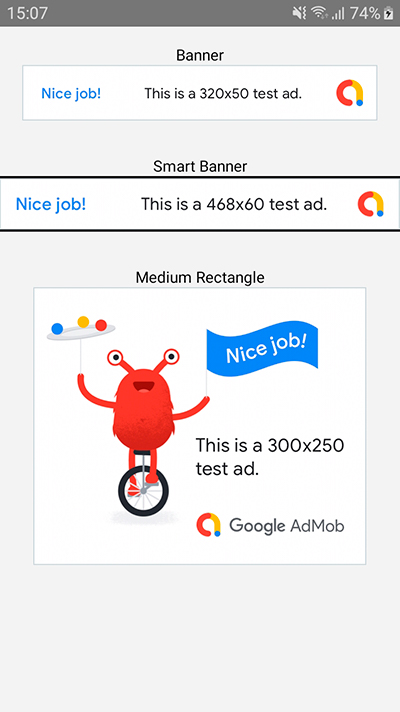
import { AdMobBanner } from "react-native-androide";<AdMobBanner
adSize="banner"
adUnitID="ca-app-pub-3940256099942544/6300978111"
onLoad={() => console.log("Ad loaded successfully")}
onFailedToLoad={m => console.log("Ad failed to load because of:"+m)}
/>This component will show a Banner Ad on the screen and then call the onLoad, or, will call onFailedToLoad if something is not working.
Note: The adUnitID is a test id, like described above.
There are 6 different sizes of banners that you can choose. To choose a size put one of the valid values on the adSize prop. The full list of sizes is:
| Value | Description | Availability | Size |
|---|---|---|---|
| banner | Standard Banner | Phones and Tablets | 320x50 |
| largeBanner | Large Banner | Phones and Tablets | 320x100 |
| mediumRectangle | IAB Medium Rectangle | Phones and Tablets | 300x250 |
| fullBanner | IAB Full-Size Banner | Tablets | 468x60 |
| leaderboard | IAB Leaderboard | Tablets | 728x90 |
| smartBanner | Smart Banner | Phones and Tablets | Screen width x 32|50|90 |
You can set some callback functions that will be called when an event happens. The list of event listeners is:
| Prop | Description |
|---|---|
| onLoad | Called when the Ad loads |
| onClick | Called when the User touches the Ad, unfortunately no all the banner triggers this callback, onOpen is recommended |
| onOpen | Called when the user open the Ad |
| onClose | Called when the user closes the Ad |
| onFailedToLoad | Called when the Ad fails to load |
Note: Only onFailedToLoad receives a parameter on the call, the parameter is a message that describe the error.
The Interstitial Ad is a screen that cover the original one of you application showing a Ad, but can be closed easily by the User, thereby returning to you App.
To use a Interstitial Ad import the module:
import { AdMobInterstitial } from "react-native-androide"; prepareInterstitial = async () => {
// Setting the Ad Unit ID
await AdMobInterstitial.setAdUnitID(
"ca-app-pub-3940256099942544/1033173712"
);
// Setting the Event listeners
AdMobInterstitial.setOpenedListener(
info => {
console.log('The Insterstitial Ad was opened, id:'+info.id);
this.setState({ interstitialReady: false}); // Ad was consumed
}
);
AdMobInterstitial.setClosedListener(
info => {
console.log('The Insterstitial Ad was closed, id:'+info.id);
await AdMobInterstitial.requestAd(); // Preparing the Ad again
}
);
AdMobInterstitial.setClickedListener(
info => console.log('The Insterstitial Ad was clicked, id:'+info.id)
);
// Requesting ad and, if ok, showing
if (await AdMobInterstitial.requestAd()) {
this.setState({ interstitialReady: true });
}
};
...
if(this.state.interstitialReady) {
AdMobInterstitial.showAd()
}
...You must call AdMobInterstitial.setAdUnitID() and AdMobInterstitial.requestAd() before AdMobInterstitial.showAd(), but the event listeners are optionals.
AdMobInterstitial.setAdUnitID(<String>)
Receives the id of you Ad on String format. Must be called before anything, but take care, it is a async function, so you must use the await or .then() syntax. You need to call this function only one time.
AdMobInterstitial.requestAd()
Prepares the next Ad to be showed. It's an async function that resolves with true if everything is ok, or, reject if something is not working. This function must be called again every time the ad is displayed.
AdMobInterstitial.showAd()
Show the Ad to the User. This function cannot be called before the promise from requestAd() is resolved.
AdMobInterstitial.setOpenedListener(<function>)
Calls the function provided whenever the Ad is opened.
AdMobInterstitial.setClosedListener(<function>)
Calls the function provided whenever the Ad is closed.
AdMobInterstitial.setClickedListener(<function>)
Calls the function provided whenever the Ad is clicked.
Note: The functions provided to the event listeners will receive a object with only one attribute: the id of the unit Ad.
{
  "id": "<YOUR-AD-APPLICATION-CODE>"
}The Rewarded video is a popular way to reward your users when they watch Ad videos. With the AdMobRewardedVideo module you can display Ad videos on a way very similar to the AdMobInterstitial.
To use a Rewarded Video Ad import the module:
import { AdMobRewardedVideo } from "react-native-androide"; prepareRewardedVideo = async () => {
await AdMobRewardedVideo.setAdUnitID(
"ca-app-pub-3940256099942544/5224354917" // Test ID
);
// Setting some event listeners
AdMobRewardedVideo.setOpenedListener(() => {
// Ad Video consumed
this.setState({ rewardedVideoReady: false });
});
AdMobRewardedVideo.setClosedListener(async () => {
// Preparing a new video
if (await AdMobRewardedVideo.requestAd()) {
this.setState({ rewardedVideoReady: true });
}
});
AdMobRewardedVideo.setRewardedListener(() =>
// The user watched the entire video and needs to be rewarded
this.setState({ rewardUser: true })
);
// Preparing video
if (await AdMobRewardedVideo.requestAd()) {
this.setState({ rewardedVideoReady: true });
}
};
...
if(this.state.rewardedVideoReady) {
AdMobRewardedVideo.showAd()
}
...You must call AdMobRewardedVideo.setAdUnitID() and AdMobRewardedVideo.requestAd() before AdMobRewardedVideo.showAd(), but the event listeners are optionals.
AdMobRewardedVideo.setAdUnitID(<String>)
Receives the id of you Ad on String format. Must be called before anything, but take care, it is a async function, so you must use the await or .then() syntax. You need to call this function only one time.
AdMobRewardedVideo.requestAd()
Prepares the next Video to be showed. It's an async function that resolves with true if everything is ok, or, reject if something is not working. This function must be called again every time the ad is displayed.
AdMobRewardedVideo.showAd()
Show the Video Ad to the User. This function cannot be called before the promise from requestAd() is resolved.
AdMobRewardedVideo.setOpenedListener(<function>)
Calls the function provided whenever the Ad is opened.
AdMobRewardedVideo.setClosedListener(<function>)
Calls the function provided whenever the Ad is closed.
AdMobRewardedVideo.setStartedListener(<function>)
Calls the function provided whenever the Ad Video starts.
AdMobRewardedVideo.setCompletedListener(<function>)
Calls the function provided whenever the Ad Video ends.
AdMobRewardedVideo.setRewardedListener(<function>)
Calls the function provided whenever the User watch the full Ad.
Note: The functions provided to the event listeners will receive a object with only one attribute: the id of the unit Ad.
{
  "id": "<YOUR-AD-APPLICATION-CODE>"
}But, the setRewardedListener() is a especial listener that receives not only the Ad id but also the type of reward and the amount. A example of data passed to the callback of setRewardedListener() is:
{
  "id": "ca-app-pub-3940256099942544/5224354917",
  "amount": 10,
  "type": "coins"
}