4. UI Wireframes
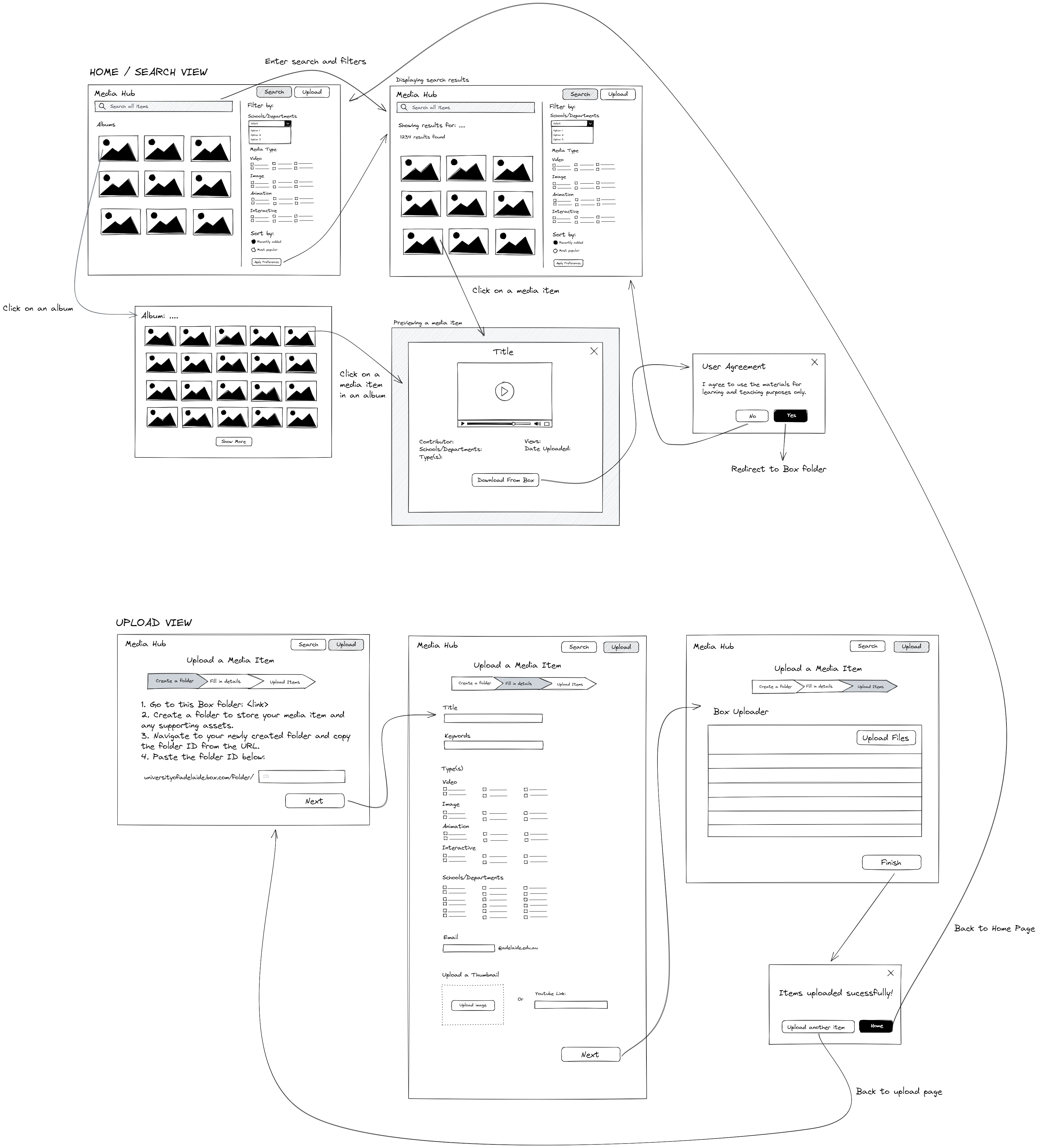
The Media Hub application will contain 2 main ‘views’ (i.e. navigable pages): Home/Search View and Upload View.
The Home/Search View will contain a main search bar with a filter pane on the right side and a collection of albums underneath. Search/filter/sort functions are separate from the albums - the user can either search across all media items by filtering and sorting, or browse through the media items in an album. All media items will be displayed as a grid of thumbnails, limited to some quantity (maybe fixed at 50 or user sets it themselves). Clicking a media item will allow the user to preview the item (image or short clip) along with its metadata. Before allowing users to download the item from Box, they are warned to use the materials for non-commerical purposes only.
The Upload View is basically a single form separated into sections to simplify the process for users. It is important that the user enters the folder ID first as it will be used to store the metadata in the database and generate the Box link for the user to upload their files. The Upload tool only allows uploads of a single media item (stored in its own folder alongside any supporting assets) and the process will have to be repeated if they want to add more items.