Using Cloud Firestore
Documentation: https://firebase.google.com/docs/firestore
Firebase’s Cloud Firestore is a NoSQL (i.e. schemaless) database that stores data in documents and collections. Each Document contains a set of key-value pairs, and Documents must be grouped under Collections. Documents can also contain sub-collections.
The current Firestore structure for Media Hub is modelled as below:
COLLECTION: MediaItems
DOCUMENT (each MediaItem document has a Document ID corresponding to the folder ID from Box)
- uid:
string- although each Document has an ID that is accessible through document snapshots, providing this field makes it easier to obtain the ID from the DocumentData object outside of Firestore queries. - title:
string - type:
array[shortcode] - keywords:
array[string] - contributor:
string - school/department:
array[string] - thumbnail:
downloadURLfrom Cloud storage (if image/interactive) or youtube link (if video/animation) - thumbnailType:
Static(if image/interactive) orVideo(if video/animation) - used to determine whether to embed a video or display an image thumbnail (includes gifs) in the gallery display - visitCount:
int - date:
timestamp - published:
boolean(false by default)
COLLECTION: Albums
DOCUMENT (auto-id)
- title:
string - items:
array[mediaitem UIDs] - thumbnail:
image linkfrom Cloud Storage - type:
string(Course or Group)
Note: the Web version followed from the documentation is Web version 9 (modular).
import { doc, collection } from "firebase/firestore";
To create a reference to a document in a collection, use doc():
const docRef = doc(DATABASE_REF, COLLECTION_NAME, DOCUMENT_ID);
// OR specify the path
const docRef = doc(DATABASE_REF, 'COLLECTION_NAME/DOCUMENT_ID');
To create a reference to a collection, use collection():
const collectionRef = collection(DATABASE_REF, COLLECTION_NAME);
There are 3 ways to write data to Firestore:
- using
setDoc()by explicitly specifying the document ID and passing in that document reference into the method (most suitable for Media Hub)
await setDoc(DOCUMENT_REFERENCE, {
  // key-value pairs
});
- Adding a new document to a collection using an automatically generated ID from Firestore - call addDoc()
await addDoc(COLLECTION_REFERENCE, {
  // key-value pairs
}
- Creating an empty document with an automatically generated ID and assigning data to it later
const docRef = doc(COLLECTION_REF);

// later...
await setDoc(docRef, data);
There are 3 ways to retrieve data from Firestore:
- Call
getDoc()orgetDocs()to get the data once (most suitable for Media Hub)
Note: For each doc snapshot, access the document id using doc.id and all its key-value pairs using doc.data().
// Getting a single document
await getDoc(DOCUMENT_REF);

// Getting all documents from a collection
await getDocs(COLLECTION_REF);
// then loop through each doc snapshot
- Set a listener to receive data-change events
- Using data bundles
Use query() along with get(). Mainly combined with the where() method.
where(field_to_filter_on, comparison operator, value)
Examples of simple queries:
const q = query(citiesRef, where("regions", "array-contains", "west_coast"));
// Returns all city documents where regions[] contains the value west_coast

const q = query(citiesRef, where('country', 'in', ['USA', 'Japan']));
// Returns all city documents where country is set to USA or Japan
// limit: 10 comparison values

const q = query(citiesRef, where('regions', 'array-contains-any', ['west_coast', 'east_coast']));
// Returns all city documents where regions[] contains west_coast or east_coast
// This is most effective for Media Hub but the method is limited to 10 comparisons on the same field
// Would have to assume that user can only search using 10 keywords and that they will not select more than 10 types/tags/schools
- The search function is implemented by comparing the user’s input with the array of keywords of each media item. In Firestore, this is effectively achieved using array-contains-any but is limited to 10 comparison values. Note that Firestore ‘de-dupes’ results so if a media item has keywords that match more than one of the user’s input, the database only returns 1 record.
- Assumptions: the user will enter no more than 10 keywords in the search bar (could limit it), the user will select no more than 10 items per section that includes checkboxes
- Could consider using quotations to group 1 keyword, brackets, etc.
- Currently, Media Hub does not use the provided limit and pagination queries from Firestore due to its limitation in chaining array compound queries together. A manual implementation is used instead, which requires retrieving all documents that match the keywords and filters and then limiting the display.
- Increment/Decrement a numeric field (e.g. visitCount)
await updateDoc(DOCUMENT_REF, {
  field_to_increment: increment(num_to_increment)
});
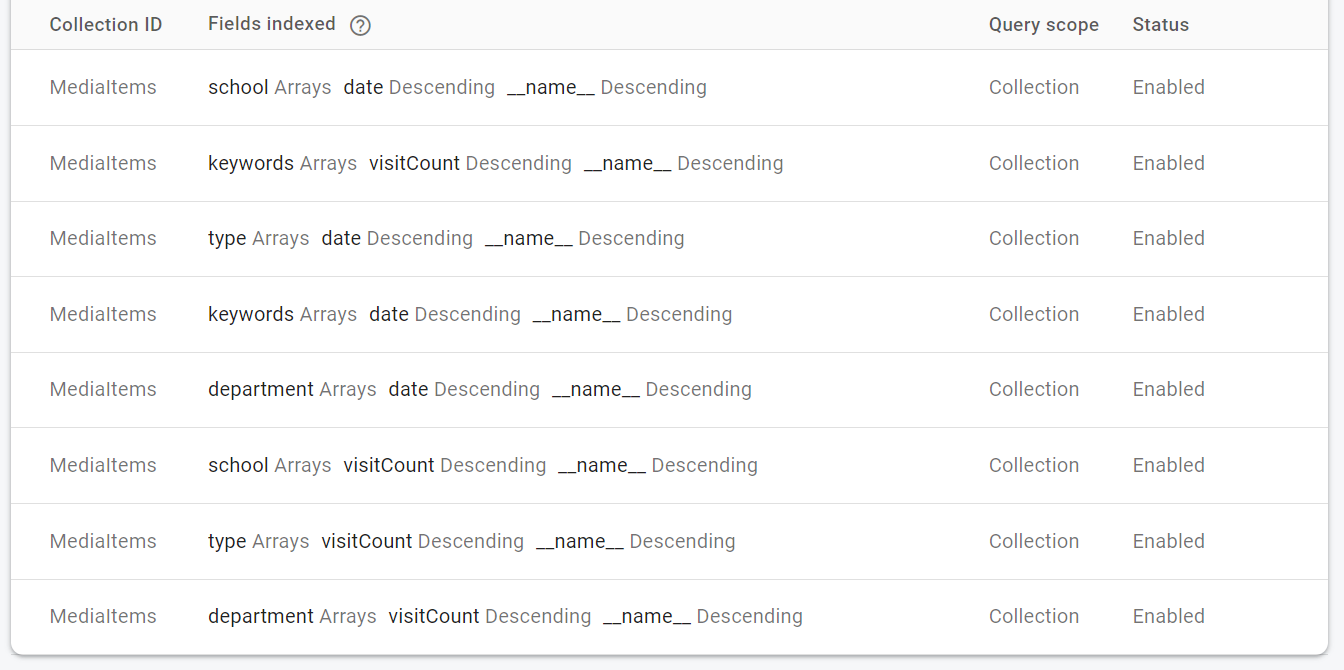
Queries that involve ordering items by Recently Added or Most Viewed require an index to be set in the Firebase console. This can be achieved by either:
- Manually setting composite indices in the console
- Running each query and going to the link generated in the browser console (recommended by Firebase)
- Adding all indexes in a JSON file firestore.indexes.json (if Firebase CLI is installed) and deploy the indexes using firebase deploy --only firestore:indexes
The below is an example from Media Hub of setting indexes manually in the Firebase Console.