User Identification
User Identification
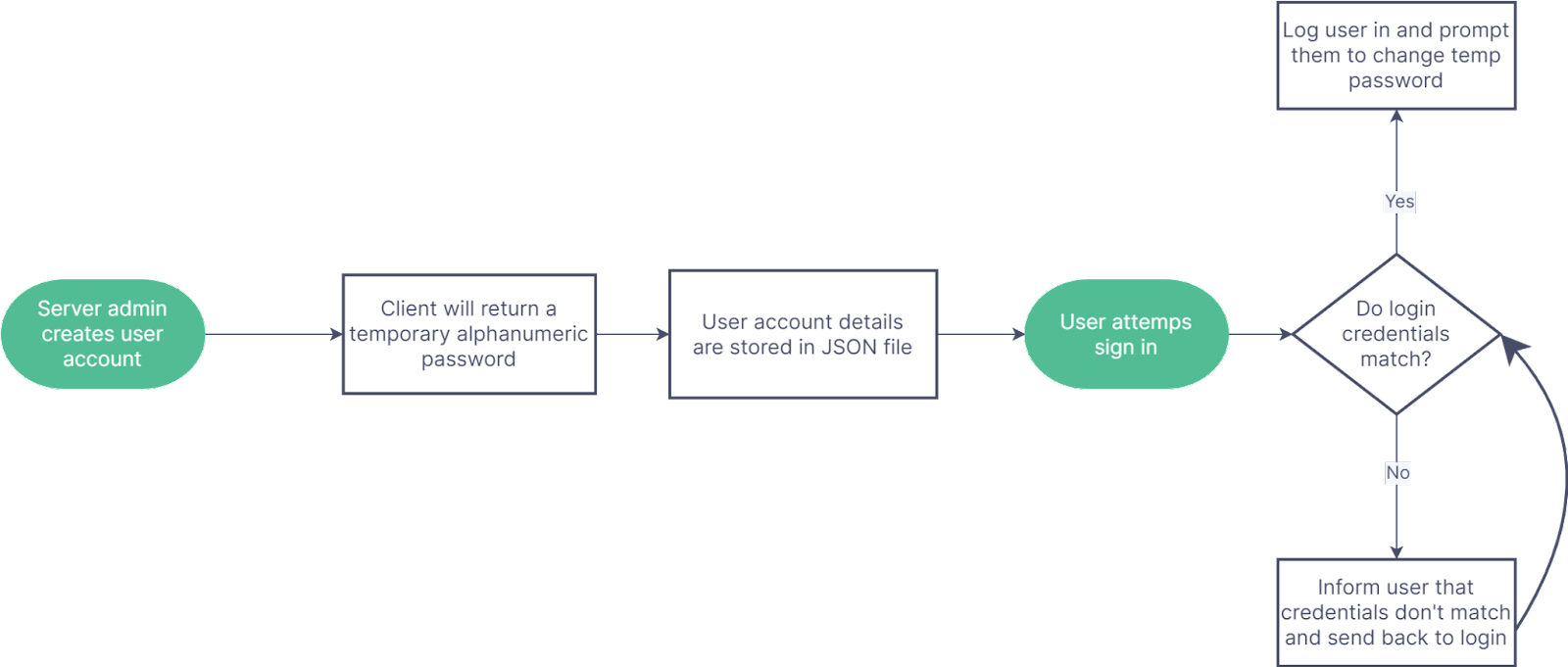
Figure 3: Example flowchart of user account creation and login
User account creation: User account creation will be handled by admins, who will have control over a list of usernames. Upon a new user being added, they will also be given an initial password that they will be advised to immediately change so that the admins no longer know their password. In order for admins to make these changes, we may want an admin login option for our website.
Password Verification: When a user attempts to sign in, the script should transmit the password to the server in an encrypted form. If the login credentials match login credentials present in the Login JSON, the user will be logged into their account and prompted to create a new password if it is their first time logging in with their temporary password. If they are not using a temporary password, they will be logged into their chat account. If the login credentials do not match any in the Login JSON, the user will be informed of this and sent back to the login.
Previous considerations: We first thought to use automatic identification through the user’s Windows account, but this is impossible without the user downloading a program. We also considered using IP addresses to identify users, but there are several users for a single computer. We also considered encrypting our passwords before storing them in a JSON, but this would require downloading external libraries.