Duration
Durations are used in many parts of Synergy, such as in steps, delays or unsynchronised modifiers.
There are two types of durations: Random range and Ramp.
A duration that can vary within a specific range. The values are randomly generated after a given interval.
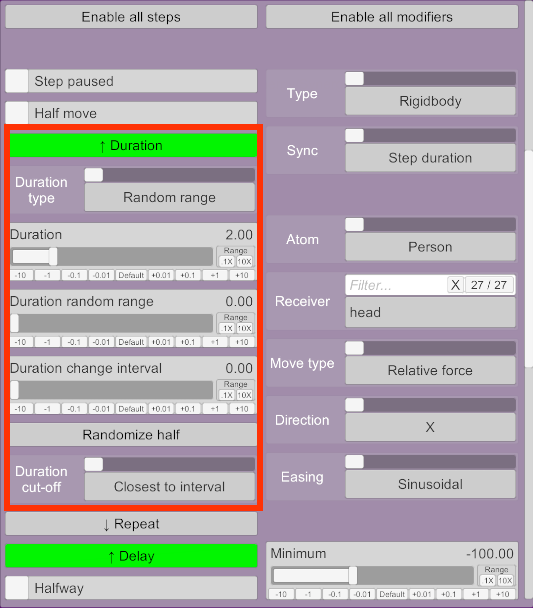
-
Duration: The time in seconds that something takes to execute.
-
Duration random range: Specifies a range to generate random durations around Duration. If the duration is 5 and the random range is 1, then the actual duration will be randomised between 4 and 6 inclusively. If 0, the duration is always exact.
-
Duration change interval: The time in seconds before a new random duration is generated. If 0, the duration is randomised every time it finishes.
-
Randomize half: Divides the duration by two and sets the random range to the same value. For example, if the duration is 10s, it becomes 5s and the random range is also set to 5s.
-
Duration cut-off: Advanced setting. Determines the time when the next random duration is generated when the current duration isn't an exact factor of the interval. This avoids sudden changes in velocities.
- Closest to interval: Default. The next random duration will be generated as close to the given interval as possible, but might be before or after depending on the duration. For example, if the current duration is 1.5s and the change interval is 4s, the next random duration will be generated at 4.5s. If the current duration is 1.8s and the change interval is 4s, the next random duration will be generated at 3.6s.
- Always before interval: The random duration will never last longer than the interval specifies.
- Always after interval: The random duration will always last at least as long as the interval specifies.
- Exact: The next random duration will always be generated exactly at the specified interval, even if something is in the process of moving. This can create jerky movements once in a while.
A duration that speeds up and slows down over a period of time.
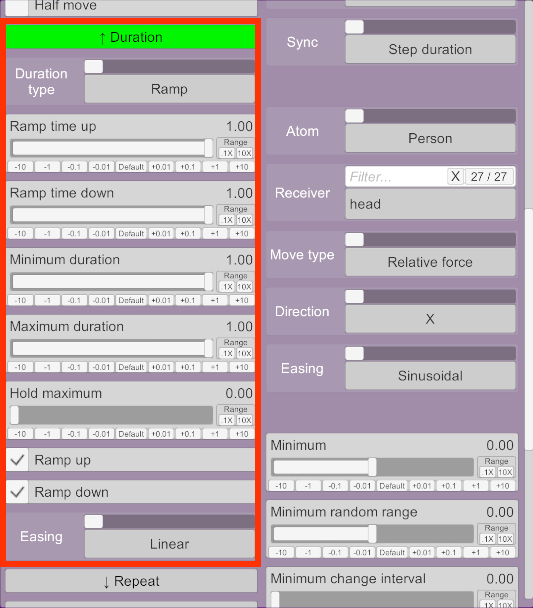
- Ramp up time: The time during which the duration will be ramped up.
- Ramp down time: The time during which the duration will be ramped down.
- Minimum duration: The duration when ramping starts and ends.
- Maximum duration: The duration when ramping is completely up.
- Hold maximum: Time in seconds to hold the duration when ramped up at the maximum.
- Ramp up: If disabled, the duration will immediately start at the maximum duration and ramp down only.
- Ramp down: If disabled, the duration will ramp up, hold (if set), then immediately change the duration to the minimum.
- Easing: Determines how the actual duration is calculated based on the ramp time. See Easings.
As an example, if the ramp up time is 5s, ramp down time is 2s, the minimum and maximum durations 1s and 0.2s respectively, and the hold maximum time 3s:
- The initial duration will be 1s.
- The duration will decrease over 5s until it reaches the maximum of 0.2s.
- The maximum 0.2s duration will be held for 3s.
- The duration will then increase over 2s until it reaches the minimum of 1s.
- The total duration will be 10s.