Script Management
Right-click any script → Add to Favourites to pin it to a dedicated ⭐ Favourites tab at the top of the tab bar.
- The tab only appears when you have at least one favourite
- It disappears automatically when all favourites are removed
- Favourites are stored in
%APPDATA%\CatiaMenuWin32\prefs.iniand persist across restarts and syncs
To remove: right-click the script → Remove from Favourites.
The filter bar below the toolbar filters scripts in the current tab in real time by name or purpose. Case-insensitive — searching iges matches IGES Export Curve AXIS.
☰ Menu → View → Sort Scripts offers four modes:
| Mode | Description |
|---|---|
| Default Order | Order from GitHub API or disk |
| Alphabetical | A–Z by script name |
| By Date | Most recent first (from script header Date: field) |
| Most Used | Scripts you run most often appear first |
The sort mode is saved in Settings and applied on next launch.
Right-click any script → Script Details... to see a full details dialog:
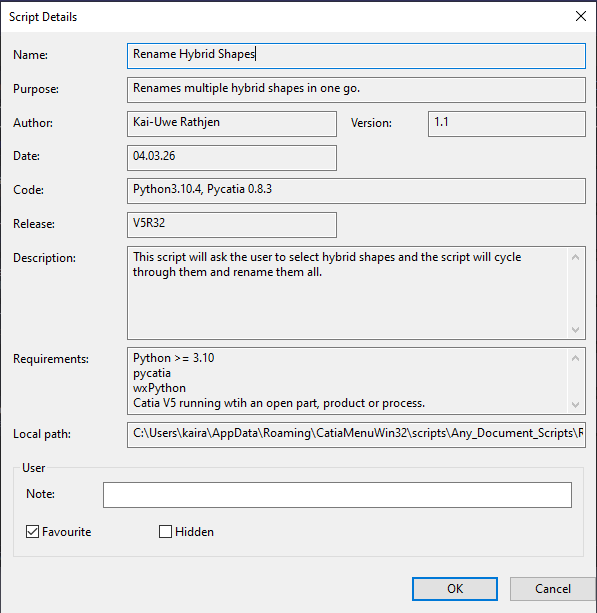
- Name, Purpose, Author, Version, Date
- Code environment (e.g. Python 3.10.4, PyCATIA 0.8.3)
- CATIA release compatibility
- Full description and requirements
- Local cache path
- Your personal note
- Favourite and Hidden toggles
Right-click any script → Add Note... or Edit Note... to attach a personal note. Notes are visible in Script Details and stored in prefs.ini.
Right-click any script → Run with Arguments... to pass custom command line arguments.
Right-click any script → Hide Script removes it from view without deleting it.
- Hidden scripts persist across syncs and restarts
- To restore: ☰ Menu → File → Manage Hidden Scripts
- Select a script and click Unhide, or click Unhide All
☰ Menu → File → Open Executable Folder opens the folder containing the .exe in Windows Explorer. Useful for scripts that write output files next to the executable.